Beginner
The Claude Code You Don't Know: Architecture, Governance, and Engineering Practices
The Claude Code You Don't Know: Architecture, Governance, and Engineering Practices
The Claude Code You Don't Know: Architecture, Governance, and Engineering Practices#
0. TL;DR#
This article stems from six months of deep experience using Claude Code, fueled by $40/month subscriptions across two accounts and the lessons learned from many pitfalls. I hope it provides some useful insights.
At first, I also used it as a ChatBot, but I quickly realized something was off: the context became increasingly messy, more tools were added but with diminishing returns, rules grew longer yet were followed less. After struggling for a while and studying Claude Code itself, I realized this wasn't a Prompt problem; this is how the system is designed.
This article aims to discuss a few things with you: how Claude Code works under the hood, why context gets messy and how to manage it, how to design Skills and Hooks, the correct usage of Subagents, the architectural impact of Prompt Caching, and how to write a truly useful CLAUDE.md.
I think the most straightforward way to understand it is to break Claude Code down into six layers:
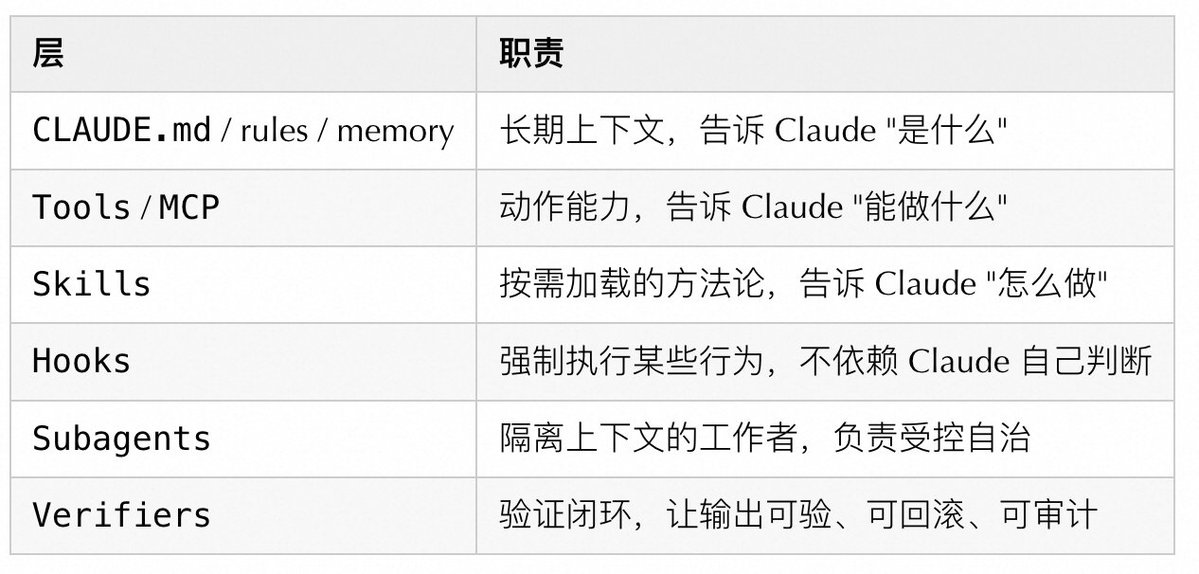
If you only reinforce one layer, the system becomes unbalanced. Write CLAUDE.md too long, and the context pollutes itself first. Pile on too many tools, and choices become unclear. Scatter subagents everywhere, and state drifts. Skip the verification step, and when something goes wrong, you have no idea where it broke.
1. How It Works Under the Hood#

The core of Claude Code is not "answering," but a recurring agent process:
Collect Context → Take Action → Verify Result → [Complete or Return to Collection]
     ↑                    ↓
  CLAUDE.md          Hooks / Permissions / Sandbox
  Skills             Tools / MCP
  Memory
After using it for a while, I realized that the sticking points are almost never the model not being smart enough. More often, it's because we gave it the wrong context, or it wrote something but we couldn't judge if it was correct, nor could we roll it back.
The Five Levels to Really Focus On:#

Looking at these aspects, many problems become easier to troubleshoot. Unstable results? Check the context loading order, not the model. Automation out of control? See if the control layer is designed, not the agent being too proactive. Long session quality degradation? Intermediate outputs polluted the context. Starting a new session is often more useful than repeatedly tweaking the prompt.
2. Conceptual Boundaries: MCP / Plugin / Tools / Skills / Hooks / Subagents#

Simple mnemonic: Use Tool/MCP to give Claude new action capabilities. Use Skill to give it a set of working methods. Use Subagent when you need an isolated execution environment. Use Hook for mandatory constraints and auditing. Use Plugin for cross-project distribution.
3. Context Engineering: The Most Important System Constraint#
Many people treat context as a "capacity problem," but the bottleneck is usually not insufficient length, but too much noise. Useful information gets drowned out by a lot of irrelevant content.
The Real Cost Composition of Context#
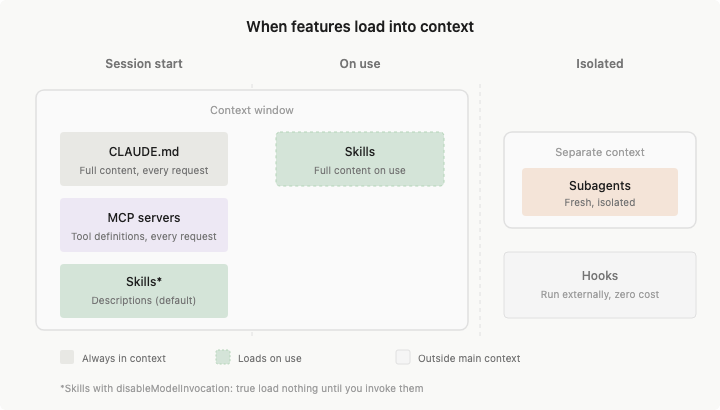
Claude Code's 200K context is not entirely usable:
200K Total Context
├── Fixed Overhead (~15-20K)
│   ├── System Instructions: ~2K
│   ├── All Enabled Skill Descriptors: ~1-5K
│   ├── MCP Server Tool Definitions: ~10-20K  ← The Biggest Hidden Killer
│   └── LSP State: ~2-5K
│
├── Semi-Fixed (~5-10K)
│   ├── CLAUDE.md: ~2-5K
│   └── Memory: ~1-2K
│
└── Dynamically Available (~160-180K)
    ├── Conversation History
    ├── File Content
    └── Tool Call Results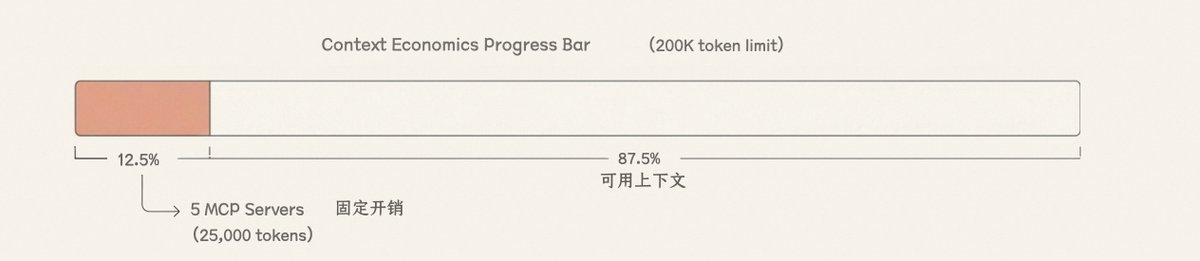
A typical MCP Server (like GitHub) contains 20-30 tool definitions, each about 200 tokens, totaling 4,000-6,000 tokens. Connect 5 Servers, and this fixed overhead alone reaches 25,000 tokens (12.5%). When I first calculated this number, I really didn't expect it to be this much. In scenarios requiring reading a lot of code, this 12.5% is really critical.
Recommended Context Layering#
Always Resident    → CLAUDE.md: Project Contract / Build Commands / Prohibitions
Load by Path       → rules: Language / Directory / File Type Specific Rules
Load on Demand     → Skills: Workflows / Domain Knowledge
Load in Isolation  → Subagents: Heavy Exploration / Parallel Research
Never Load to Context → Hooks: Deterministic Scripts / Auditing / Blocking
Simply put, don't load things you only use occasionally every time.
Context Best Practices#
- Keep CLAUDE.md short, strict, and executable. Prioritize writing commands, constraints, and architectural boundaries. Anthropic's own official CLAUDE.md is only about 2.5K tokens, which you can reference.
- Split large reference documents into Skills' supporting files; don't stuff them into the SKILL.md body.
- Use
.claude/rules/for path/language rules; don't make the root CLAUDE.md bear all the differences. - Actively use
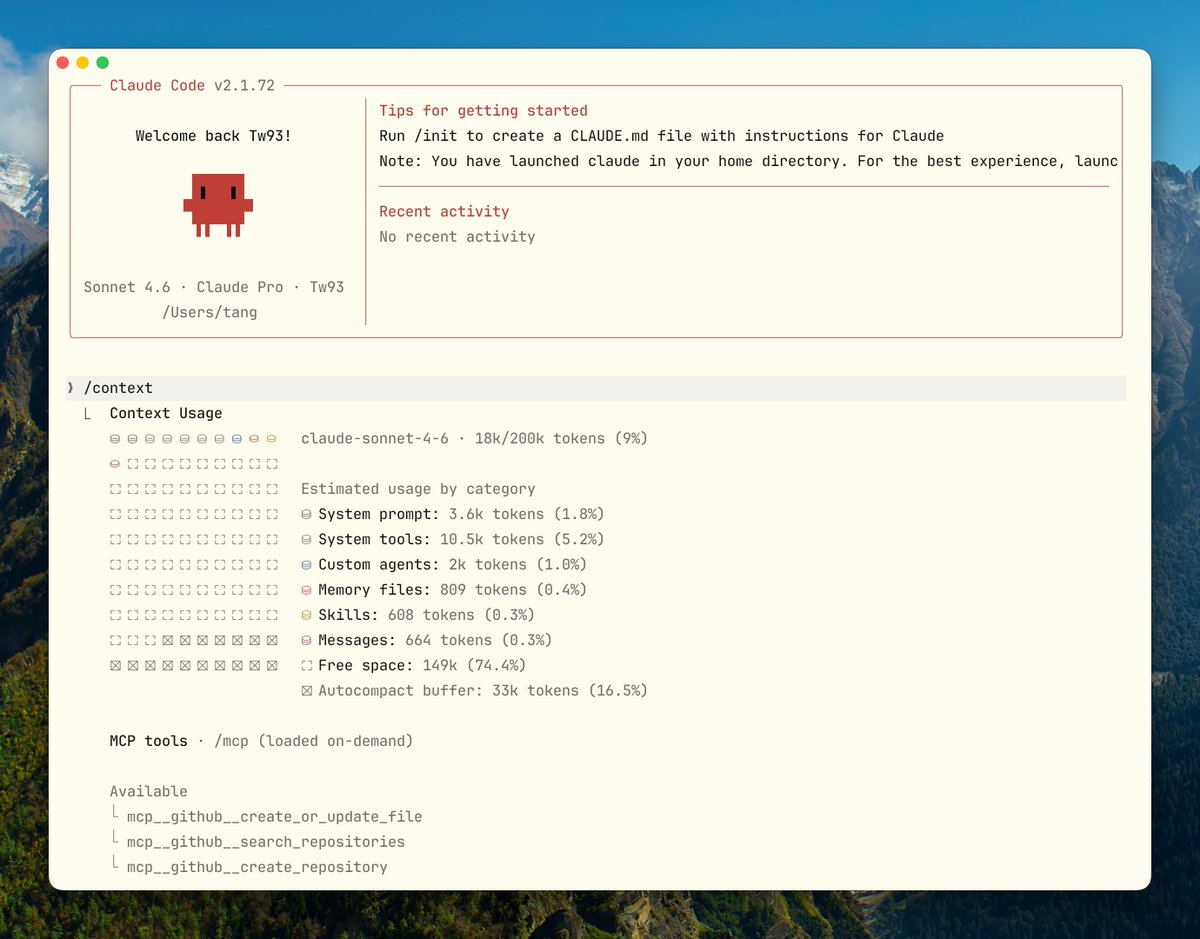
/contextto observe consumption in long sessions; don't wait for the system to auto-compress before remedying.
- Prefer
/clearfor task switching; use/compactwhen entering a new phase of the same task. - Write Compact Instructions into CLAUDE.md. What must be preserved after compression is controlled by you, not guessed by the algorithm.
Tool Output Noise: Another Hidden Context Killer#
The previous calculation was for the fixed overhead of MCP tool definitions, but the dynamic part also has a pitfall easily overlooked: Tool Output. A full
cargo test output can easily be thousands of lines. git log, find, grep in slightly larger repositories can also fill the screen. Claude doesn't need to see all this output, but as long as it appears in the context, it consumes real tokens and squeezes out space for conversation history and file content.Later, I saw the RTK (Rust Token Killer) approach and thought it was quite right. What it does is simple: automatically filter command output before it reaches Claude, keeping only the core information needed for decision-making. For example,
cargo test:
# Raw Output Claude Sees

running 262 tests
test auth::test_login ... ok
... (thousands of lines)

# After RTK

✓ cargo test: 262 passed (1 suite, 0.08s)
What Claude really needs to know is "passed or failed, and where it failed." Everything else is noise. It transparently rewrites commands via Hooks, completely invisible to Claude Code.
Section 6 will mention manual truncation like
| head -30. RTK does exactly this, but with broader coverage, so you don't have to add it to every command yourself. The project is open-sourced on GitHub.The Pitfalls of the Compression Mechanism#
The default compression algorithm judges by "re-readability." Early Tool Output and file content are prioritized for deletion, often discarding architectural decisions and constraint reasoning along with them. Two hours later when you need to modify something, you might not remember what was decided two hours ago. Mysterious bugs often originate this way.
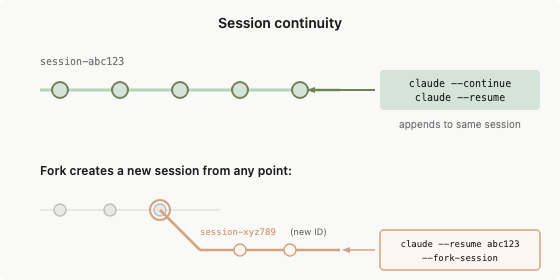
The solution is to explicitly state in CLAUDE.md:
## Compact Instructions


When compressing, preserve in priority order:

1. Architecture decisions (NEVER summarize)
2. Modified files and their key changes
3. Current verification status (pass/fail)
4. Open TODOs and rollback notes
5. Tool outputs (can delete, keep pass/fail only)
Besides writing Compact Instructions, there's a more proactive approach: before starting a new session, have Claude write a HANDOFF.md, clearly stating current progress, what's been tried, what worked, what were dead ends, and what to do next. The next Claude instance can continue just by reading this file, without relying on the quality of the compression algorithm's summary.
Write clearly in HANDOFF.md about the current progress. Explain what you tried, what worked, what didn't, so the next agent with a fresh context can continue the task just by reading this file.
After writing, quickly scan it. If anything is missing, have it add it directly. Then start a new session and send the path to HANDOFF.md.
The Engineering Value of Plan Mode#

The core of Plan Mode is separating exploration from execution. The exploration phase doesn't touch files; execution happens only after confirming the plan.
- The exploration phase focuses on read-only operations.
- Claude can clarify goals and boundaries first, then submit a concrete plan.
- Execution cost only occurs after the plan is confirmed.
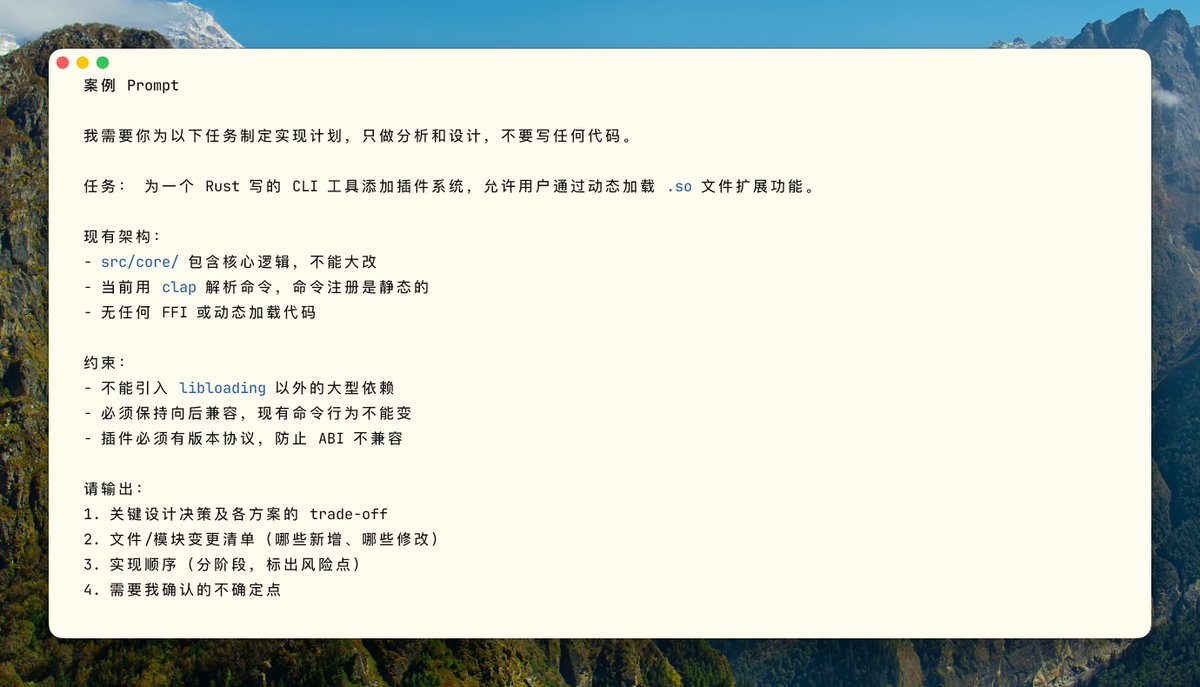
For complex refactoring, migrations, and cross-module changes, this is much more useful than "rushing to produce code." It significantly reduces situations where you run further and further off course based on wrong assumptions. Press Shift+Tab twice to enter Plan Mode. An advanced technique is to have one Claude write the plan and another Codex review it as a "senior engineer," letting AI review AI, which works well.
4. Skills Design: Not a Template Library, but Workflows Loaded When Needed#
The official description of Skill is "on-demand loaded knowledge and workflows." Descriptors reside in context; full content loads on demand. Using it feels quite different from a "saved Prompt."
What a Good Skill Should Satisfy#
- The description should let the model know "when to use me," not "what I do." These are very different.
- Have complete steps, inputs, outputs, and stop conditions. Don't write a start without an end.
- The body should only contain navigation and core constraints. Large materials should be split into supporting files.
- Skills with side effects should explicitly set
disable-model-invocation: true; otherwise, Claude will decide whether to run it.
How Skills Achieve On-Demand Loading#
The Claude Code team repeatedly emphasizes "progressive disclosure" in their internal design. The idea is not to let the model see all information at once, but to first obtain an index and navigation, then pull details as needed.
- SKILL.md is responsible for defining task semantics, boundaries, and execution skeleton.
- Supporting files are responsible for providing domain details.
- Scripts are responsible for deterministically collecting context or evidence.
A relatively stable structure looks like this:
.claude/skills/
└── incident-triage/
    ├── SKILL.md
    ├── runbook.md
    ├── examples.md
    └── scripts/
        └── collect-context.sh
Three Typical Types of Skills#
The following examples are from actual Skills I used in the open-source terminal project Kaku, which are quite intuitive.
Type 1: Checklist Type (Quality Gate)
Run before release to ensure nothing is missed:
---
name: release-check
description: Use before cutting a release to verify build, version, and smoke test.
---

## Pre-flight (All must pass)

- [ ] `cargo build --release` passes
- [ ] `cargo clippy -- -D warnings` clean
- [ ] Version bumped in Cargo.toml
- [ ] CHANGELOG updated
- [ ] `kaku doctor` passes on clean env

## Output

Pass / Fail per item. Any Fail must be fixed before release.
Type 2: Workflow Type (Standardized Operations)
Configuration migration is high-risk. Use explicit invocation + built-in rollback steps:
---
name: config-migration
description: Migrate config schema. Run only when explicitly requested.
disable-model-invocation: true
---

## Steps

1. Backup: `cp ~/.config/kaku/config.toml ~/.config/kaku/config.toml.bak`
2. Dry run: `kaku config migrate --dry-run`
3. Apply: remove `--dry-run` after confirming output
4. Verify: `kaku doctor` all pass

## Rollback

`cp ~/.config/kaku/config.toml.bak ~/.config/kaku/config.toml`
Type 3: Domain Expert Type (Encapsulating Decision Frameworks)
When runtime issues occur, have Claude collect evidence along a fixed path instead of guessing blindly:
---
name: runtime-diagnosis
description: Use when kaku crashes, hangs, or behaves unexpectedly at runtime.
---

## Evidence Collection

1. Run `kaku doctor` and capture full output
2. Last 50 lines of `~/.local/share/kaku/logs/`
3. Plugin state: `kaku --list-plugins`

## Decision Matrix

| Symptom | First Check |
|---|---|
| Crash on startup | doctor output → Lua syntax error |
| Rendering glitch | GPU backend / terminal capability |
| Config not applied | Config path + schema version |

## Output Format

Root cause / Blast radius / Fix steps / Verification command
Write descriptors shorter. Each Skill is stealing your context space. Each enabled Skill's descriptor resides in context. The difference before and after optimization is significant:
# Inefficient (~45 tokens)

description: |
  This skill helps you review code changes in Rust projects.
  It checks for common issues like unsafe code, error handling...
  Use this when you want to ensure code quality before merging.

# Efficient (~9 tokens)

description: Use for PR reviews with focus on correctness.
Another important strategy is the use of
disable-auto-invoke:- High frequency (>1 time/session)Keep auto-invoke, optimize the descriptor.
- Low frequency (<1 time/session)disable-auto-invoke, trigger manually, descriptor completely out of context.
- Very low frequency (<1 time/month)Remove Skill, convert to documentation in AGENTS.md.
Skill Anti-patterns#
- Description too short:
description: help with backend(Can trigger for any backend work, lol) - Body too long: Hundreds of lines of runbook stuffed into SKILL.md body.
- One Skill covering review, deploy, debug, docs, incident — five things.
- Skills with side effects allowing model auto-invocation.
5. Tool Design: How to Make Claude Choose Less Wrongly#
The more I used it, the more I felt that tools for Claude and APIs for humans are not the same thing. APIs for humans often pursue comprehensive functionality, but for agents, the focus isn't on how complete the features are, but on making it easier to use correctly.
Good Tools vs. Bad Tools#
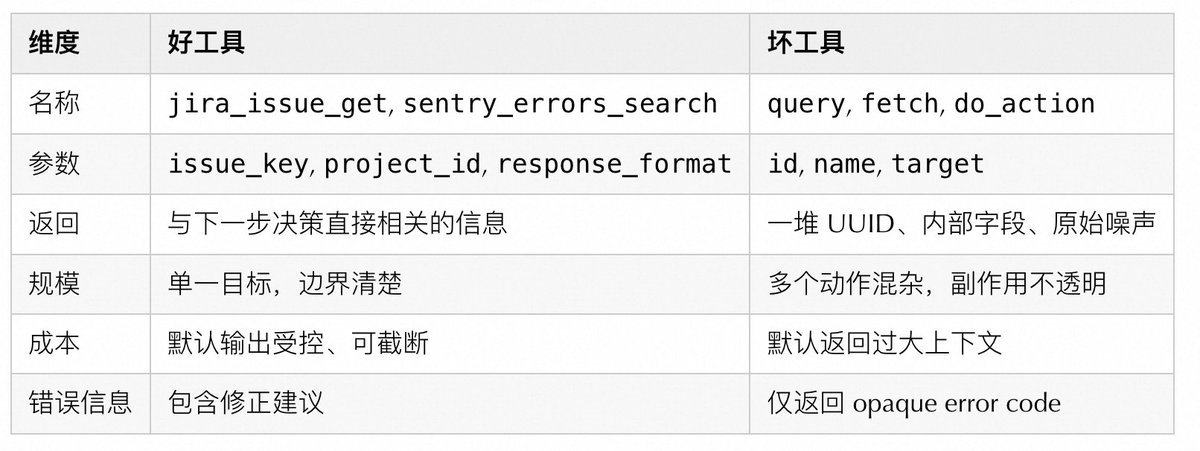
Several practical design principles:
- Prefix names by system or resource layer:
github_pr_*,jira_issue_* - Support
response_format: concise / detailedfor large responses. - Error responses should teach the model how to correct, not just throw opaque error codes.
- When possible to merge into higher-level task tools, don't expose too many low-level fragmented tools. Avoid
list_all_*that forces the model to filter.
Lessons from Claude Code's Internal Tool Evolution#
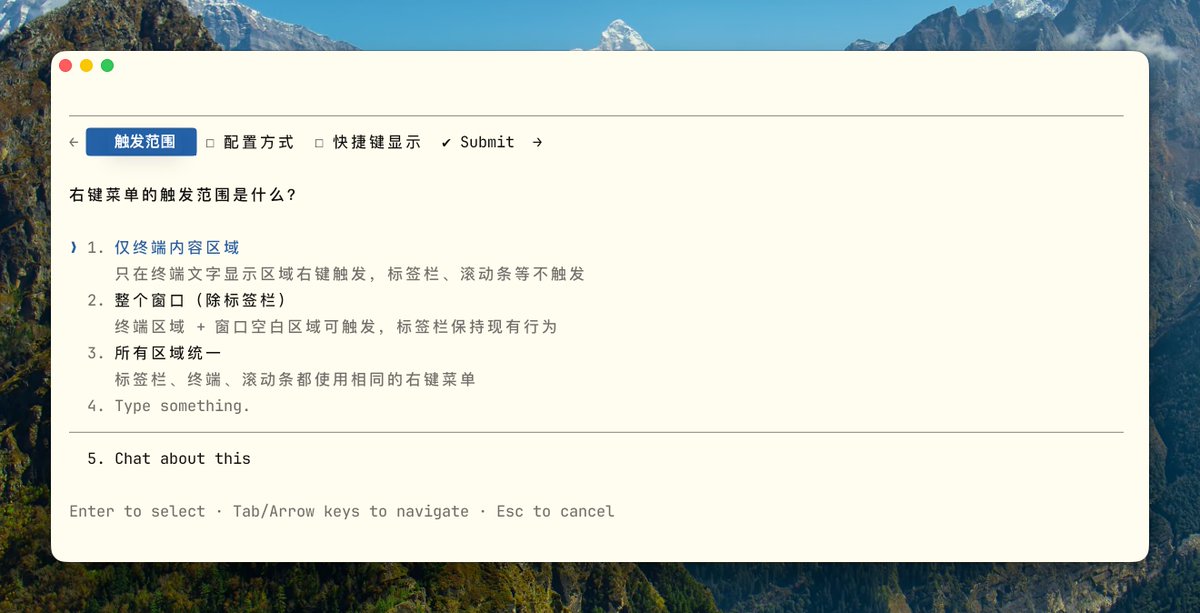
When I saw this evolution of Claude Code's internal tools, I found it quite interesting. For scenarios like needing to stop and ask the user mid-task, they tried three approaches:
- Version 1: Add a
questionparameter to existing tools (like Bash), letting Claude ask while calling the tool. Result: Claude mostly ignored this parameter, continuing without stopping to ask. - Version 2: Require Claude to write a specific markdown format in the output; the outer layer parses this format and pauses. Problem: No enforcement, Claude often "forgot" to write in the format, making the questioning logic very fragile.
- Version 3: Make it an independent
AskUserQuestiontool. If Claude wants to ask, it must explicitly call this tool. Calling it means pausing, no ambiguity, much more reliable than the first two.
The following diagram explains why the third version is clearly more stable:
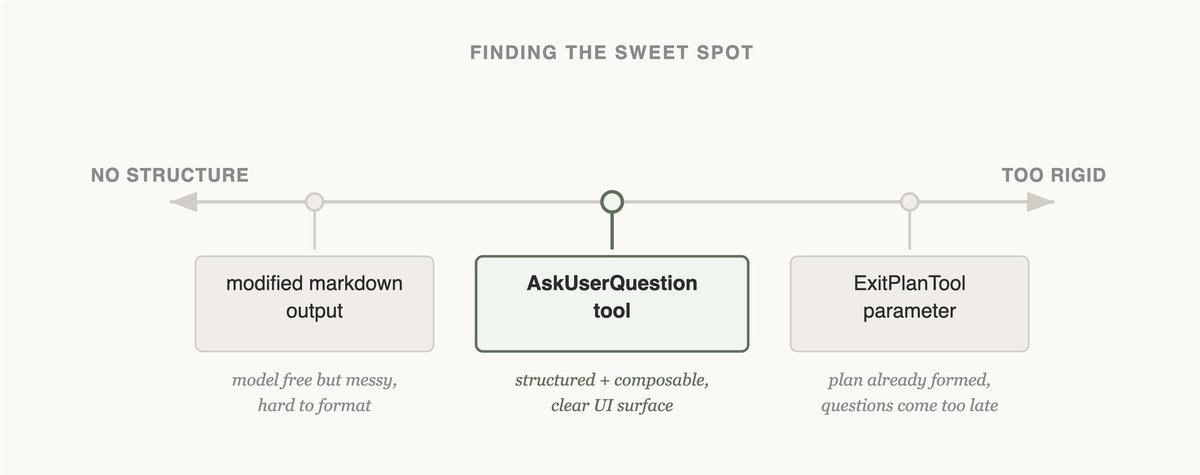
Left (markdown free output) is too loose: model format is arbitrary, outer parsing is fragile. Right (
ExitPlanTool parameter) is too rigid: by the time you exit plan phase to ask, it's too late. The independent AskUserQuestion tool sits in the middle: structured and callable anytime, the most stable design among the three.Simply put, if you want Claude to stop and ask a question, just give it a dedicated tool. Adding a flag or agreeing on an output format often gets ignored as it proceeds.
Evolution of the Todo Tool#

Early on, they used the
TodoWrite tool + inserting reminders every 5 turns to make Claude remember tasks. As the model improved, this tool became a limitation. Todo reminders made Claude think it must strictly follow, unable to flexibly modify plans. An interesting lesson: this tool was added because the model wasn't strong enough; after the model improved, it became a shackle. Worth checking periodically if the restrictions added back then still hold.Evolution of Search Tools#
Initially used RAG vector database: fast but required indexing, fragile across environments, and most importantly, Claude didn't like using