Beginner
Design Without Designing
Design Without Designing
Design Without Designing#
I'm an engineer who never touched UI/UX design until three months ago. I ended up putting together an agent harness for design, which enabled me to ship design end to end.
Agents are changing what one person can cover. I've been pushing myself toward generalist territory, picking up areas of work I couldn't do before. Design was the big one. Pixels, spacing, typography, color. The stuff that makes people trust your product before they read a single word.
I never had the skill set for any of it. So I put together a harness for design: three layers that give me real design capability without me having to become a designer.
Here's what's in it.
Layer 1: Skills (the expertise)#
Skills are instruction files you install into your AI agent, whether that's Claude Code, Cursor, Codex, or something else. They transfer someone else's design expertise into your workflow. You're basically borrowing taste from seasoned designers.
Impeccable (@pbakaus)
This is my most-used skill, built by the original creator of jQuery UI. It has 20+ commands: /audit, /polish, /animate, /typeset, /arrange. It catches the anti-patterns that make AI-generated UI look obviously AI-generated: overused fonts, gray-on-color text, pure blacks, nested cards.

/delight is my favorite command so far. I use it a lot, and every time it introduces something that amazes me and upgrades the overall feeling of the product. This one changed how my output looks pretty much overnight.
Emil Kowalski's Design Engineer Skill (@emilkowalski )
Emil is a design engineer at Linear, previously at Vercel, who created Sonner and Vaul (15M+ weekly npm downloads between them). His skill encodes how he thinks about animations, UI polish, and the small details most people skip.
I use the free version to borrow Emil's mindset for a while and apply his thinking to my design work occasionally. The full version comes with his animations.dev course.
Interface Design (@Dammyjay93)
This one solves the most annoying problem with AI-assisted design: your agent forgets every design decision between sessions. This plugin stores your specs (spacing grids, color palettes, depth strategies, component patterns) in a persistent system.md file that loads automatically.
UI Skills (@ibelick)
Created by Julien Thibeaut, who also built motion-primitives. 15 open-source skills covering baseline UI, accessibility, motion performance, and metadata. Solid foundation for broad coverage. I don't reach for it as often as Impeccable, but it's there when I need it.
Layer 2: Agent Canvas (the surface)#
I also call these agent shells. They are design surfaces that don't have a built-in agent. They use YOUR agents. Claude Code, Codex, whatever you run locally.
The canvas is the shell; your agent is the kernel.
Paper (@paper)
This is the one I use more often recently. The canvas is built on real HTML and CSS, not a proprietary format. What you design is actual code. No translation layer, no handoff.

It exposes MCP tools with full read/write access. Since there's no format translation needed, it works well with local agents out of the box.
Most of the time I use Paper for design systems, design tokens, and page design iterations, then use it as the source of truth and design reference alongside building the product. Paper has a free tier with limited MCP call quotas.
Pencil (@tomkrcha)
Takes a different approach. It uses a JSON-based .pen format that's Git-diffable and agent-manipulable via MCP. My design files sit in my repo, versioned like code.

Pencil also has a swarm mode where I can spin up multiple agents (up to six) working on my canvas at the same time: one handling typography, another doing layout, a third propagating the design system. The first time I saw the agent swarm working visually on my canvas, it was mindblowing.
Pencil is currently free, and I use both Pencil and Paper regularly.
Layer 3: Inspiration and taste (the eye)#
Skills give me expertise. Canvases give me a surface. But I still need to train my eye, to know what good looks like before I can ask an agent to make it.
Variant (@variantui)
Type an idea, scroll through endless non-repeating design interpretations. The standout feature is the Style Dropper: you point it at any design, it absorbs the visual DNA (color palette, typographic rhythm, spatial density) and transfers it onto another design.
I spend about 20 minutes a day just scrolling through it. It's become part of how I warm up my eye before doing any design work.
But Variant is more than just inspiration for me. I pick up something I like from the community, prompt it to generate variants, explore different directions, and when I land on something I like, I can copy the code, export as React, or copy prompts with HTML references and hand them directly to my coding agents for implementation.
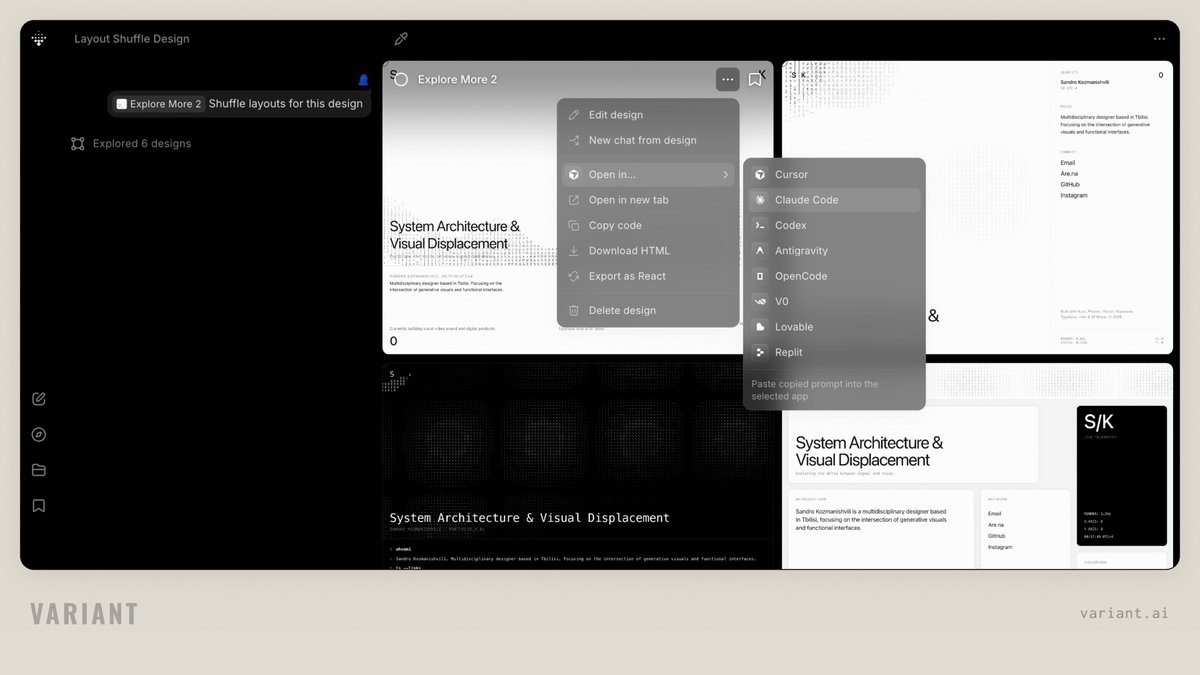
From there I extract tokens or components and start building out more views and pages. It's a surprisingly smooth bridge from inspiration to actual product.
Mobbin (@mobbin) & Awwwards (@awwwards)
These have been well-known in the design world for a long time. I use them to absorb the best, most curated design work out there and learn taste from it.
Mobbin covers both mobile apps and websites. When I need to see how top apps handle onboarding, settings, or checkout, that's where I go. They recently released a Figma plugin to let you pull references directly, though I don't use Figma (don't know how) and haven't tested it.
Awwwards is jury-scored and covers the cutting edge of web craft. They also run conferences and an academy.
Cosmos (@thecosmos)
This is the place where I collect all my inspiration and ideas and explore collections from others. Web design, interiors, typography, photography, architecture, whatever catches my eye.
I keep discovering things through their hex color search or even vague descriptions. It finds what I'm looking for in ways that still surprise me. I use it to build clusters of visual references that slowly shape how I think about design.
The pattern#
Three layers. Skills for expertise. Canvases for agents to work on. Inspiration to train the eye.
I'm not a designer. I don't have years of trained intuition, and my taste is still developing. I'm learning every day. But I unblocked myself. I went from not being able to do design at all to shipping it weekly and being okay with what I put out. Nothing was there three months ago.
You don't need to become a designer. You need the right harness.