Beginner
Tutorial: Nano Banana2+ Milvus+ qwen3.5, Building an E-commerce Image Generation Assembly Line for Hit Products
Tutorial: Nano Banana2+ Milvus+ qwen3.5, Building an E-commerce Image Generation Assembly Line for Hit Products
Tutorial: Nano Banana2+ Milvus+ qwen3.5, Building an E-commerce Image Generation Assembly Line for Hit Products#
This article is a submission from an e-commerce SaaS company, compiled based on user interviews and materials.
In the e-commerce AI SaaS business, the most frequent request we get from cross-border merchants in Yiwu is: "A new style is out. Can you generate images with AI immediately without hiring models or shooting scenes? It needs to be cheap and look like a hit product."
In plain English, how can we copy a hit product image without violating any rules?
That's why, as soon as Google Nano Banana2 was released yesterday, we conducted hands-on tests and integrated it with the Milvus vector database. The results show the overall image generation cost dropped to one-third of the original, with efficiency doubling.
Next, I will break down this AI image generation solution suitable for small and medium-sized e-commerce SaaS companies with zero local GPU, covering both model testing details and an end-to-end practical tutorial.
01 Nano Banana 2 Hands-on Test: Two-Thirds Cost Reduction, No More "Gacha"#
For e-commerce scenarios, AI image generation has three core requirements: low cost, accurate replication of hit products, and no copyright infringement. Additionally, it needs to adapt to multi-platform specifications for cross-border sales and support multi-language text.
The latest update to Nano Banana 2 meets almost all these requirements.
(1) Cost Slashed to 1/3
The most obvious advantage of Nano Banana 2 is its price. The cost per image dropped from $0.134 for the Pro version to $0.067, cutting it in half.
More importantly, rework costs are virtually eliminated. Previously, with other models, adjusting aspect ratios and clarity required significant rework time (Amazon main images require 1:1, independent sites need 3:4). Nano Banana 2 solves this directly, reducing costs to one-third of the original:
- Resolution covers the full range from 512px to 4K. Use 512px for Shopee and AliExpress thumbnails, and 4K for Amazon detail pages, eliminating the need for secondary upscaling.
- New ultra-wide/ultra-tall aspect ratios like 4:1, 1:4, 8:1, and 1:8 allow for cross-border banner ads and live stream backgrounds to be generated in one go, without needing border extension or editing.
(2) 14-Reference-Image Fusion, Stability Greatly Improved
The most practical update is multi-reference image fusion. Nano Banana 2 supports blending up to 14 reference images: 10 high-fidelity object images + 4 character images. A single workflow can maintain consistent features for 5 characters and 14 objects.
Simply put, it can simultaneously import scene, model, and prop characteristics from multiple hit products. New images directly inherit the "hit product genes," eliminating the need for repeated prompt adjustments. This is also the key to integrating it with Milvus for hit product retrieval.

(3) Commercial-Grade Scene Generation, More Realistic Details
Generally, to generate images stably, you shouldn't feed all requirements to the AI at once. A safer approach is to generate the background first, then the model image, and finally composite them.
We tested three generations of models with a background generation request: a 4:1 rainy day scene of a Shanghai office building, looking through a window at the Oriental Pearl Tower (testing composition, detail, and realism).
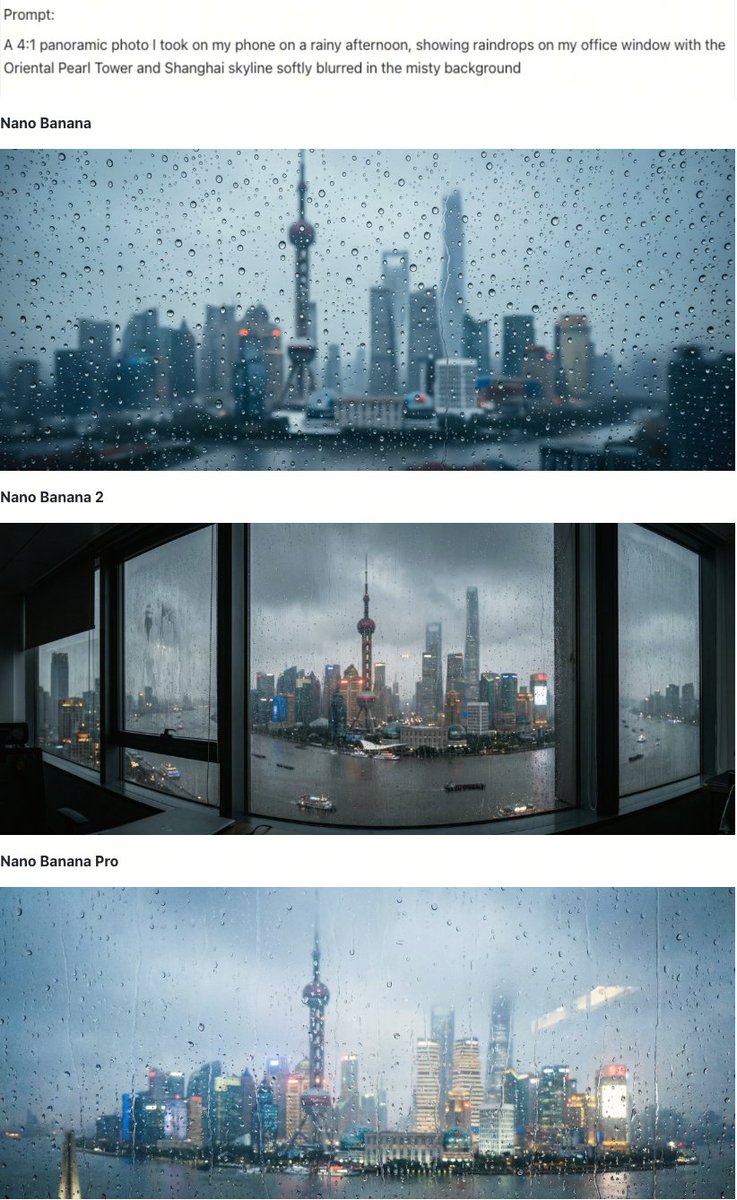
Overall results show:
- First-gen Nano Banana: Decent, with a dull blue-gray tone. Raindrop texture is good, with natural size distribution, but building details are too blurred, the Oriental Pearl Tower is barely recognizable, and resolution is insufficient.
- Pro Version: Atmosphere is excellent, with warm lights against cold rain creating a cinematic feel. However, the lack of a foreground window frame makes the image flat, suitable for supplementary images but not as a main image.
- Nano Banana 2: Completion is top-notch. Adding a window frame as foreground creates depth. The Oriental Pearl Tower details are clear, there are boats on the Huangpu River, and the lighting has distinct layers. The texture of raindrops and water stains is almost indistinguishable from real photos. The 4:1 ultra-wide aspect ratio shows no perspective distortion, requiring no editing and ready for use as a main image. The only minor flaw is slight distortion on the left side of the window frame, but compared to its commercial value, this issue is negligible.
(4) Text Processing: A Major Pain Point for Cross-Border E-commerce
E-commerce images inevitably involve text: price tags, marketing slogans, cross-border multi-language copy. These have been common weaknesses in past AI image generation. Nano Banana 2's advantage lies in generating readable text without errors or omissions, while also supporting multi-language translation and localization.
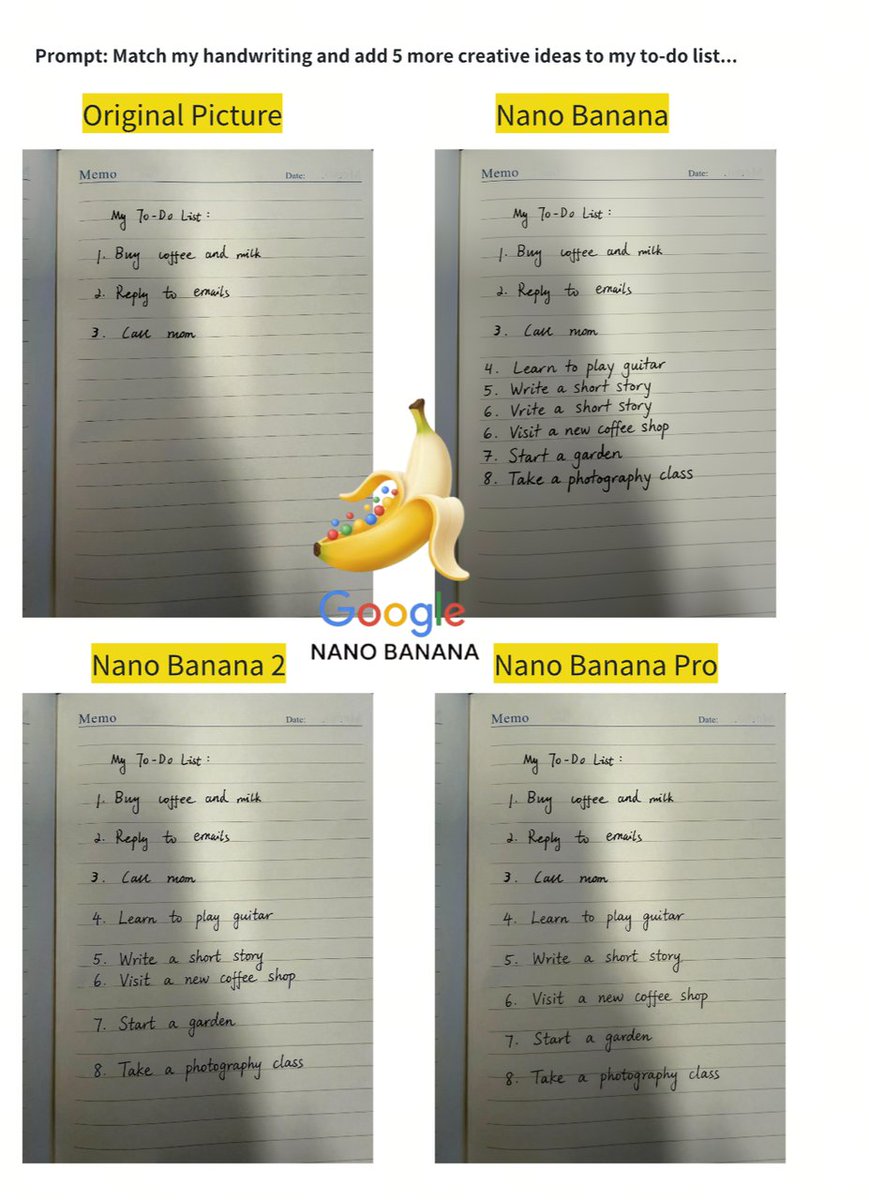
Additionally, we tested handwritten text continuation (relevant for e-commerce handwritten price tags and personalized cards), and the results were impressive: First-gen Nano Banana had repeated serial numbers and structural misunderstandings; the Pro version had good layout but mediocre font restoration; Nano Banana 2 not only continued the text with zero errors, but its font restoration was even better than the Pro version, with stroke thickness and font style almost identical to the original, making it directly usable.
(5) Panoramic Restoration: A Pleasant Surprise
Here's a popular prompt going viral abroad: simply take a screenshot from Google Maps, send it to the model, and ask it to generate a panoramic anime-style view of that location. The results are also very realistic and vivid.
Prompt: make me a 4:1 panorama of this location in an anime style


02 Fast Fashion AI: Find Hit Products + Automatically Generate Product Promo Images Tutorial#
(1) Model Preparation and Architecture Setup#
To avoid the "gacha" nature of AI image generation, we break down each step for control, adopting a three-step pipeline: Milvus hybrid retrieval + Qwen3.5 for element analysis + Nano Banana 2 for image generation.
Many ask: why use a vector database for image generation? Because one of the core assets in e-commerce is a massive library of market-validated hit product images. The model's expressiveness, scenes, and lighting are all tested with money. Directly reusing these features is 10 times more efficient than reconstructing prompts.
The overall framework process is as follows (all models are called via OpenRouter API, requiring no local GPU or model downloads):
Regarding Milvus, we primarily utilize three capabilities:
- Dense + Sparse Hybrid Retrieval: Combined search using image vectors + text TF-IDF vectors, with results fused via RRF reranking.
- Scalar Field Filtering: Filter by fields like category and sales_count.
- Multi-Field Hybrid Schema: Store vectors, sparse vectors, and scalar fields in the same Collection.
(2) Data Preparation#
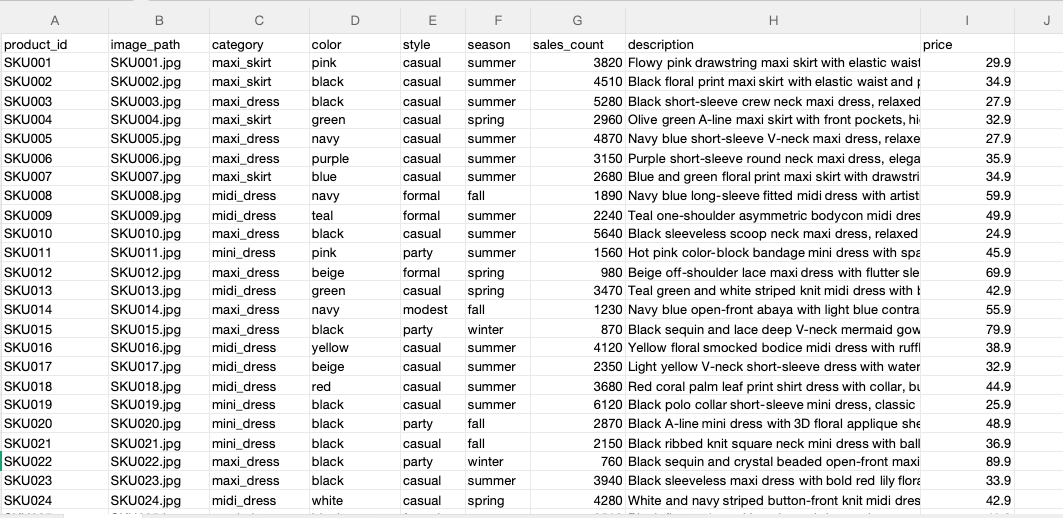
Historical Product Data
Prepare an
images/ folder and a products.csv metadata file: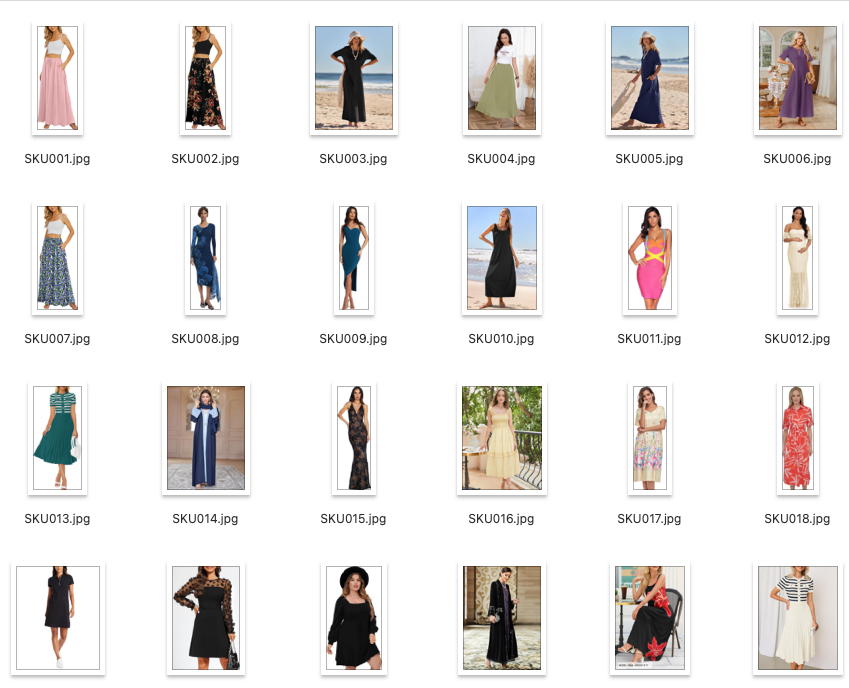
New Product Data
Prepare a
new_products/ folder and new_products.csv: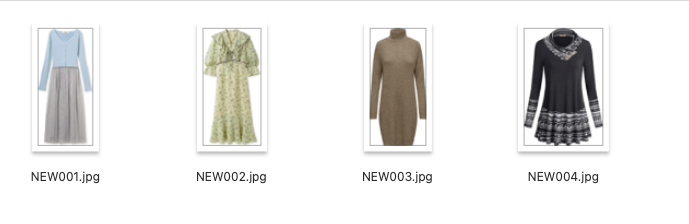
Step 1: Install Dependencies
Step 2: Import Modules and Configuration
Configure all models and paths:
Utility Functions
Define a set of utility functions for image encoding, API calls, and result parsing:
image_to_uri(): Convert PIL image to base64 data URI for API transmission.get_image_embeddings(): Batch call OpenRouter Embedding API, converting images2048-dim vectors.get_text_embedding(): Text2048-dim vector (same vector space).sparse_to_dict(): Convert scipy sparse matrix row to Milvus sparse vector format{index: value}.extract_images(): Extract generated images from Nano Banana 2's API response.
Step 3: Load Product Catalog#
Read
products.csv metadata and corresponding product images: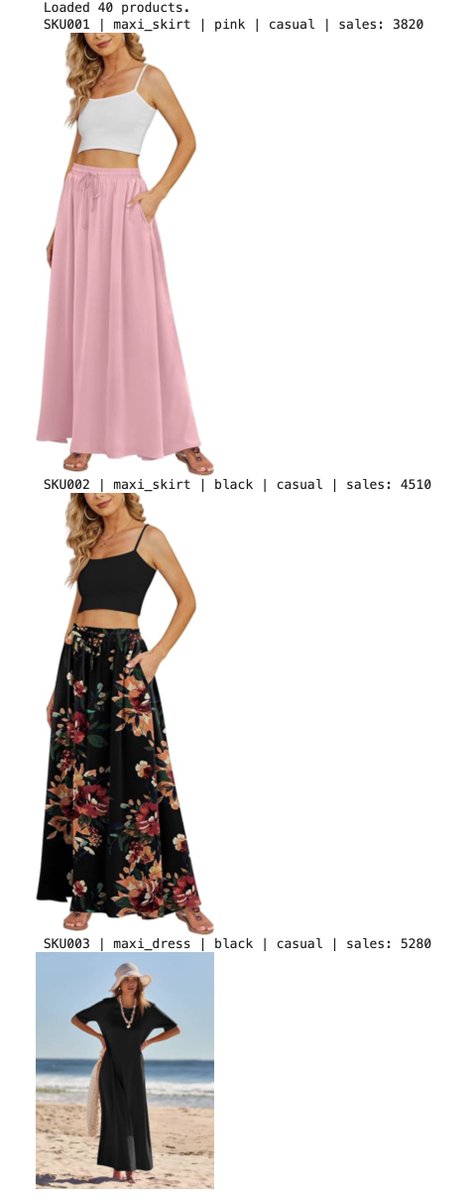
Step 4: Generate Embeddings#
Generate two types of vectors for hybrid retrieval:
4.1 Dense Vectors: Image Embeddings
Call the
nvidia/llama-nemotron-embed-vl-1b-v2 model via OpenRouter to encode each product image into a 2048-dim dense vector. This model supports mixed image-text encoding, allowing searches for both images and text within the same vector space.Output:
4.2 Sparse Vectors: TF-IDF Text Embeddings
Use sklearn's TF-IDF on the product text description (
description field) to generate sparse vectors for keyword matching:Output:
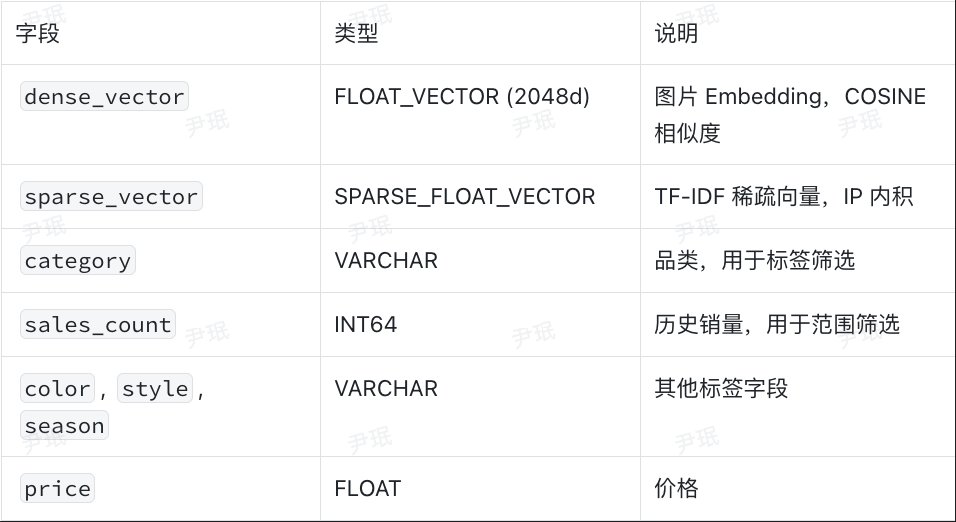
Step 5: Create Milvus Collection (Hybrid Schema)#
This is the core step of the tutorial:
Create a hybrid Schema containing Dense vectors, Sparse vectors, and scalar fields simultaneously:
Insert Data
Output:
Step 6: Hybrid Retrieval – Find Similar Hit Products for New Items#
This demonstrates the core of Milvus's advanced functionality. For each new product, we simultaneously execute:
- Dense Retrieval: Image embedding similarity (What does the new product look like?)
- Sparse Retrieval: TF-IDF text matching (Do keywords match?)
- Scalar Filtering: Category match + only hit products (
sales_count > 1500) - RRF Reranking: Fuse Dense + Sparse results
Load New Products
Output:
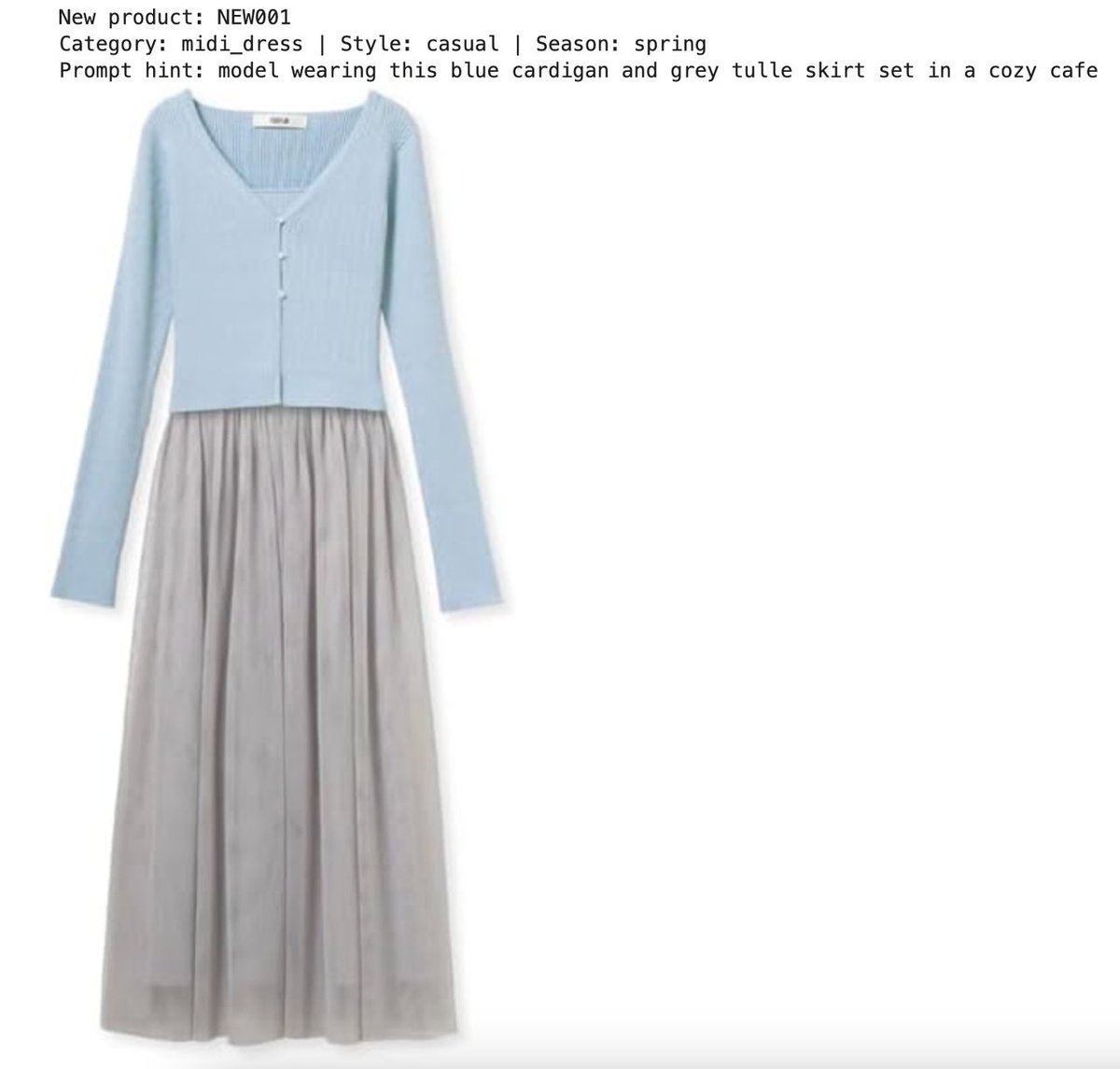
Encode New Products
Output:
Execute Hybrid Retrieval
> Key Code Analysis:
> -
AnnSearchRequest creates search requests for Dense and Sparse vectors respectively.
> - expr=filter_expr adds scalar filtering conditions to each request.
> - RRFRanker(k=60) uses the Reciprocal Rank Fusion algorithm to merge results from both search paths.
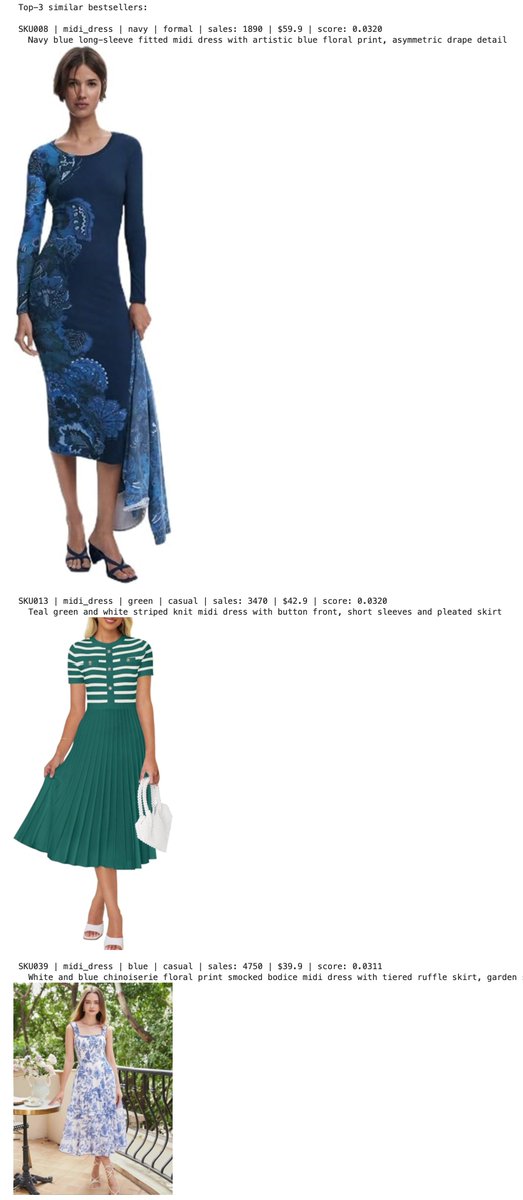
> - hybrid_search combines all requests for execution, returning comprehensive rankings.Output: Top three most similar hit products
Step 7: Analyze Hit Product Style with Qwen3.5#
Send the retrieved hit product promo images to the Qwen3.5 multimodal LLM, asking it to analyze scene, lighting, pose, atmosphere, and generate a style description prompt:
Qwen3.5 Output Example:
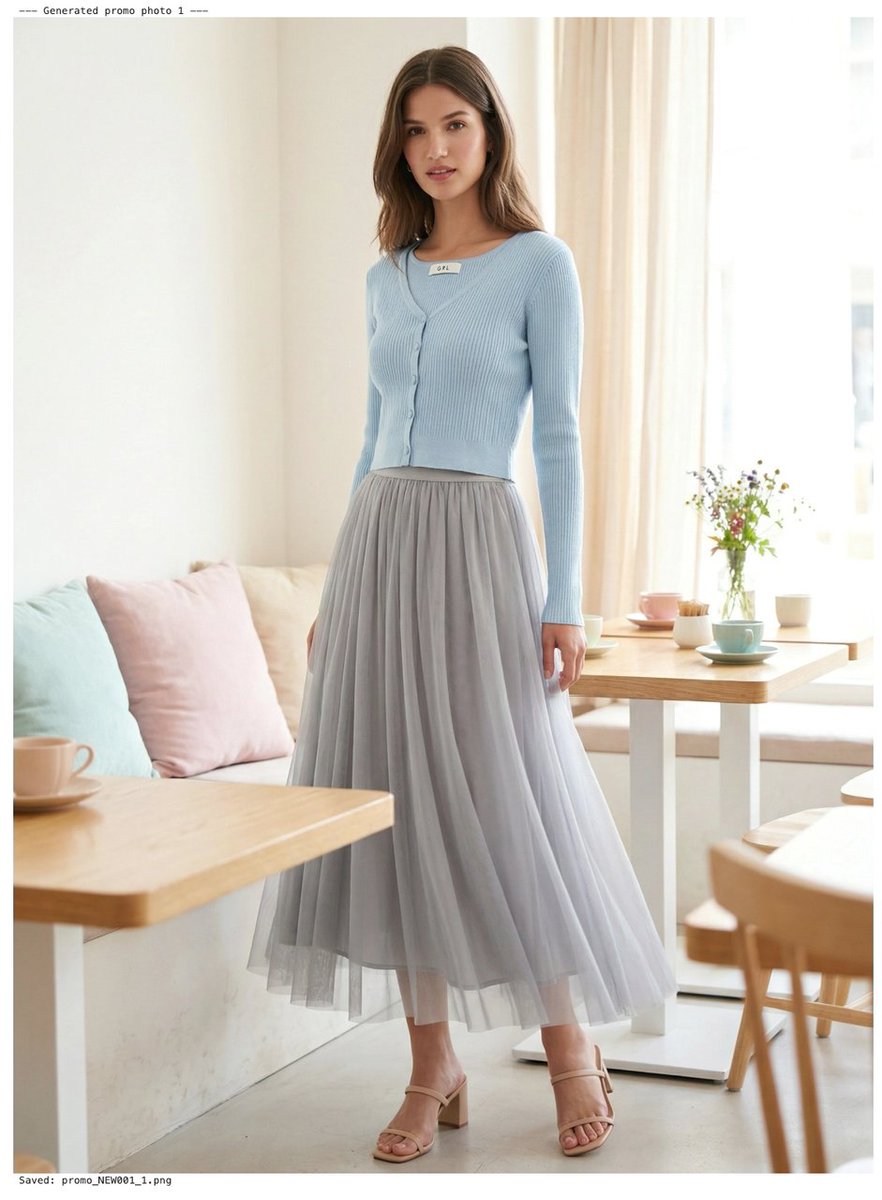
Step 8: Generate Promo Images with Nano Banana 2#
Send the new product flat lay image + hit product reference images + style prompt to Nano Banana 2 to generate professional promo images:
> Nano Banana 2 API Key Parameters:
> -
modalities: ["text", "image"]: Must declare output includes images.
> - image_config.aspect_ratio: Controls aspect ratio (3:4 suitable for portraits).
> - image_config.image_size: Resolution (supports 512px to 4K).Extract the generated images:
Step 9: Comparison Display
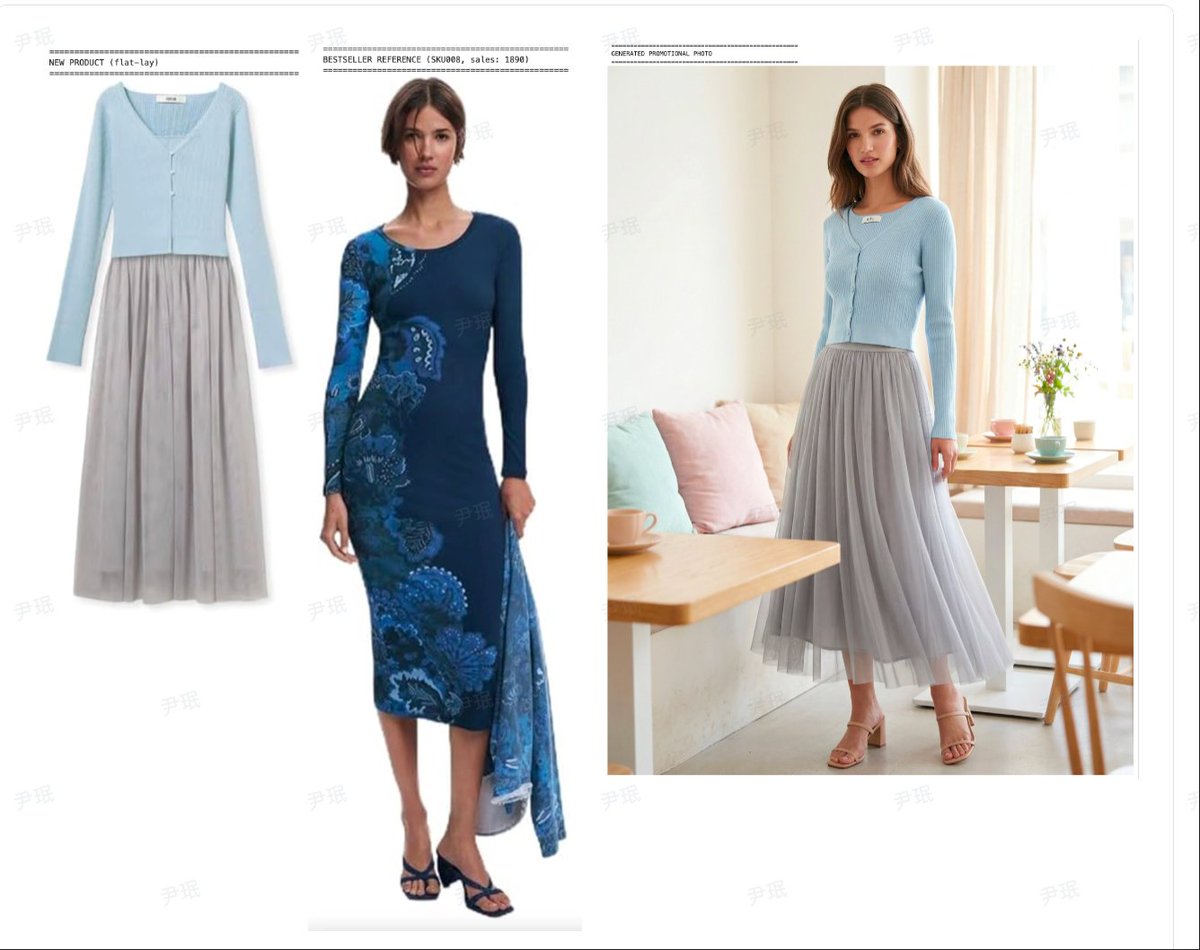
From the comparison results below, we can see that the new product promo images generated by Nano Banana 2 have excellent overall scene atmosphere, soft lighting, and natural model poses.
The only flaw is that the cardigan appears to be directly "pasted" on, with the white label at the neckline visibly protruding, breaking the realism. This indicates room for improvement in the model's fusion of clothing and the human body.
Step 10: Batch Generate All New Products#
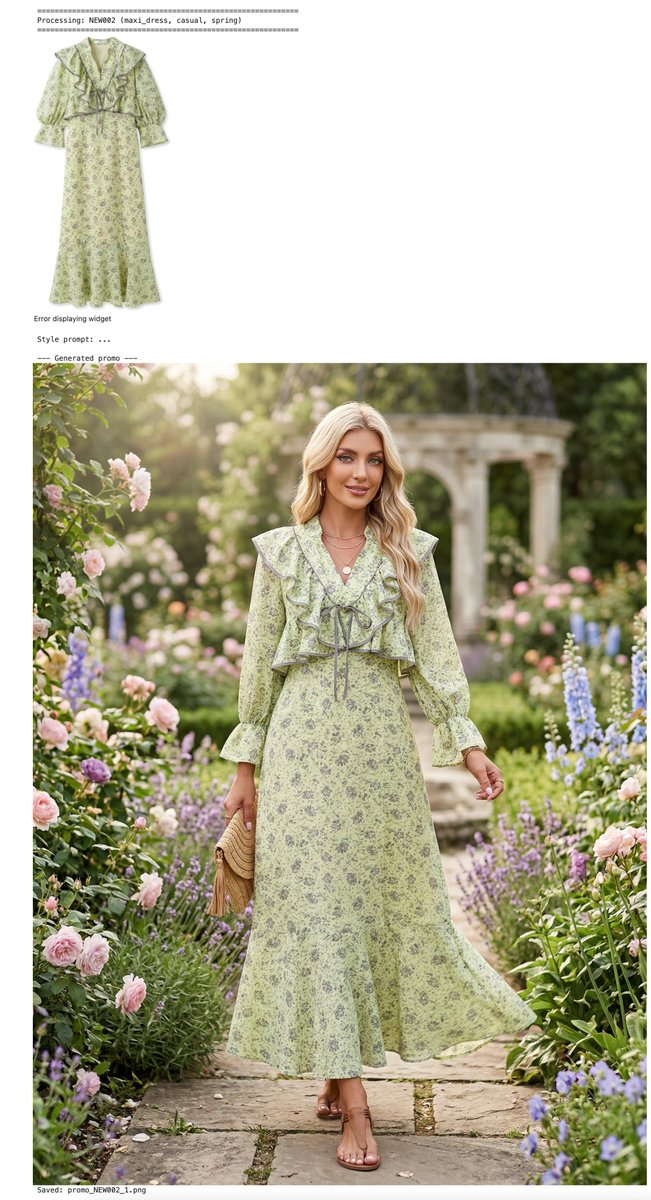
Encapsulate the complete process into a function and execute it for all new products: hybrid retrieval → style analysis → promo image generation. (Due to the length of this article, the code is omitted here. Those in need can leave a comment or message the editor.)
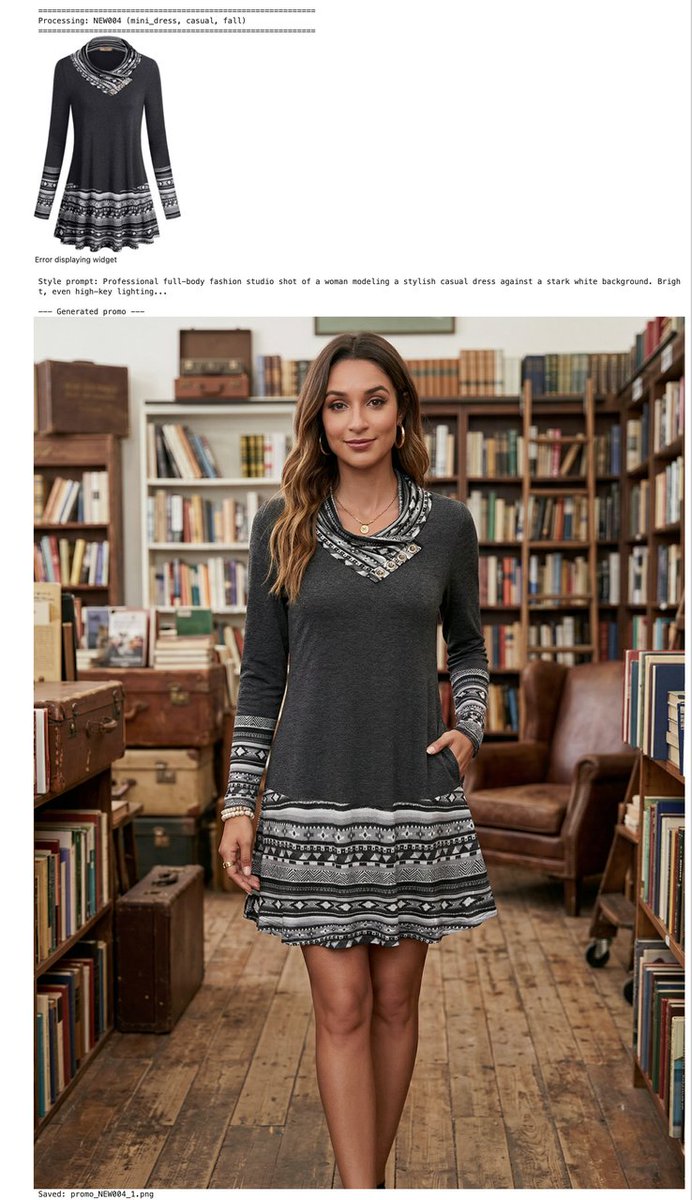
We batch-generated promo images for the remaining new products. From the promo images below, we can see that Qwen3.5 possesses deep understanding and precise control over dimensions such as the season, usage scenarios, and matching accessories suitable for the new products. Nano Banana 2 can then render corresponding visual scenes with high quality, presenting realistic effects that are almost indistinguishable from real photos.
Summary#
The above AI-driven fast-fashion promo image generation pipeline has four major advantages:
- Zero Local Models: All AI models are called via OpenRouter API.
- Milvus Hybrid Retrieval: Dense + Sparse + Scalar three-way fusion, with retrieval accuracy far exceeding single-vector retrieval.
- End-to-End Automation: Fully automated from new product flat lay images to promo images.
- Controllable Cost: Embedding models are free, and Nano Banana 2 costs half the price of the Pro version.
However, there are some shortcomings, such as occasional unnatural fusion of clothing and the human body, and blurry details on small accessories. Two simple techniques can resolve these:
- Generate in Steps: First generate a background scene matching the hit product, then generate the model image, and finally composite your own product onto it, significantly improving fusion quality.
- Use Refined Prompts: Add prompts like "clothing fits the human body naturally, no exposed labels, no extra elements, product details are clear" to guide the model to optimize details. If that still doesn't work, simply use the Pro version, as its stability in this aspect is much higher than Nano Banana 2.