Beginner
The Claude Code Moment for Design Has Arrived
The Claude Code moment for design has arrived
Anthropic released Claude Design today. I tried it immediately, and the shock was comparable to the first time I used Claude Code for programming. To borrow a phrase from teacher flypig:
I just tried it, and here's what I'll say: Claude Design makes Google's Stitch look like a joke.
This is the Claude Code moment for the design field. I won't say sensationalist things like "design is dead" or "designers will be replaced." I just want to say:
The gap between an idea and a high-fidelity interactive prototype has essentially disappeared. Non-designers can now independently produce deliverable designs. Designer productivity will increase exponentially, but design outsourcing and traditional design tools will shrink significantly.
Today's sharp drop in Figma's stock price is indirect proof of this.
First, Look at My Real Test Case#
Let me show you a complete case study. This is a design piece I created in about 3 rounds of interaction. It's not just a simple static image or webpage; most of the links inside are clickable and interactive.

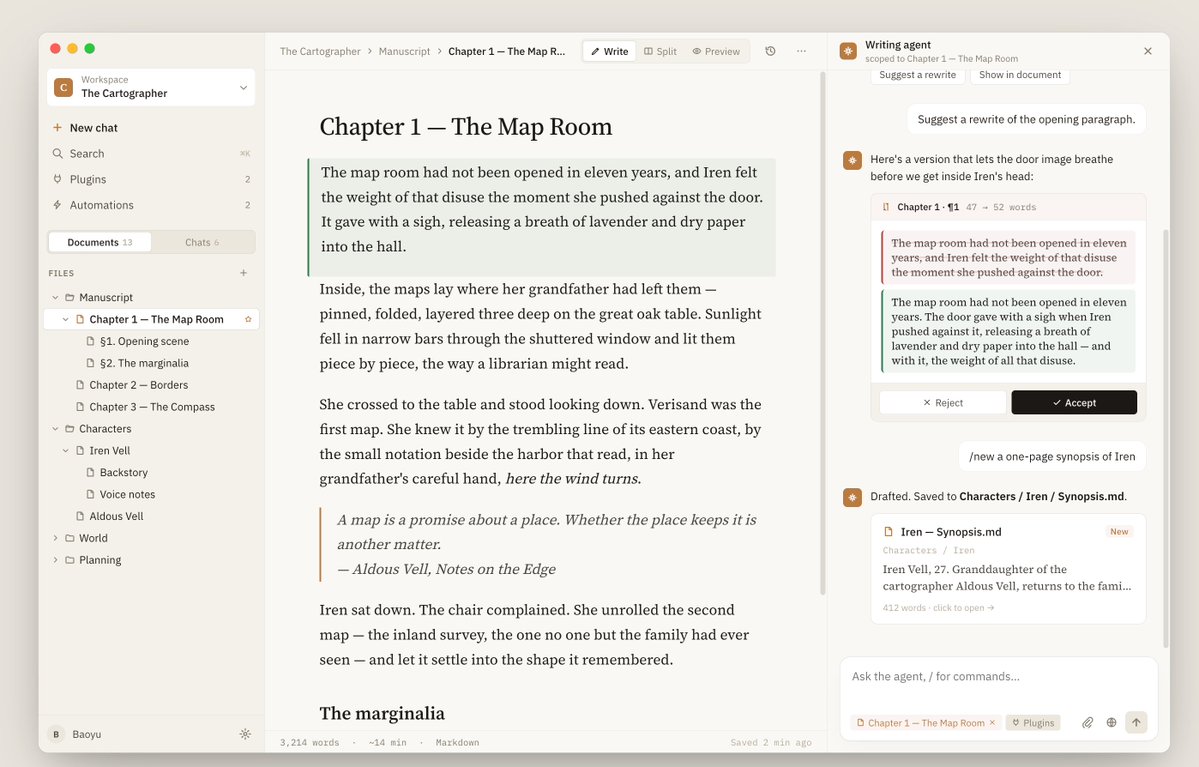
The initial prompt was very basic:
Help me design a Mac App for a writing agent. It should support multiple workspaces, allow viewing documents (markdown, text files) within a workspace, enable manual editing of documents, and allow calling an agent to edit markdown documents. It should also allow creating/editing documents within a chat conversation.
Mainly, I hadn't fully decided what I wanted it to look like, hoping it would help me brainstorm, so I was vague.
Then it gave me some questions to choose from, including single-select, multi-select, options to input my own, or letting it decide.

After a while, I checked back, and it gave me 3 options to choose from, just like a professional designer who clarifies your requirements first, then presents a few different directions for you to pick.

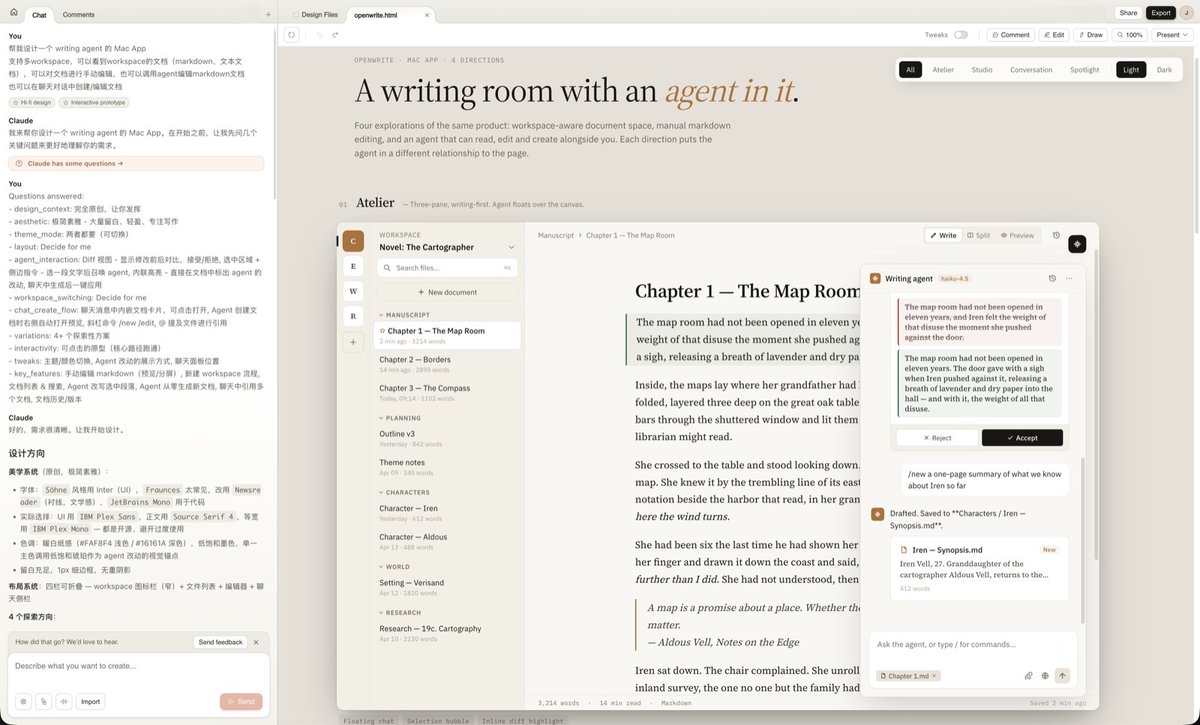


Each result wasn't a static image or webpage; they were all clickable and interactive.
After reviewing, I thought Option 2 and Option 3 were both good but had issues and needed to be combined. So I gave some revision feedback, even sent it a screenshot of Codex for reference, asking it to merge Option 2 and Option 3, incorporating some of Codex's design elements.
It quickly gave me a new version, basically what I wanted but couldn't describe clearly. For example, it separated Documents and Chat with a Tab, which is a design I liked, better than my anticipated "top and bottom" layout.

I was quite satisfied with the overall design and couldn't ask for better. Next was refining details. It hadn't implemented document edit history, so I asked it to add that part.
The prompt was simple:
Based on the current design, help me design the history section. I want users to more easily view document edit history and compare differences.
It quickly produced a version, but upon opening it, the effect wasn't good.

I was about to prompt it to fix it, but then I noticed it had detected the layout issue itself and fixed it.
The fixed version looked great, with no layout issues, and even allowed conveniently selecting any two versions to compare changes.

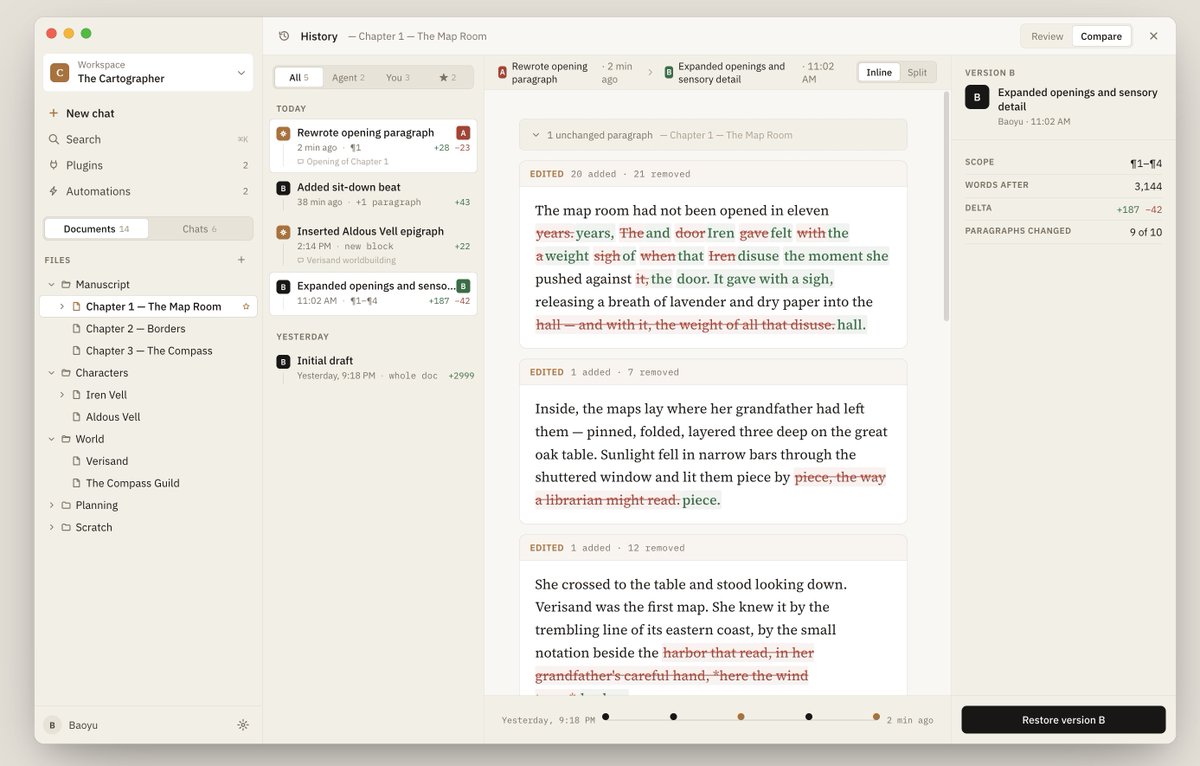
Looking at the message history on the left, it has an automatic error correction mechanism.

The final output was React code and a stylesheet.

Several things surprised me during the whole process: it proactively asks for requirements, it provides multiple options, it understands mixed-image references, it self-checks and self-corrects, and it outputs runnable code, not static mockups. This collaboration model is different from any previous design tool.
What Exactly is Claude Design?#
First, some basics. Claude Design is a new product released today by Anthropic Labs, powered by Claude Opus 4.7. It's available for Pro, Max, Team, and Enterprise subscriptions (Enterprise is off by default, requires admin to enable). You can go directly to
claude.ai/design.The interface is simple: chat on the left, canvas on the right. You describe what you want, and it draws it on the right; you modify it via chat, inline comments, direct editing, or automatically generated adjustment sliders; after modifications, you can export to HTML, PDF, PPTX, ZIP, send it to Canva for further editing, or directly package it for Claude Code to implement as product code.
It might seem like just an AI version of Figma? Not really.
Ryan Mather is from Anthropic's own design team, one person simultaneously responsible for 7 product lines. A key statement from his tweet today is:
Don't try to use Claude Design the way you would use a canvas-based tool. It's a different animal with different superpowers. Honestly, it's more like Claude Code than a canvas-based design tool. https://x.com/Flomerboy/status/2045162328593670321
This statement is the key to understanding Claude Design.
Quoted tweet 6. Ask Claude to make bespoke on-the-fly tools In general, don’t try to use Claude Design the way you would use a canvas-based tool. It’s a different animal with different superpowers. Experiment and get funky! You’ll find yourself designing circles around the way you used to. https://x.com/i/web/status/2045162328593670321
Fundamental Differences from Figma, Canva, etc.#
Over the past year, Figma added AI, Adobe added AI, Canva added AI. Their logic is the same: add an AI plugin layer on top of a human-centric canvas tool to help you draw a bit faster, write copy more conveniently.
Claude Design takes a different path: AI is the primary generator, humans are the primary reviewers. The entire tool's framework is built around this assumption.
This difference sounds abstract, but manifests in several concrete product differences.
Output is Runnable Code, Not Static Mockups#
In my Mac App case above, the final deliverable was React + CSS, a runnable thing where links are clickable, tabs are switchable, and versions can be diffed. This is a different species from "generating a pretty UI image."
Organization-Level Design System#
After you upload a codebase, PPT, brand materials, it extracts colors, fonts, components, layout specifications, and automatically applies them to all subsequent projects. A designer from Brilliant gave feedback that complex interactions that previously required 20+ rounds of prompts in other tools were solved in 2 rounds in Claude Design, precisely because it already "knows" your design language.
Understands Your Codebase#
It doesn't treat code as screenshots; it actually reads component structures, framework patterns, and file organization. So after a designer finishes, clicking "handoff" gives engineers not "here's an image for you to recreate" but "here's an implementation draft that can be directly integrated into your existing component library."
Can Create Tools, Not Just Designs#
The official blog mentions a capability: you can ask Claude Design to temporarily generate a specialized tool for you, like a color picker for your brand palette, a custom spec generator, or a small interactive prototype testing tool. The output isn't limited to "design files" but "any computational product that helps you think through a problem."
Datadog's feedback is also interesting: what previously took a week, spanning multiple rounds of brief → mockup → review, can now be done in a single meeting, producing a formed prototype while chatting, even allowing engineers to participate in the design conversation live.
This isn't an optimization like "Figma speed increased by 30%." It's more like a different way of working.
What Can It Be Used For?#
Based on the official blog and currently disclosed use cases, Claude Design can at least cover these types of work:
Product Prototypes and Interaction Flows. Like my Mac App case, or a 5-screen onboarding flow, a search experience with filtering and detail drawers, an approval workflow queue. This is its strongest area.
Presentation Decks. A 10-page Q1 results deck, a 15-page board roadmap, pre-meeting client materials, all-hands deck. Export to PPTX directly usable, or send to Canva for further editing.
Marketing Materials. Landing pages, social media graphics, event visuals.
Internal Tool Backends. Admin panels, content moderation queues, permission management interfaces. This category previously required hiring a dedicated front-end role; now PMs can produce deliverable prototypes themselves.
Design Exploration. Produce 3 to 5 directions at once for you to choose from. Previously, this was "I don't have enough time so I can only show you two versions." Now it's "I'll produce five versions, you pick one to refine."
Also important but not heavily emphasized by the official blog: video demos. Ryan Mather mentioned it can directly generate video-form demos, not just static images. This opens a new capability for product launches, user testing, and investor communication.
In one sentence to define its boundaries: It does well with things that are structurally clear, have distinct information blocks, and describable interaction logic; it's not here to take over purely artistic, emotionally-driven creative work.
This Isn't Just About Design#
Ryan Mather serving 7 product lines alone is a signal. This would have been impossible two months ago.
For Designers#
Productivity will increase exponentially, but team sizes will likely shrink. Work that previously required 5 designers at a company can now be done by 1 to 2, with individual output being greater and better. Those who remain will be more valuable because they'll focus on work requiring real judgment: brand direction, key illustrations, naming, strategic-level decisions. The remaining 80% of execution work is taken over by the model.
The Same Script Has Already Played Out#
In programming, it was Claude Code; engineers who can leverage AI see output multiply, while those who can't keep up are gradually squeezed out. In analytics, it's various AI-assisted data analysis; analysts shift from "SQL writers" to "question askers with AI." Every time a new profession reaches this point, it follows the same trajectory: per capita output soars, top performers gain more, while those at the bottom see opportunities gradually disappear. The design field is just reaching this inflection point.
For PMs, Founders, Marketers#
This is a completely new capability. Previously, if you had an idea, you either sketched it and queued for a designer, or endured making an ugly, depressing PPT yourself. Now you describe your idea clearly, and it gives you a finished product you can directly show to engineers, investors, or clients.
For Figma, Adobe, Canva#
This is a wake-up call, but a 10% stock drop might only reflect the surface-level impact. There's a deeper signal in Ryan Mather's tweet: Anthropic's own design team already uses Claude Design as their primary tool, with Figma only mentioned occasionally. If Anthropic's designers aren't primarily using Figma, why should other tech companies? In another 2 to 3 quarters, when enterprises start re-evaluating design tool budgets annually, renewal numbers for legacy tools will give a more direct answer than stock prices.
For Company Decision-Makers#
Two things need recalculation. One is design headcount. Mather covering 7 product lines alone implies work that previously required 3 to 5 designers; on an annual budget sheet, this number will be hard to ignore. The other is tool subscription costs. When primary work can be largely completed within one product, those accounts previously scattered across Figma, Sketch, Notion, Miro, Keynote will be re-evaluated.
For Engineers#
This is long-awaited good news. The handoff from design to engineering has always been one of the most painful parts: designers work visually, engineers work in code, relying entirely on Figma annotations and back-and-forth reviews. Now, what comes out of Claude Design inherently carries component structures and implementation drafts, reducing implementation costs by an order of magnitude.
Other Notes#
Claude Design is currently in research preview, with some practical boundaries to be aware of:
It currently lacks audit logs and usage tracking, doesn't support data residency, and uploaded assets are persistently stored. If you're at a company with strict compliance requirements, it's best not to put highly sensitive design materials directly into it for now.
It currently only has a web interface, with no open API. If you want to embed it into your own product, that's not possible yet; you can only build similar capabilities based on the Claude API and Agent SDK. But Claude Design's strength lies crucially in the Opus 4.7 model's enhanced multimodal capabilities. Theoretically, you could build a similar product using Opus 4.7.
However, just like with Claude Code, even using the same Claude models, Claude Code performs better in many aspects. After all, Anthropic knows best how to maximize the new models, and they can, in turn, use user design data and interactions to train the next generation of models, creating a data flywheel.
This advantage is something other players like OpenAI and Gemini won't catch up to quickly in the short term.
Pricing and Allowances#
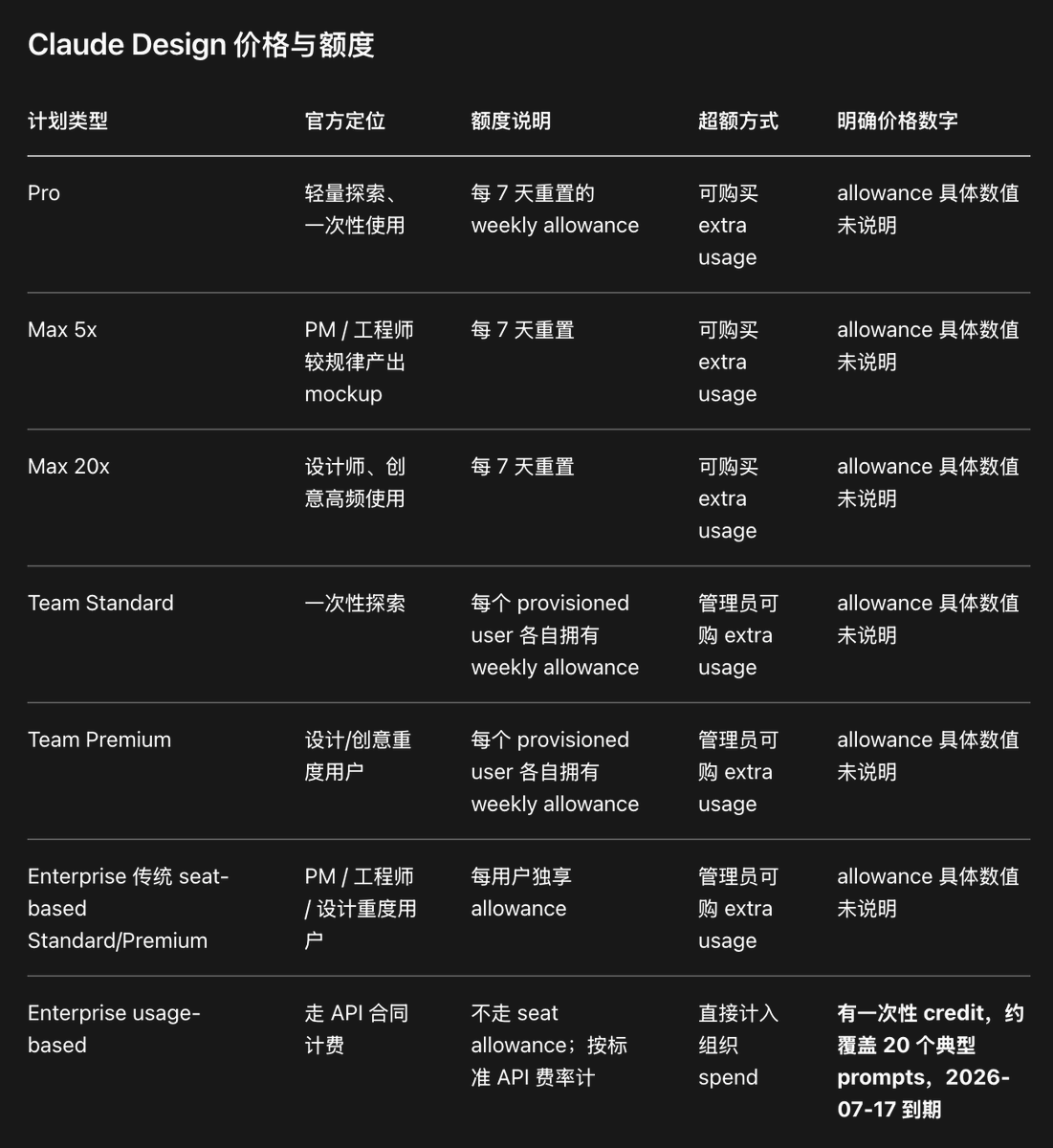
This table is compiled based on Anthropic's official Claude Design pricing documentation; the official hasn't disclosed specific weekly allowance values, so these cells must be marked as "Not Specified."
I'm on Claude Max@5x, and after designing one App and generating one Slides, my weekly allowance was gone.
Models, Specifications, and Multimodal Capabilities#
The only explicitly disclosed underlying model for Claude Design is Claude Opus 4.7. The official hasn't stated whether users can switch to Sonnet or Haiku within Claude Design, so this should be considered not specified / likely fixed. Meanwhile, Anthropic's model overview page provides a comparison of current main models, helping understand the reasoning behind Claude Design's model choice.
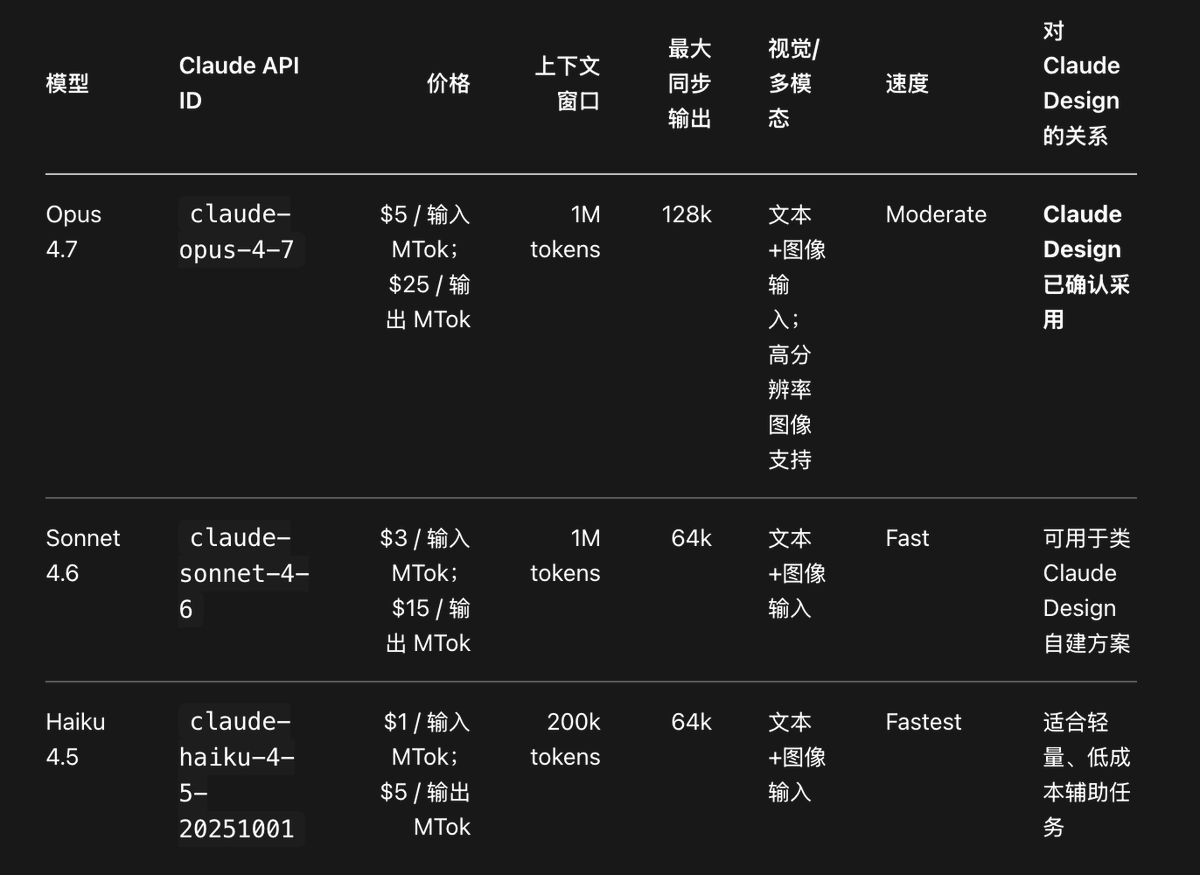
The data in the above table is summarized from Anthropic's model overview; the "Claude Design Adoption Relationship" is from the Claude Design official blog.
Regarding visual specifications, Opus 4.7 is the first Claude model supporting high-resolution images, with a maximum native resolution up to 2576 pixels on the long side, approximately 4784 image tokens per image max. This is especially important for Claude Design because it heavily relies on screenshots, webpage captures, prototype comparisons, and document visual semantics. Meanwhile, Opus 4.7 uses a new tokenizer, potentially increasing tokens by about 1x–1.35x compared to Opus 4.6 for the same text, meaning developers must re-estimate
max_tokens, caching, and costs in image/code/long-context scenarios.Finally#
The impact brought by Claude Design isn't just an efficiency upgrade for the design circle; it's more like a profound paradigm shift. In the past, designers were accustomed to meticulously crafting on a canvas and manually annotating; now, AI can directly go from idea to runnable high-fidelity interactive prototypes, shifting the designer's role from pure executor to strategic decision-maker. This change isn't happening only in design; programmers, analysts, marketers, and product managers have already or will soon experience similar revolutions.
In such an era, what's being redefined isn't just our way of working, but also our understanding of productivity and creativity. AI won't replace human judgment of beauty, insight into brands, or strategic planning, but its arrival allows everyone to focus more on these most valuable capabilities.
Perhaps years from now, we'll look back at today's Claude Design, just as we now look back at the first time we used Claude Code, realizing that the watershed moment in history happened inadvertently—and we've just stepped into that brand new future.