Beginner
The 8 Levels of Agentic Engineering [Translated]
The 8 Levels of Agentic Engineering [Translated]
The 8 Levels of Agentic Engineering [Translated]#
Author: Bassim Eledath
Original: The 8 Levels of Agentic Engineering — Bassim Eledath
AI's programming capabilities are outpacing our ability to harness them. That's why all that frantic effort to boost SWE-bench scores hasn't translated into the productivity metrics engineering leadership actually cares about. The Anthropic team shipped Cowork in 10 days, while another team using the same model can't even get a POC off the ground—the difference is that one team has bridged the gap between capability and practice, and the other hasn't.
This gap doesn't disappear overnight; it closes in levels. Eight levels, to be exact. Most people reading this have probably passed the first few, and you should be eager to reach the next—because each level up means a massive leap in output, and each bump in model capability further amplifies those gains.
Another reason you should care: the multiplayer effect. Your output depends more than you think on your teammates' levels. Let's say you're a Level 7 wizard, with background agents filing multiple PRs while you sleep. But if your repo requires a colleague's approval to merge, and that colleague is stuck at Level 2, manually reviewing PRs, your throughput is bottlenecked. So leveling up your teammates benefits you too.
From talking to many teams and individuals about their AI-assisted programming practices, here's the progression path I've observed (the order isn't strictly rigid):
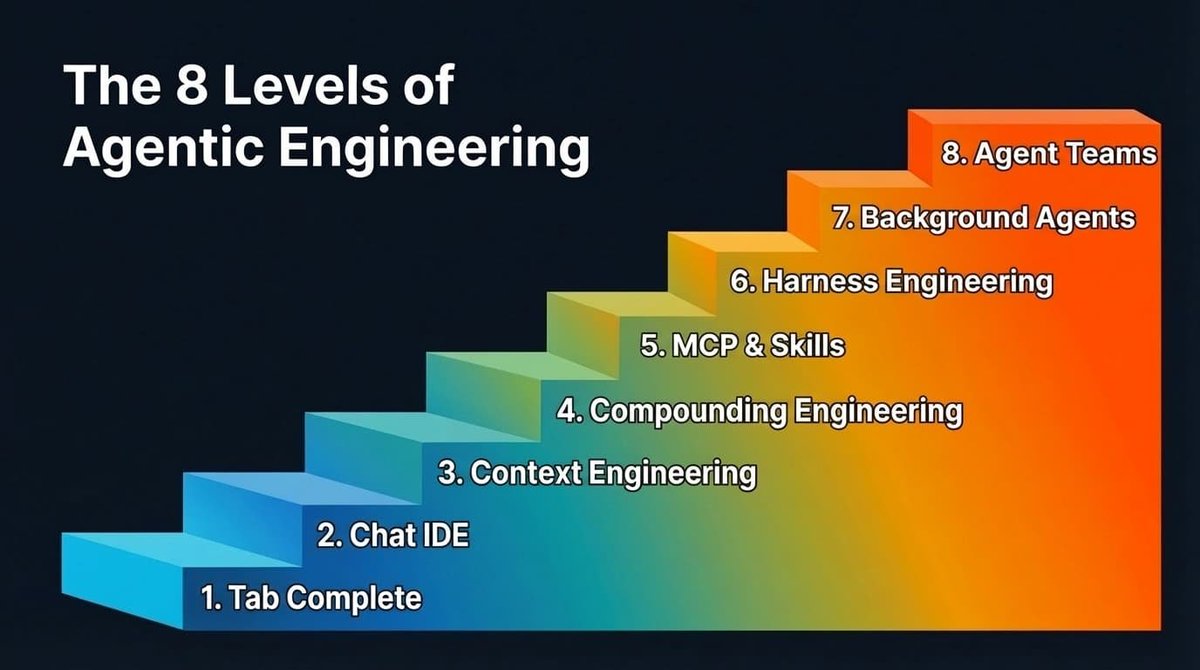
The 8 Levels of Agentic Engineering
Levels 1 & 2: Tab Completion & Agent IDEs#
I'll breeze through these two levels, mainly for completeness. Feel free to skim.
Tab completion is where it all began. GitHub Copilot kicked off this movement—press Tab, get code. Many have probably forgotten this stage, and newcomers might have skipped it entirely. It's better suited for experienced developers who can sketch out the skeleton of the code and let the AI fill in the details.
AI-native IDEs, led by Cursor, changed the game by connecting chat to the codebase, making cross-file editing much easier. But the ceiling was always context. The model can only help with what it can see, and the frustration was that it either didn't see the right context or saw too much irrelevant context.
Most people at this level are also experimenting with the Plan mode of their chosen programming agent: turning a rough idea into a structured step-by-step plan for the LLM, iterating on that plan, and then triggering execution. It works well at this stage and is a reasonable way to maintain control. However, as we'll see in later levels, reliance on Plan mode diminishes.
Level 3: Context Engineering#
Now we get to the interesting part. Context Engineering was the buzzword of 2025. It became a thing because models could finally reliably follow a reasonable number of instructions with just the right context. Noisy context is as bad as insufficient context, so the core work is about increasing the information density per token. "Every token must fight for its place in the prompt"—that was the mantra.
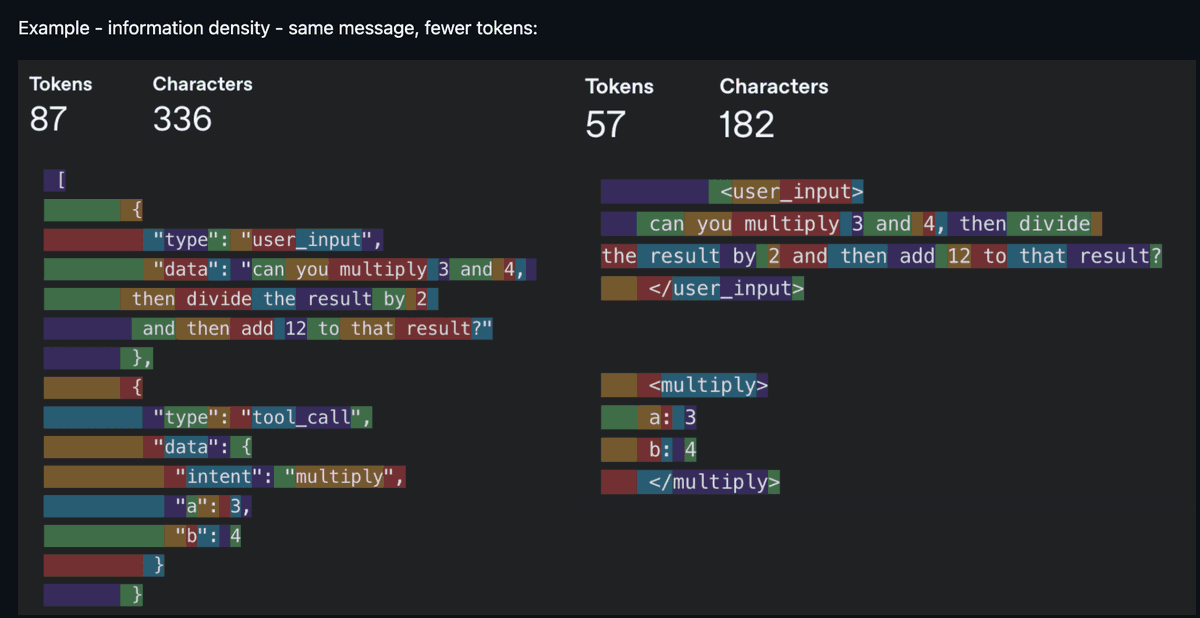
Same information, fewer tokens—information density is king (Source: humanlayer/12-factor-agents)
In practice, context engineering is broader than most realize. It includes your system prompt and rule files (.cursorrules, CLAUDE.md). It includes how you describe tools, because the model reads those descriptions to decide which tool to call. It includes managing conversation history to avoid long-running agents getting lost after the tenth turn. It also includes deciding which tools to expose each turn, because too many options overwhelm the model—just like people.
You don't hear as much about context engineering these days. The scales have tipped towards models that tolerate noisier context and can reason in messier scenarios (larger context windows help too). But being mindful of context consumption still matters. It becomes a bottleneck in a few scenarios:
- Smaller models are more sensitive to context. Voice applications often use smaller models, and context size also correlates with first-token latency, affecting response speed.
- Token hogs. MCPs (Model Context Protocol) like Playwright and image inputs quickly eat up tokens, pushing you into "compressed sessions" in Claude Code sooner than expected.
- Agents with dozens of tools, where the model spends more tokens parsing tool definitions than doing actual work.
The broader takeaway: context engineering isn't gone; it's evolving. The focus has shifted from filtering out bad context to ensuring the right context appears at the right time. And it's this shift that paves the way for Level 4.
Level 4: Compounding Engineering#
Context engineering improves this session. Compounding Engineering (coined by Kieran Klaassen) improves every session after. This concept was a turning point for me and many others—it made us realize that "programming by vibes" is far more than just prototyping.
It's a "Plan, Delegate, Evaluate, Compound" loop. You plan the task, giving the LLM enough context to succeed. You delegate. You evaluate the output. Then the crucial step—you compound what you learned: what worked, what went wrong, what patterns to follow next time.
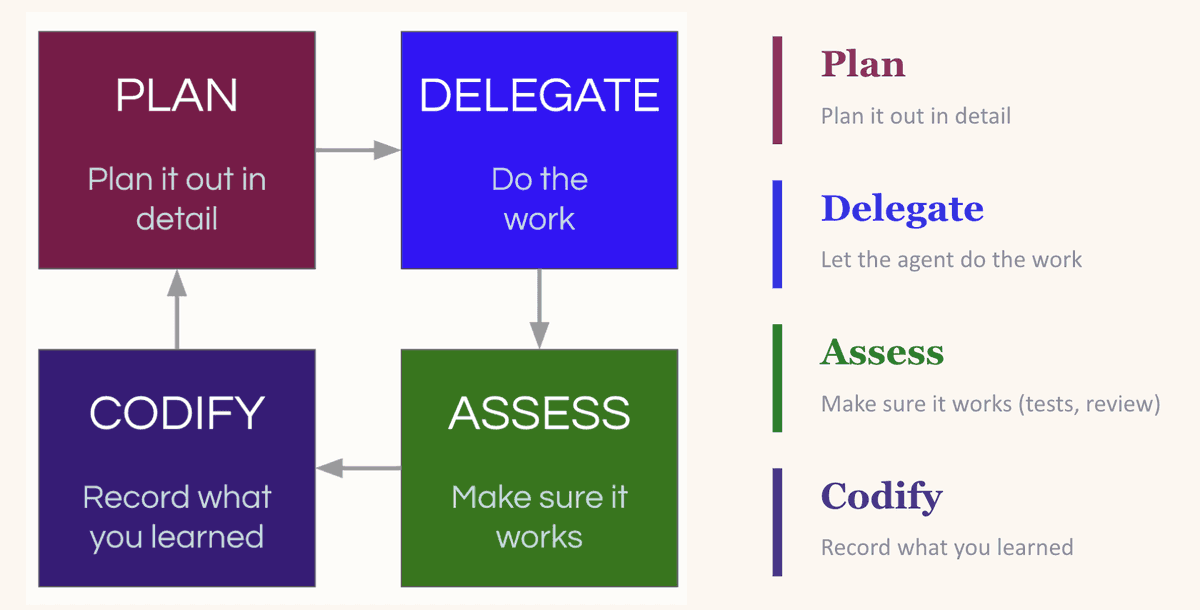
The Compounding Loop: Plan, Delegate, Evaluate, Compound—each round makes the next one better
The magic is in the "Compound" step. LLMs are stateless. If it reintroduced a dependency you explicitly removed yesterday, it'll do it again tomorrow—unless you tell it not to. The most common fix is updating your CLAUDE.md (or equivalent rule file), baking the lessons into every future session. But beware: the impulse to dump everything into the rule file can backfire (too many instructions is no instruction). A better approach is creating an environment where the LLM can easily discover useful context on its own—like maintaining an up-to-date
docs/ folder (more on this at Level 7).People practicing compounding engineering are typically hypersensitive to the context fed to the LLM. When the LLM makes a mistake, their instinct is to first consider if something was missing from the context, not to blame the model. It's this intuition that makes Levels 5 through 8 possible.
Level 5: MCP & Skills#
Levels 3 and 4 solve for context. Level 5 solves for capability. MCPs and custom skills give your LLM access to databases, APIs, CI pipelines, design systems, Playwright for browser testing, Slack for notifications. The model is no longer just thinking about your codebase—it can now directly operate on it.
There's plenty of good material on what MCPs and skills are, so I won't rehash that. But a few examples from my usage: our team shares a PR review skill that we've all iterated on (and still are). It conditionally spins up sub-agents based on the PR's nature. One checks for security in database integrations, one does complexity analysis to flag redundancy or over-engineering, another checks prompt health to ensure prompts follow the team's standard format. It also runs linters and Ruff.
Why invest so much in a review skill? Because when agents start churning out PRs in bulk, human review becomes the bottleneck, not the quality gate. Latent Space made a compelling case: code review as we know it is dead. In its place is automated, consistent, skill-driven review.
On the MCP side, I use the Braintrust MCP to let LLMs query evaluation logs and make direct edits. I use the DeepWiki MCP to let agents access documentation for any open-source repo without manually pulling docs into context.
When multiple people on a team start writing similar skills independently, it's worth consolidating into a shared registry. Block (condolences) had a great post: they built an internal skill marketplace with over 100 skills and curated skill packages for specific roles and teams. Skills get the same treatment as code: pull requests, reviews, version history.
Another trend to watch: LLMs are increasingly using CLI tools over MCPs (and it seems every company is releasing their own: Google Workspace CLI, Braintrust is about to launch one too). The reason is token efficiency. MCP servers inject full tool definitions into the context every turn, regardless of whether the agent uses them. CLIs work the opposite way: the agent runs a targeted command, and only the relevant output enters the context window. I use agent-browser heavily instead of Playwright MCP for this very reason.
Pause before moving on. Levels 3 through 5 are the foundation for everything that follows. LLMs are surprisingly good at some things and surprisingly bad at others. You need to develop an intuition for these boundaries before layering more automation on top. If your context is noisy, prompts are insufficient or inaccurate, and tool descriptions are vague, Levels 6 through 8 will only amplify those problems.
Level 6: Harness Engineering#
The rocket really starts taking off here.
Context engineering is about what the model sees. Harness Engineering is about building the entire environment—tools, infrastructure, and feedback loops—that allows agents to work reliably without your intervention. You give the agent not just an editor, but a complete feedback loop.
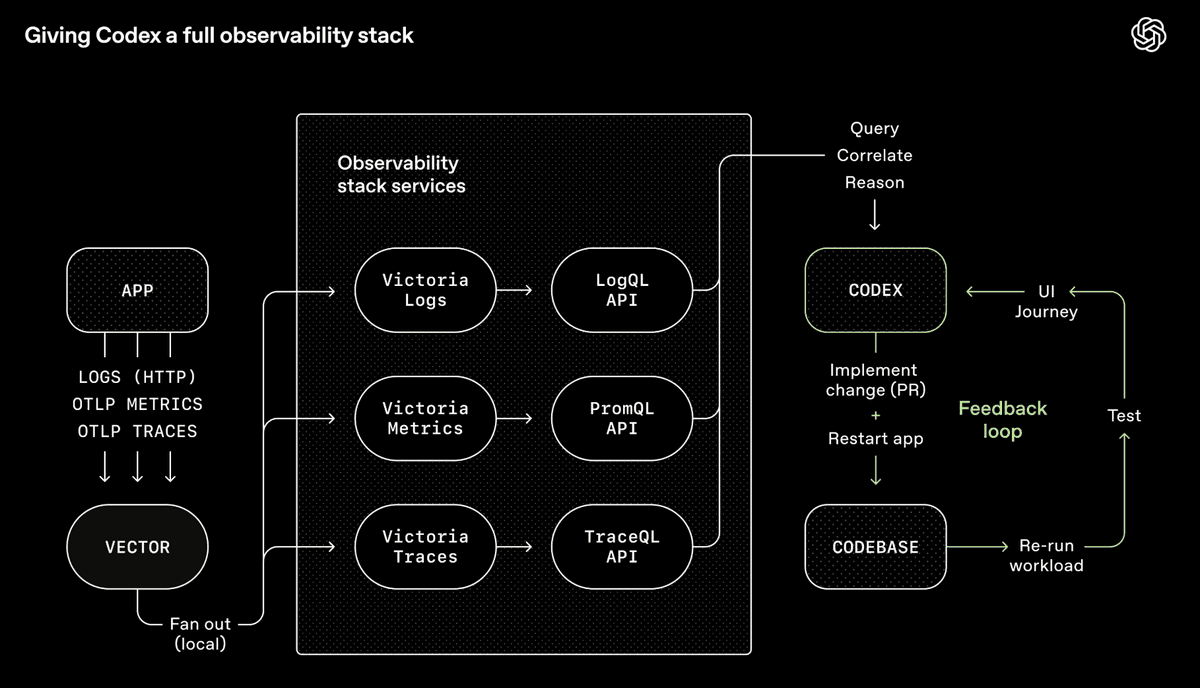
OpenAI's Codex Toolchain—a complete observability system allowing agents to query, correlate, and reason about their own outputs (Source: OpenAI)
OpenAI's Codex team integrated Chrome DevTools, observability tools, and browser navigation into the agent runtime, allowing it to take screenshots, drive UI flows, query logs, and verify its own fixes. Give it a prompt, and the agent can reproduce a bug, record a video, implement a fix. Then it verifies by manipulating the app, submits a PR, responds to review feedback, merges—escalating to a human only for judgment calls. The agent isn't just writing code; it's seeing what that code produces and iterating—just like a human.
My team works on voice and chat agents for technical troubleshooting, so I built a CLI tool called
converse that lets any LLM chat with our backend interface for turn-by-turn conversations. After the LLM modifies code, it uses converse to test the conversation on the live system, then iterates. Sometimes this self-improvement loop runs for hours. This is especially powerful when the outcome is verifiable: the conversation must follow this flow, or call these tools in specific situations (like escalating to a human).The core concept underpinning all this is Backpressure—automated feedback mechanisms (type systems, tests, linters, pre-commit hooks) that allow agents to discover and correct mistakes without human intervention. If you want autonomy, you must have backpressure; otherwise, you get a garbage-generating machine. This extends to security as well. Vercel's CTO pointed out that agents, the code they generate, and your keys should be in different trust domains because a prompt injection attack buried in a log file could trick an agent into stealing your credentials—if everything shares the same security context. Security boundaries are backpressure: they constrain what an agent can do if it goes rogue, not just what it should do.
Two principles to make this clearer:
- Design for throughput, not perfection. When every commit must be perfect, agents get stuck rehashing the same bug, overwriting each other's fixes. It's better to tolerate small, non-blocking errors and do a final quality check before shipping. We do this with human colleagues too.
- Constraints over instructions. Step-by-step prompting ("do A, then B, then C") is becoming passé. In my experience, defining boundaries is more effective than listing steps because agents fixate on the list, ignoring everything outside it. A better prompt is: "Here's the outcome I want. Keep going until it passes all these tests."
The other half of Harness Engineering is ensuring agents can navigate the codebase without you. OpenAI's approach: keep AGENTS.md to about 100 lines as a table of contents pointing to other structured docs, and bake doc freshness into the CI process instead of relying on ad-hoc updates that quickly become stale.
Once you've built all this, a natural question arises: if the agent can verify its own work, navigate the repo, and correct errors without you—why do you need to be in the chair at all?
A heads-up for those still in earlier levels: what follows might sound like science fiction (but that's okay, bookmark it and come back later).
Level 7: Background Agents#
Hot take: Plan mode is dying.
Boris Cherny, creator of Claude Code, still starts 80% of tasks in Plan mode. But with each new model generation, the one-shot success rate after planning keeps climbing. I think we're approaching a tipping point where Plan mode as a separate, manual step will fade. Not because planning itself is unimportant, but because models are becoming smart enough to plan well on their own. But there's a crucial caveat: this only holds true if you've done the work of Levels 3 through 6. If your context is clean, constraints are clear, tool descriptions are solid, and feedback loops are closed, the model can reliably plan without you reviewing it. If that work isn't done, you'll still be clinging to the plan.
To be clear, planning as a general practice isn't disappearing; it's just changing shape. For beginners, Plan mode is still the right entry point (as described in Levels 1 & 2). But for complex features at Level 7, "planning" looks less like writing a step-by-step outline and more like exploration: probing the codebase, prototyping in a worktree, mapping the solution space. And increasingly, it's background agents doing that exploration for you.
This is significant because it's what unlocks background agents. If an agent can generate a reliable plan and execute it without your sign-off, it can run asynchronously while you do other things. This is a key shift—from "I'm context-switching between tabs" to "work is progressing without me."
The Ralph loop is a popular entry point: an autonomous agent loop that repeatedly runs a programming CLI until all items in a PRD are complete, spawning a fresh instance with new context each iteration. In my experience, getting the Ralph loop to work well is tricky; any insufficiency or inaccuracy in the PRD eventually comes back to bite you. It's a bit too "fire and forget."
You can run multiple Ralph loops in parallel, but the more agents you spin up, the more you'll find your time spent: coordinating them, sequencing work, checking outputs, pushing progress. You're not coding anymore—you've become a middle manager. You need an orchestrator agent to handle scheduling so you can focus on intent, not logistics.
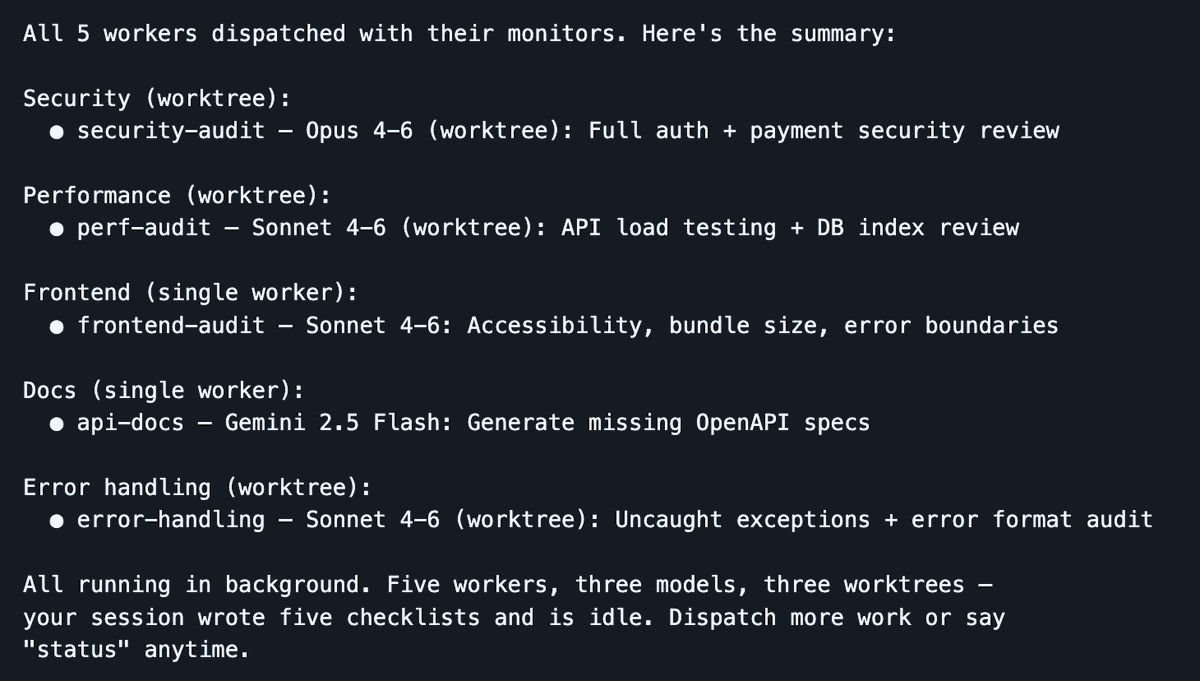
Dispatch spins up 5 workers in parallel across 3 models—your session stays lean, agents do the work
A tool I've been using heavily lately is Dispatch, a Claude Code skill I made that turns your session into a command center. You stay in a clean session, while workers do the heavy lifting in isolated contexts. The dispatcher handles planning, delegation, and tracking, preserving your main context window for orchestration. When a worker gets stuck, it throws clarification questions instead of failing silently.
Dispatch runs locally and is perfect for rapid development where you want to stay close to the work: faster feedback, easier debugging, no infrastructure overhead. Ramp's Inspect is the complementary approach for longer-running, more autonomous work: each agent session spins up in a cloud sandbox VM with a full dev environment. A PM spots a UI bug, tags it in Slack, and Inspect takes over and handles it while your laptop is closed. The trade-off is operational complexity (infrastructure, snapshots, security), but you get scale and reproducibility that local agents can't match. I recommend using both (local and cloud background agents).
An unexpectedly powerful pattern at this level: using different models for different jobs. The best engineering teams aren't made of clones. Team members think differently, have different training, different strengths. The same logic applies to LLMs. These models have undergone different post-training and have distinct personalities. I often assign Opus for implementation work, Gemini for exploratory research, and Codex for review, yielding a combined output stronger than any single model working alone. Think swarm intelligence, but for code.
Crucially, you also need to decouple the implementer from the reviewer. I've learned this lesson the hard way too many times: if the same model instance is both implementing and evaluating its own work, it's biased. It will overlook issues, tell you all tasks are done—when they're not. It's not malice; it's the same reason you wouldn't grade your own exam. Have another model (or a different instance with a review-specific prompt) do the review. Your signal quality improves dramatically.
Background agents also open the floodgates for CI + AI integration. Once agents can run without someone at the helm, they can be triggered from existing infrastructure. A documentation bot regenerates docs after every merge and submits a PR to update CLAUDE.md (we use this; saves tons of time). A security review bot scans PRs and submits fixes. A dependency management bot doesn't just flag issues; it actually upgrades packages and runs the test