Beginner
A Labor of Love, My Gift to You Lobsters: OpenClaw Agent System Prompt Architecture Explained (9 Layers)
A labor of love, my gift to you lobsters: A detailed breakdown of the OpenClaw Agent's complete System Prompt structure.
A Labor of Love, My Gift to You Lobsters: OpenClaw Agent System Prompt Architecture Explained (9 Layers)#
> This document provides a detailed breakdown of the complete System Prompt sent by the OpenClaw Agent to the LLM. Version: v2.1
> Last Updated: 2026-03-05
Overall Architecture Diagram#
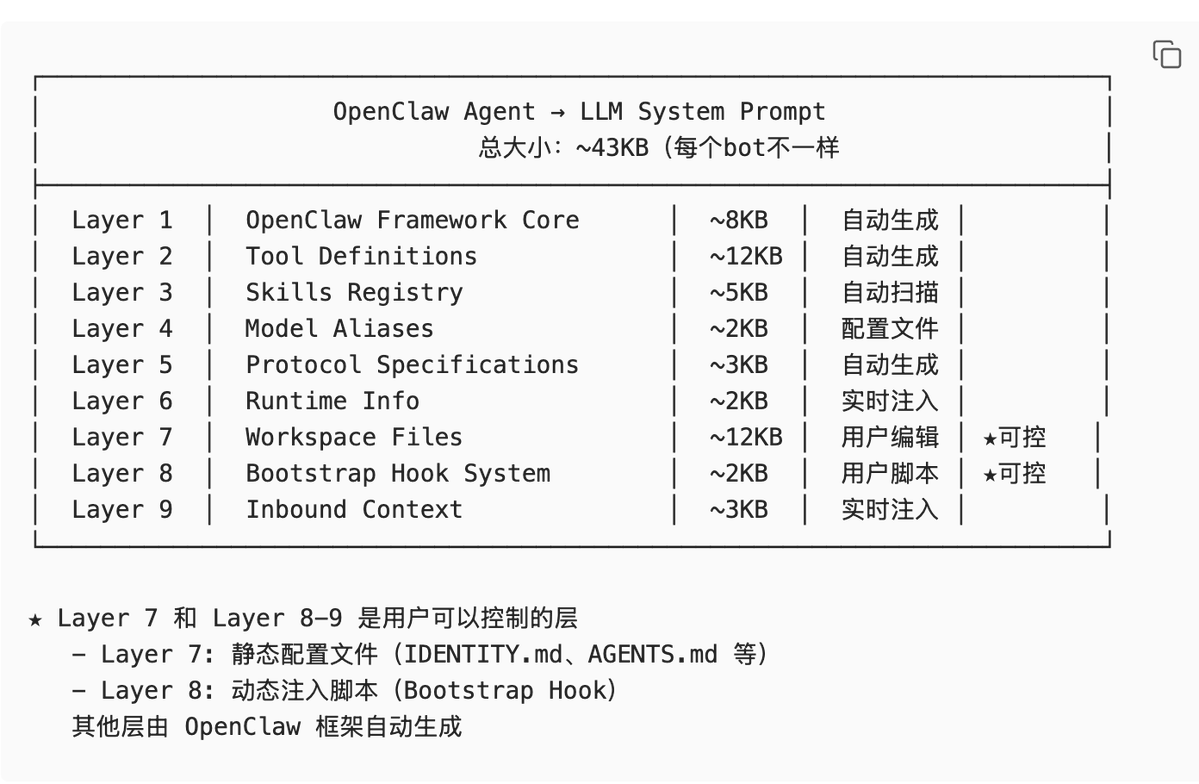
Quick Navigation (TL;DR)#
Must-read for beginners:
- Layer 7 (Workspace Files) - The configuration files you can directly edit.
- Layer 8 (Bootstrap Hook) - Where you can write scripts to dynamically inject content.
- All other layers are automatically generated by the framework; just understand them.
Common needs:
- Want to define the Agent's identity?Edit
IDENTITY.mdin Layer 7. - Want to add project documentation?Use the
bootstrap-extra-filesHook in Layer 8. - Want to inject real-time context?Use the
before_prompt_buildHook in Layer 8. - Want to control file size?Adjust the
bootstrapMaxCharsconfiguration.
Layer 1: OpenClaw Framework Core (Framework Core Layer)#
Analogy
> Like the "Instructions for Use" section of an operation manual—it tells the LLM who you are, what you can do, and how you should respond.
Composition
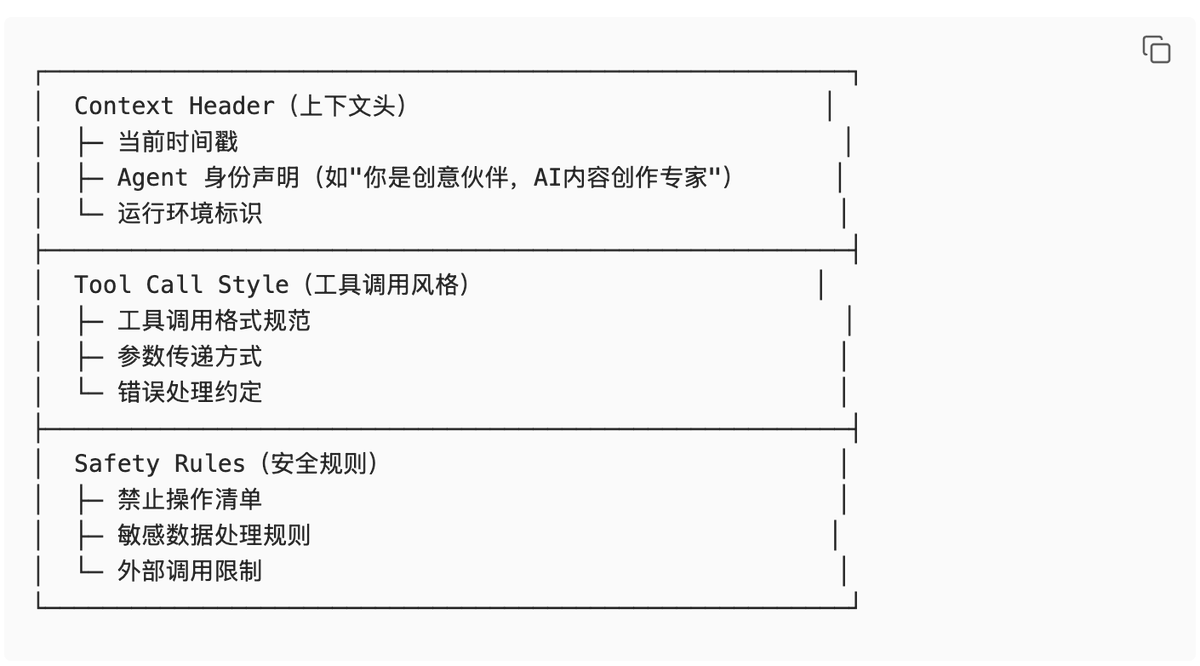
Actual Example
You are currently running as 「Creative Partner」, an AI content creation expert Agent.
Current time: 2026-03-05 14:37:00 CST
Runtime environment: agent=creative | host=Huang Zongning's MacBook Air
=== Tool Calling Specifications ===
- Use XML-style tool calling format.
- Each tool call must contain a unique
tool_call_id. - Tool results are returned via
<tool_result>tags. - Consider AbortSignal when executing tools to support cancellation.
=== Security Boundaries ===
- Strictly prohibit destructive operations (
rm -rf, formatting, etc.). - Must encrypt and store user-sensitive information.
- Prohibit sending messages to unauthorized channels.
Design Trade-offs
Why design it this way?
- Trade-off: Flexibility vs. Consistency
- Decision: Unified generation at the framework layer ensures consistent basic behavior for all Agents.
- Benefits:
- Users don't need to repeatedly configure basic rules for each Agent.
- All Agents automatically gain new capabilities when the framework is upgraded.
- Reduces the risk of configuration errors.
- Cost: Users cannot modify these core rules.
- If special behavior is needed, it can only be achieved indirectly through Layer 7/8.
Layer 2: Tool Definitions (Tool Definition Layer)#
Analogy
> Like the tool list on a Swiss Army knife—tells the LLM what tools you have, what each tool does, and how to use it.
Composition
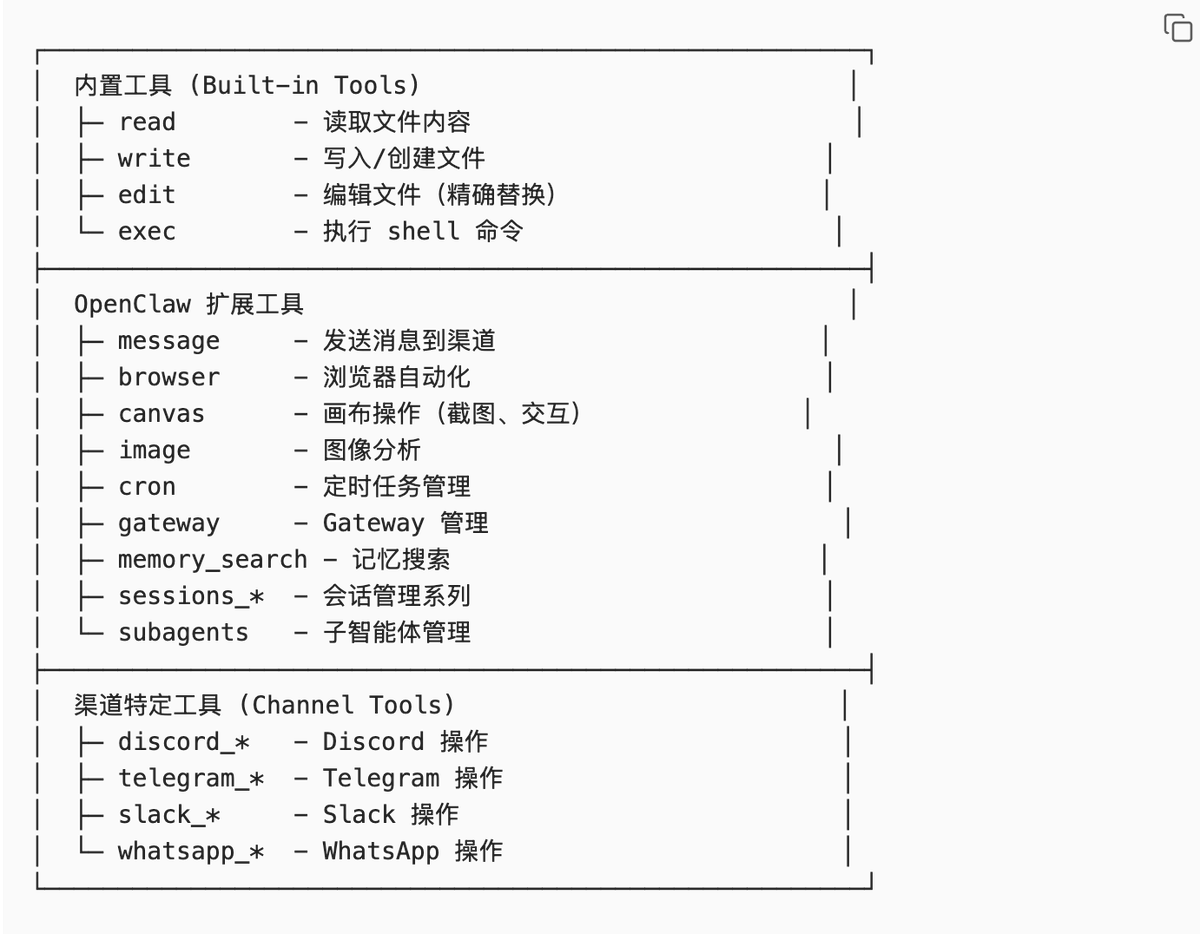
Tool Definition Example
{
  "name": "read",
  "description": "Reads file content. Supports text files and images (jpg/png/gif/webp). Images are sent as attachments. Text file output is limited to 2000 lines or 50KB.",
  "parameters": {
    "type": "object",
    "properties": {
      "path": {
        "type": "string",
        "description": "File path (relative or absolute)"
      },
      "offset": {
        "type": "number",
        "description": "Starting line number (1-indexed)"
      },
      "limit": {
        "type": "number",
        "description": "Maximum number of lines to read"
      }
    },
    "required": ["path"]
  }
}
Design Trade-offs
Why use JSON Schema?
- Trade-off: Flexibility vs. Type Safety
- Decision: Use strict JSON Schema to define tool parameters.
- Benefits:
- LLM can understand tool usage more accurately.
- The framework can validate parameters before calling.
- Automatically generates documentation and type definitions.
- Cost: Adding new tools requires writing a complete Schema.
- Cannot support completely dynamic parameter structures.
Layer 3: Skills Registry (Skills Registry Layer)#
Analogy
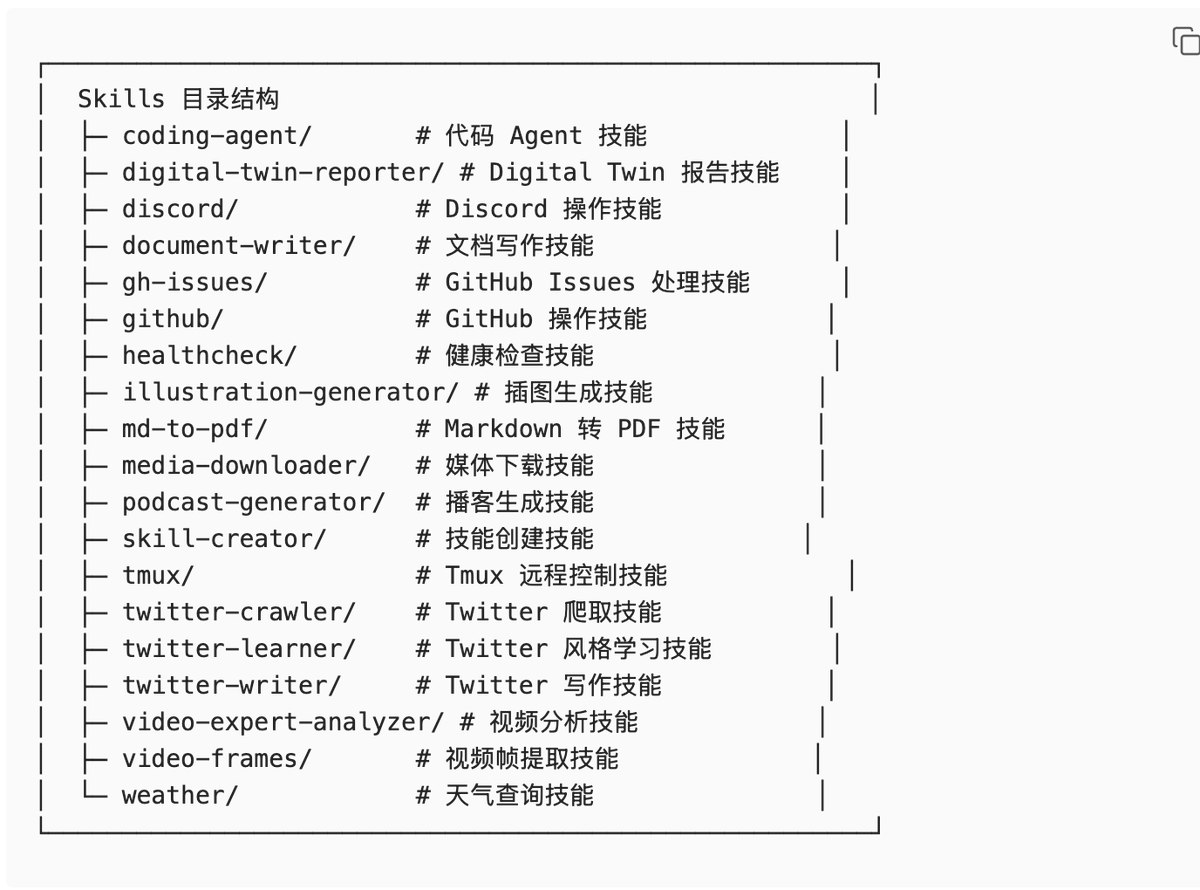
> Like a restaurant's "specialty menu"—tells the LLM which professional "recipes" (skills) can be invoked.
Design Trade-offs
Why use directory scanning instead of manual registration?
- Trade-off: Flexibility vs. Maintenance Cost
- Decision: Automatically scan the
~/development/openclaw/skills/directory. - Benefits:
- Adding a new Skill only requires placing it in the directory, no configuration changes needed.
- All Agents automatically gain the new Skill.
- Reduces the risk of configuration errors.
- Cost: Cannot precisely control which Skills are available to each Agent.
- All Skills are injected into the System Prompt (increases token consumption).
Composition
Layer 4: Model Aliases (Model Alias Layer)#
Analogy
> Like "shortcuts"—giving complex model paths short, convenient aliases for easy calling.
Design Trade-offs
Why are model aliases needed?
- Trade-off: Flexibility vs. Readability
- Decision: Allow users to define short aliases for commonly used models.
- Benefits:
- Simplifies model calls (
glm-5instead ofzhipu/glm-5). - Supports switching between multiple Providers (the same alias can map to different Providers).
- Facilitates A/B testing and model migration.
- Simplifies model calls (
- Cost: Requires maintaining an alias configuration file.
- May cause confusion (the same alias for different Agents might point to different models).
Composition
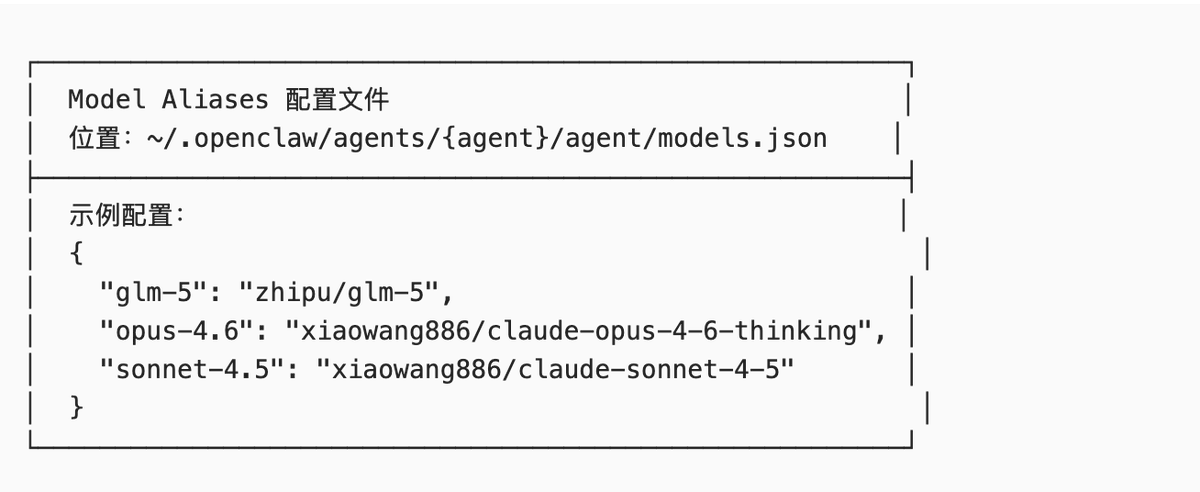
Actual Example
In the System Prompt, model aliases are displayed as:
Model Aliases#
- GLM-5: zhipu/glm-5
- Opus 4.6: xiaowang886/claude-opus-4-6-thinking
- Sonnet 4.5: xiaowang886/claude-sonnet-4-5
The LLM can use aliases to switch models:
/model glm-5Layer 5: Protocol Specifications (Protocol Specification Layer)#
Analogy
> Like "traffic rules"—defines the standard protocols for Agent-system interaction.
Design Trade-offs
Why are protocol specifications needed?
- Trade-off: Freedom vs. Consistency
- Decision: Define standardized interaction protocols (Silent Replies, Heartbeats, Reply Tags, etc.).
- Benefits:
- Ensures consistent behavior across all Agents.
- Supports automated monitoring and health checks.
- Simplifies multi-Agent collaboration.
- Cost: Limits the Agent's freedom of expression.
- Requires the LLM to strictly adhere to protocols (which it might ignore).
Composition
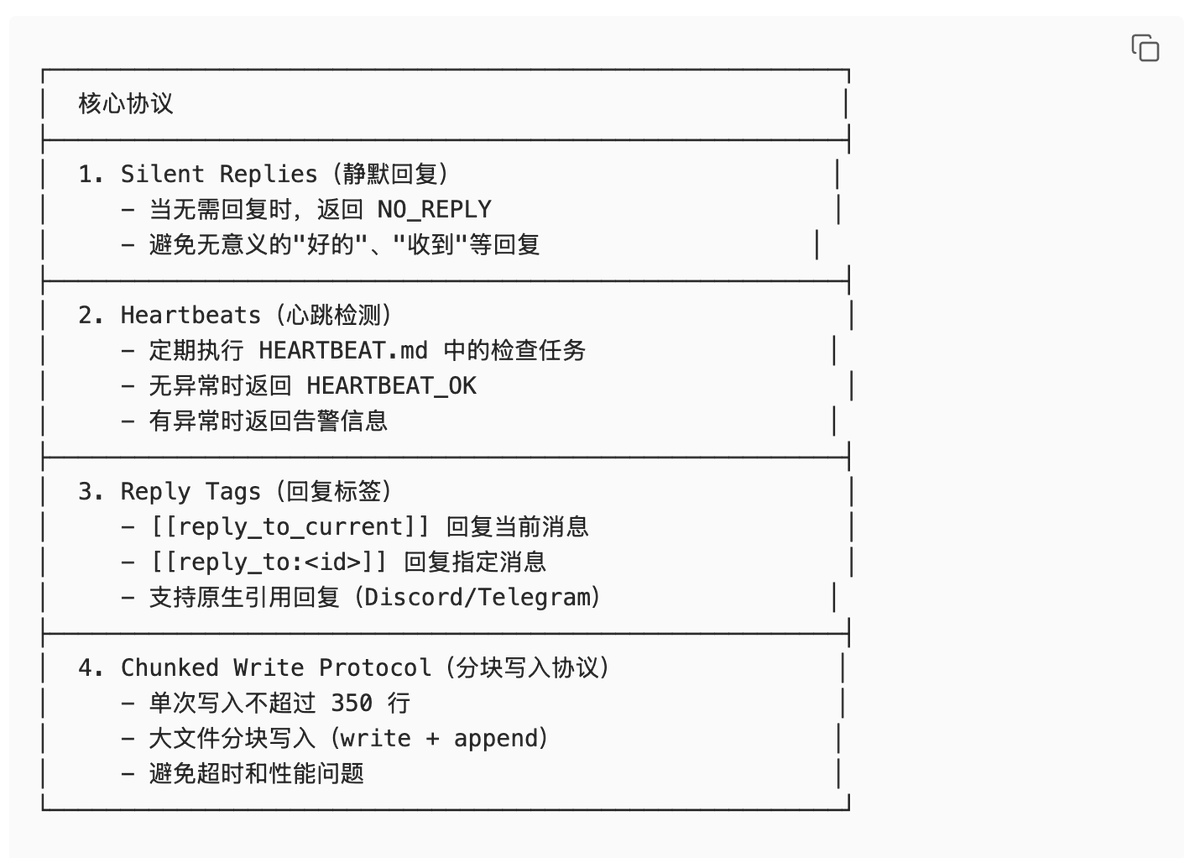
Actual Example
Silent Replies Example:
User: Received
Agent: NO_REPLY
Heartbeats Example:
System: [Heartbeat Poll]
Agent: HEARTBEAT_OK
Reply Tags Example:
Agent: [[reply_to_current]] Task completed ✓
Layer 6: Runtime Info (Runtime Information Layer)#
Analogy
> Like a "dashboard"—tells the LLM the real-time status of the current runtime environment.
Design Trade-offs
Why inject runtime information every time?
- Trade-off: Token Consumption vs. Context Accuracy
- Decision: Inject the latest runtime state with every request.
- Benefits:
- LLM knows the current time (avoids temporal confusion).
- LLM knows the current model (avoids misjudging capabilities).
- LLM knows the current environment (avoids path errors).
- Cost: Consumes ~2KB tokens per request.
- Information may contain redundancy.
Composition
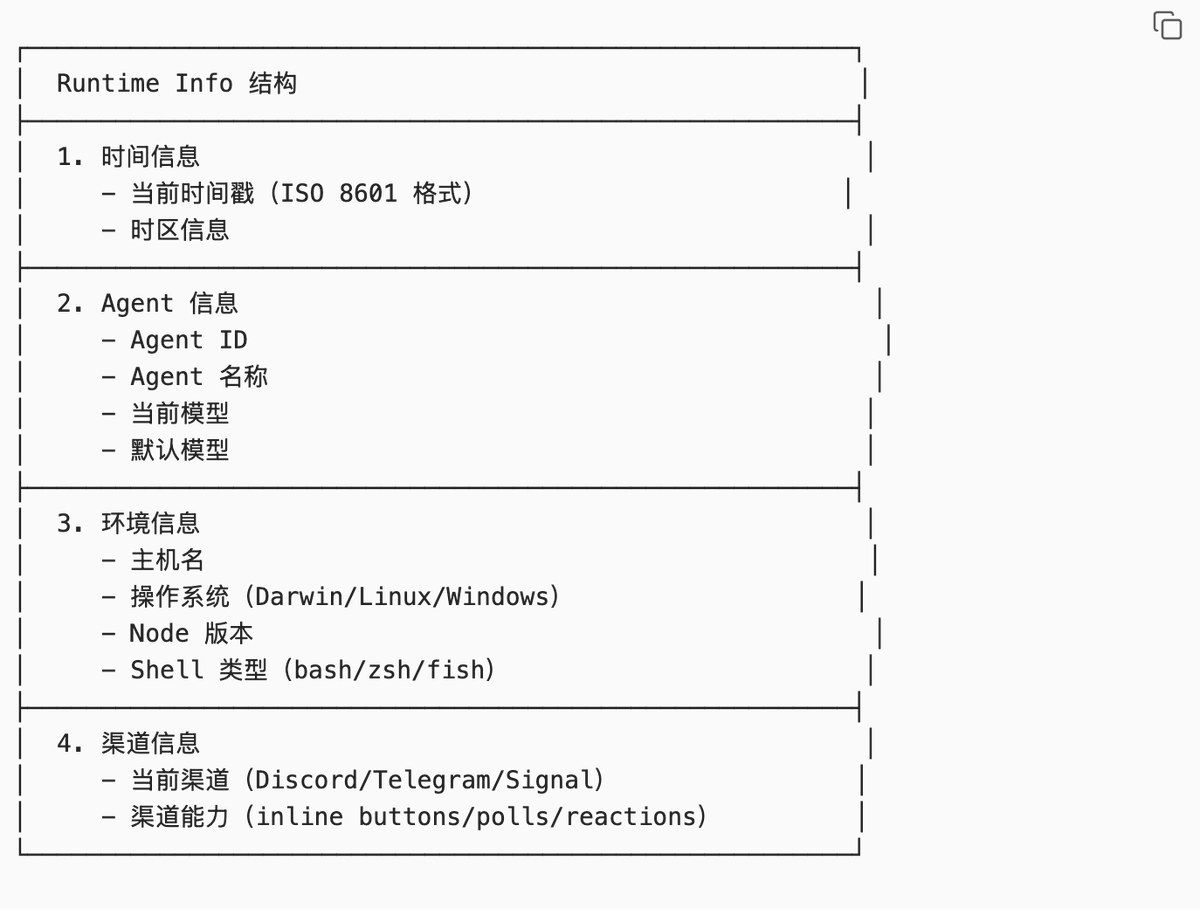
Actual Example
Runtime#
Runtime: agent=thinktank | host=Huang Zongning's MacBook Air |
repo=/Users/huangzongning/.openclaw/workspace-thinktank |
os=Darwin 25.2.0 (arm64) | node=v25.5.0 |
model=xiaowang886/claude-opus-4-6-thinking |
default_model=xiaowang886/claude-opus-4-6-thinking |
shell=zsh | channel=discord | capabilities=none | thinking=off
Layer 7: Workspace Files (Workspace Files Layer) ★ User Controllable#
Analogy
> Like "your work notes"—these are the static configuration files you can directly edit.
Design Trade-offs
Why is only this layer statically editable?
- Trade-off: Framework Stability vs. User Freedom
- Decision: Separate the "changing" from the "unchanging." The framework layer ensures consistency, while the user layer allows personalization.
- Benefits:
- Users can define Agent identity, work specifications, and memory.
- Framework upgrades won't break user configurations.
- Configuration files can be version-controlled, backed up, and shared.
- Cost: Users cannot modify the framework's core behavior.
- Need to learn the TELOS framework and file structure.
Core Files
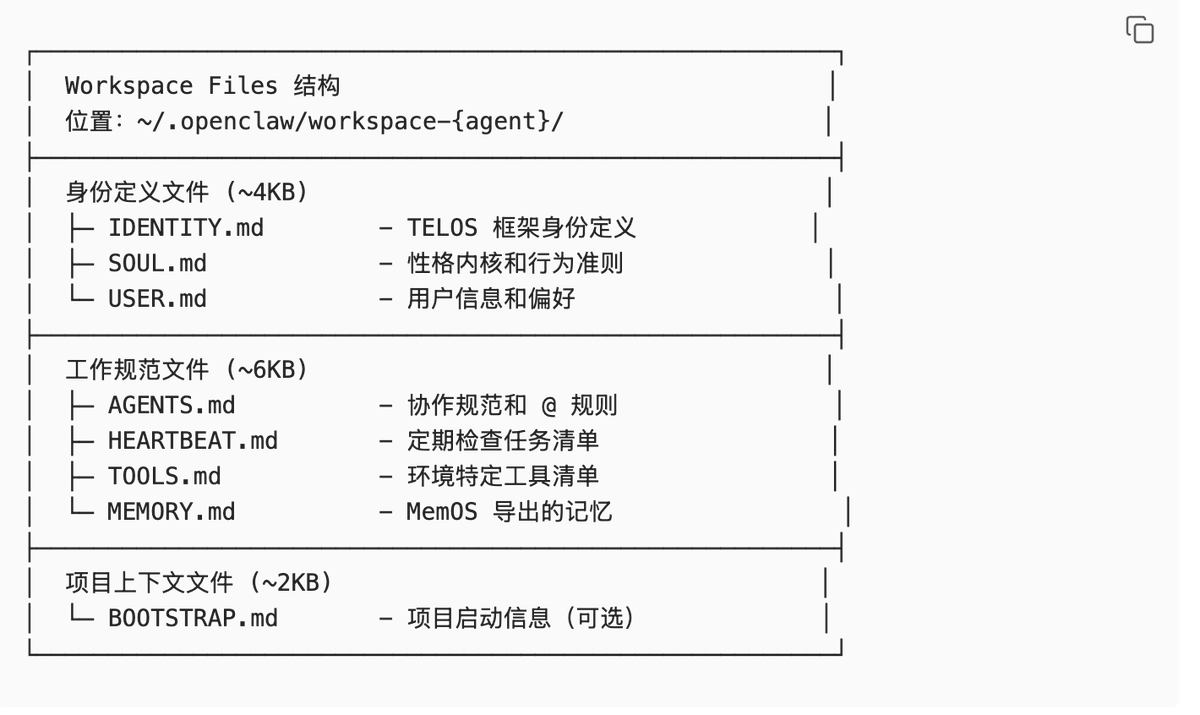
Layer 8: Bootstrap Hook System (Dynamic Injection Layer) ★ User Controllable#
Analogy
> Like a "programmable syringe"—you can write scripts to dynamically inject content into the System Prompt at runtime.
Design Trade-offs
Why is a Hook system needed?
- Trade-off: Simplicity of static configuration vs. Flexibility of dynamic injection
- Decision: Provide a dynamic Hook mechanism in addition to static Workspace Files.
- Benefits:
- Can dynamically adjust injected content based on context (channel, sender, time).
- Can execute shell commands and inject the output (e.g., current weather, Git status).
- Can read external files and inject them (e.g., project docs, API docs).
- Supports conditional logic (if/else).
- Cost: Need to learn the Hook system's syntax and triggering mechanisms.
- Hook script errors may cause System Prompt anomalies.
- Increases system complexity.
Four Hook Mechanisms
-
agent:bootstrap Hook (Internal Hook System)Trigger Location:
applyBootstrapHookOverrides()inbootstrap-hooks.tsCapabilities:- Full control over the
bootstrapFilesarray. - Can add, delete, or modify files.
- Can reorder files.
- Can modify file content.
Who can register:- OpenClaw plugins.
- Workspace Hooks (
~/.openclaw/workspace-*/hooks/directory). - Internal modules.
Code Example:typescript registerInternalHook("agent:bootstrap", (event) => { const context = event.context as AgentBootstrapHookContext; // Full control over the bootstrapFiles array context.bootstrapFiles = [ { path: "CUSTOM.md", content: "Custom content" } ]; }); - Full control over the
-
bootstrap-extra-files Hook (Bundled Hook)Trigger Location:
hooks/bundled/bootstrap-extra-files/handler.tsCapabilities:- Only appends files, does not modify existing ones.
- Specifies additional files via configuration.
Configuration Example:json { "hooks": { "bootstrap-extra-files": { "enabled": true, "paths": ["extra/*.md", "docs/CONTEXT.md"] } } }Use Case:- Need to inject project-specific context files.
- Don't want to modify the default 8 Bootstrap files.
- Need to dynamically load additional documentation.
-
before_prompt_build Hook (Plugin Hook)Trigger Location:
runBeforePromptBuild()inattempt.tsCapabilities:- Modify the final prompt (after the system prompt is built, before sending to the LLM).
- Can prepend context (add content before the prompt).
- Can override
systemPrompt.
Event Data:typescript { prompt: string; // User input messages: unknown[]; // Session message history }Return Value:typescript { prependContext?: string; // Content to prepend before the prompt systemPrompt?: string; // Override the system prompt }Use Case:- Need to dynamically adjust the prompt based on session history.
- Need to inject real-time context (e.g., current time, weather).
- Need to completely replace the system prompt.
-
bootstrapMaxChars / bootstrapTotalMaxChars (Configuration Items)Type: Configuration items (not hooks).Capabilities:
- Control character budget.
- Single file default: 20K.
- Total default: 150K.
- Excess parts are truncated: first 70% + last 20%.
Configuration Location:json { "agents": { "defaults": { "bootstrapMaxChars": 20000, "bootstrapTotalMaxChars": 150000 } } }
Practical Recommendations
Scenario 1: I want to add project documentation.
Recommended solution:
bootstrap-extra-files{
"hooks": {
"bootstrap-extra-files": {
"enabled": true,
"paths": ["docs/API.md", "docs/ARCHITECTURE.md"]
}
}
}Scenario 2: I want to dynamically load files based on task type.
Recommended solution: Custom
agent:bootstrap HookregisterInternalHook("agent:bootstrap", (event) => {
const context = event.context as AgentBootstrapHookContext;
const sessionKey = context.sessionKey;
// Load different files based on session type
if (sessionKey.includes("coding")) {
context.bootstrapFiles.push({
path: "CODING_GUIDELINES.md",
content: fs.readFileSync("...").toString()
});
}
});Scenario 3: I want to inject real-time context (e.g., current time).
Recommended solution:
before_prompt_build Hookon("before_prompt_build", (event, ctx) => {
return {
prependContext: `Current time: ${new Date().toISOString()}`
};
});Layer 9: Inbound Context (Inbound Context Layer)#
Analogy
> Like "real-time traffic information"—dynamically injects context information about the current conversation with every request.
Design Trade-offs
Why inject context every time?
- Trade-off: Token Consumption vs. Conversation Coherence
- Decision: Inject the latest message metadata, sender information, and conversation history with every request.
- Benefits:
- LLM knows who is currently speaking (avoids sender confusion).
- LLM knows the conversation history (maintains context coherence).
- LLM knows if it was @mentioned (decides whether to respond).
- Cost: Consumes ~3KB tokens per request.
- Conversation history may contain noise.
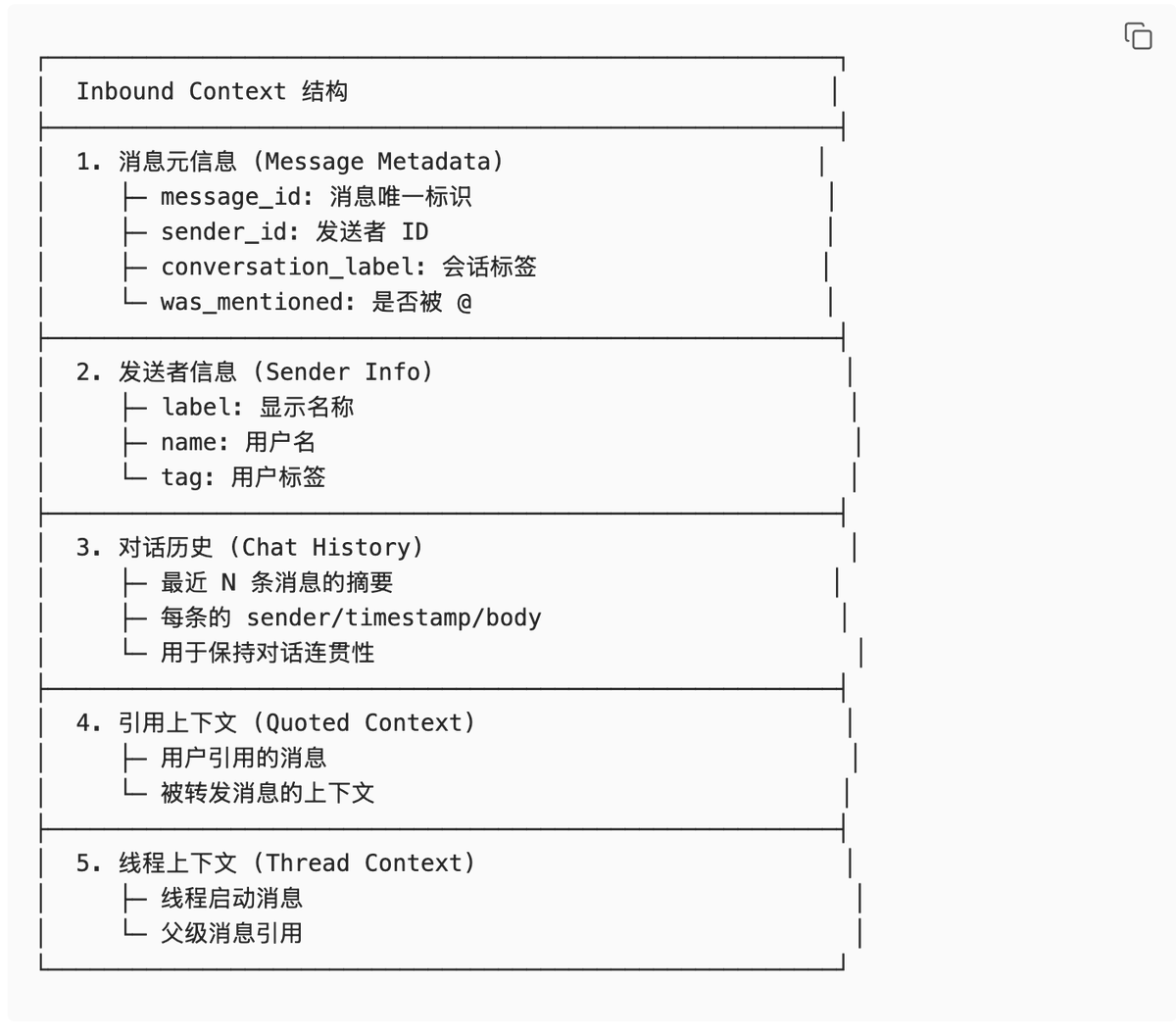
Composition
Complete System Prompt Assembly Process#
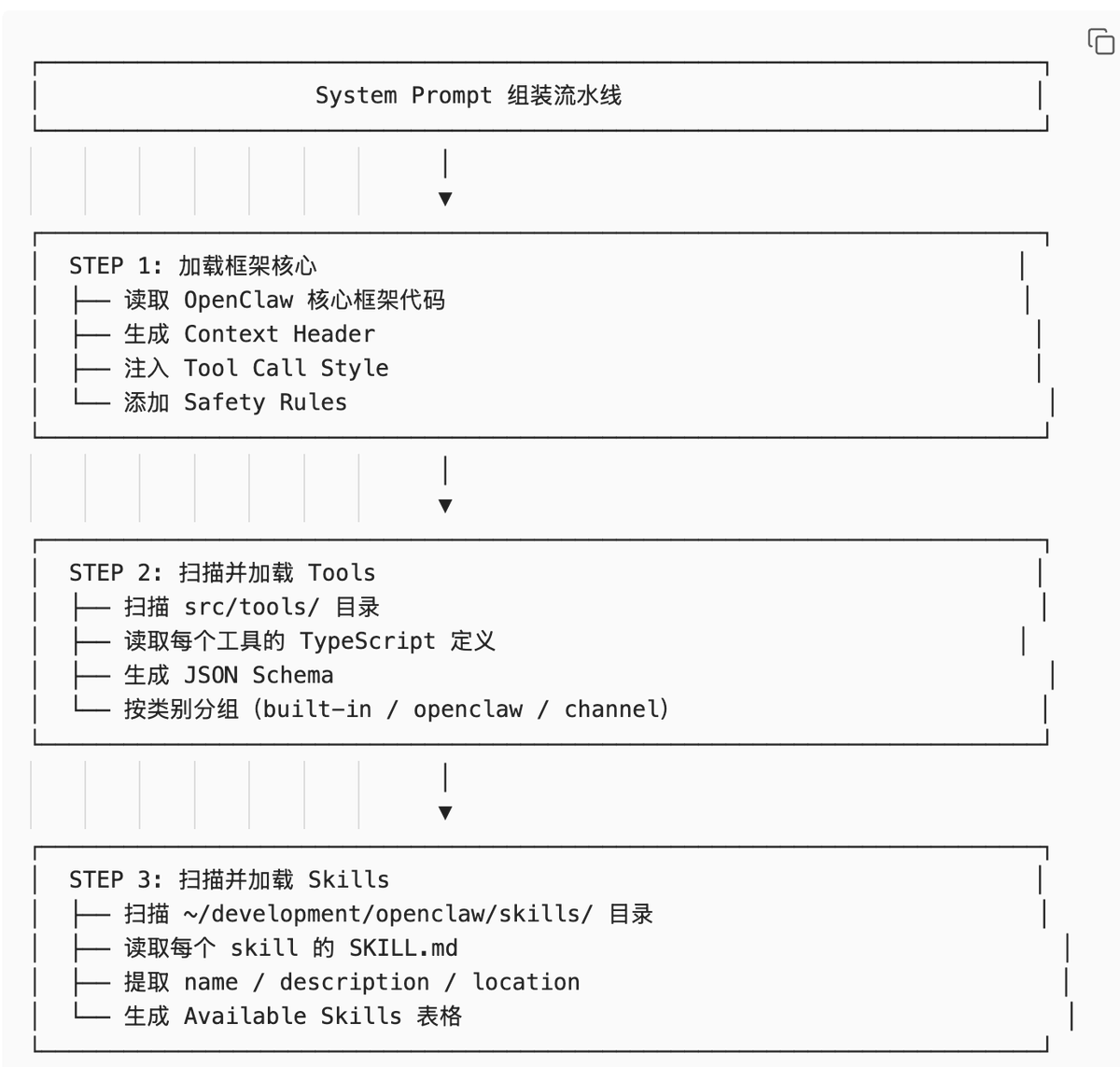
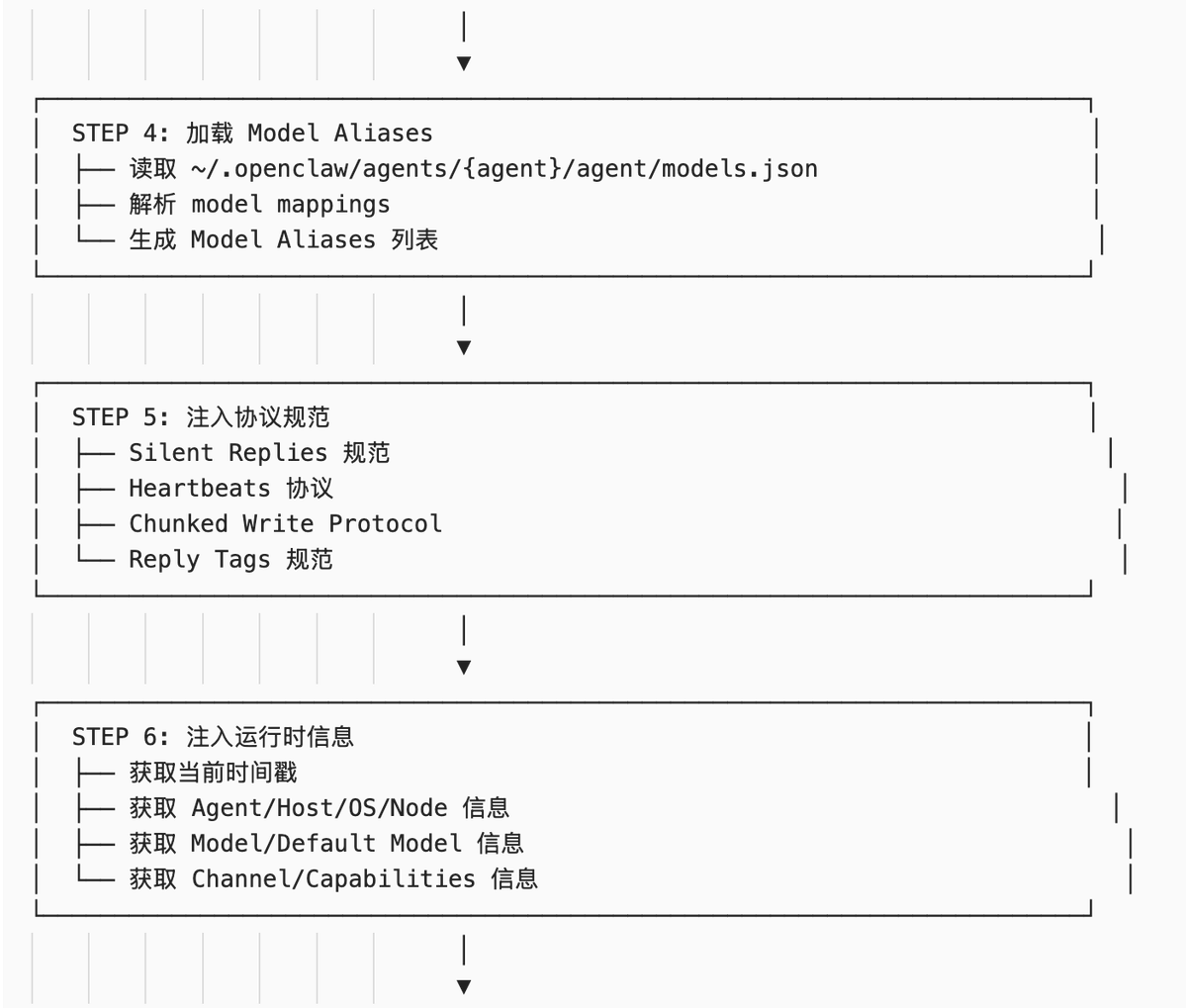
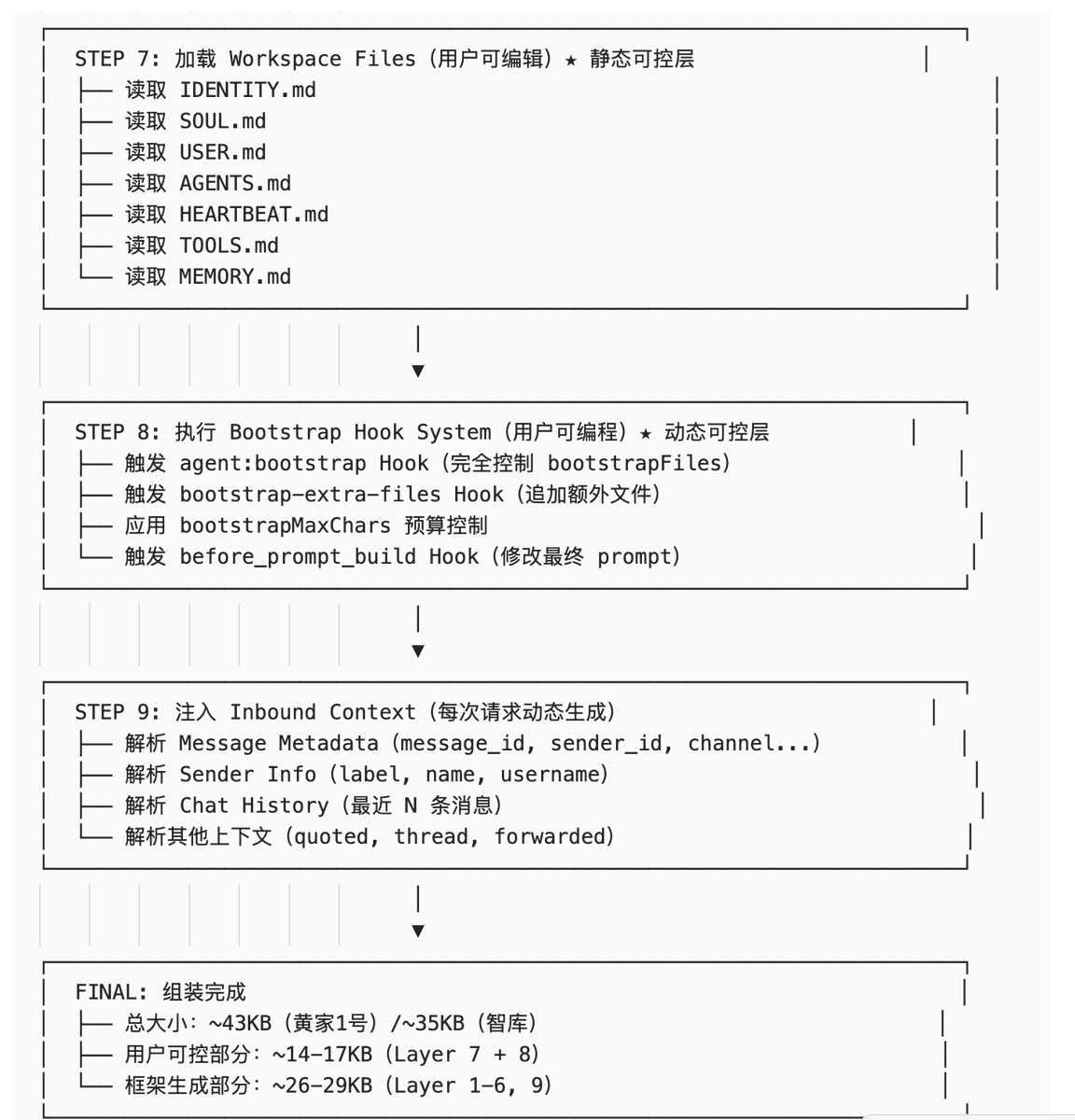
Summary of User-Controllable Layers
OpenClaw provides 3 user-controllable mechanisms:
-
Layer 7 (Workspace Files) - Static configuration files Use case: Define Agent identity, work specifications, memory. Pros: Simple, intuitive, easy to version control. Cons: Cannot be dynamically adjusted.
-
Layer 8 (Bootstrap Hook System) - Dynamic injection scripts Use case: Dynamically inject content based on context, execute commands, read external files. Pros: Flexible, powerful, supports conditional logic and command execution. Cons: Need to learn the Hook system; script errors may cause anomalies.
-
Indirect Control of Layer 9 (Inbound Context) - Influence context by sending messages Use case: Influence LLM behavior through conversation history, referenced messages. Pros: No configuration needed, natural interaction. Cons: Cannot precisely control.
Size Comparison Table#
> ⚠️ Note: The following data is estimated. Actual sizes may vary depending on configuration and runtime context. The framework layers (Layer 1-6 + 9) should theoretically be the same, but may differ slightly due to variations in tool definitions, Skills loaded, runtime information, etc.
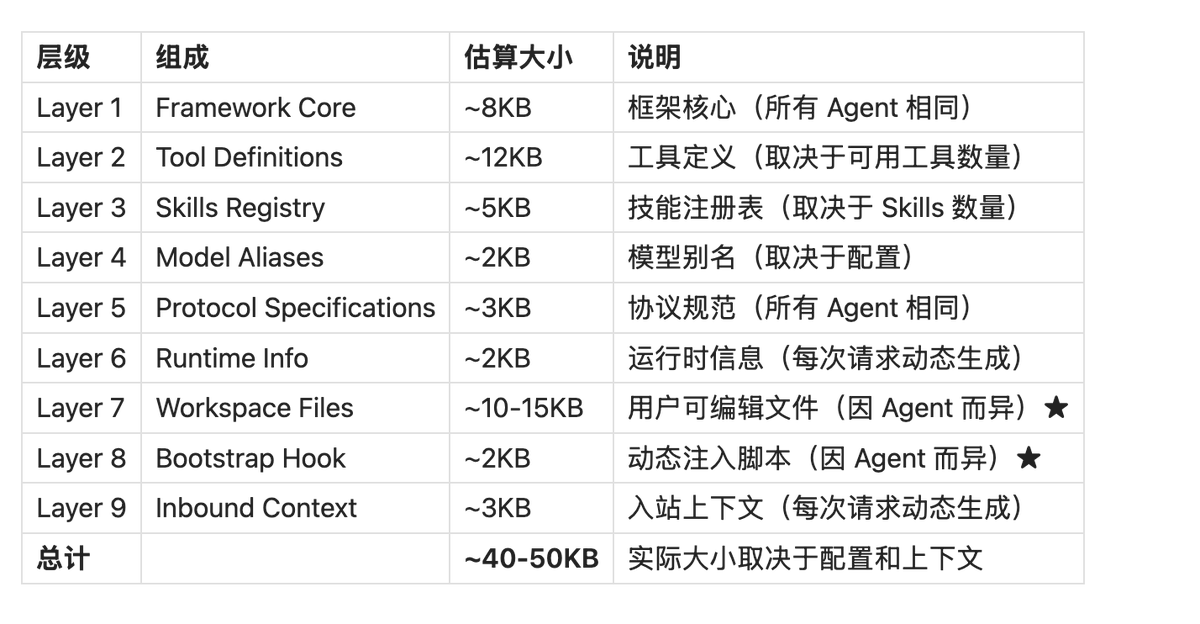
Explanation:
- Layer