Beginner
From 0 to 1: Replicating an Agent Like Claude Code
From 0 to 1: Replicating an Agent Like Claude Code
From 0 to 1: Replicating an Agent Like Claude Code#
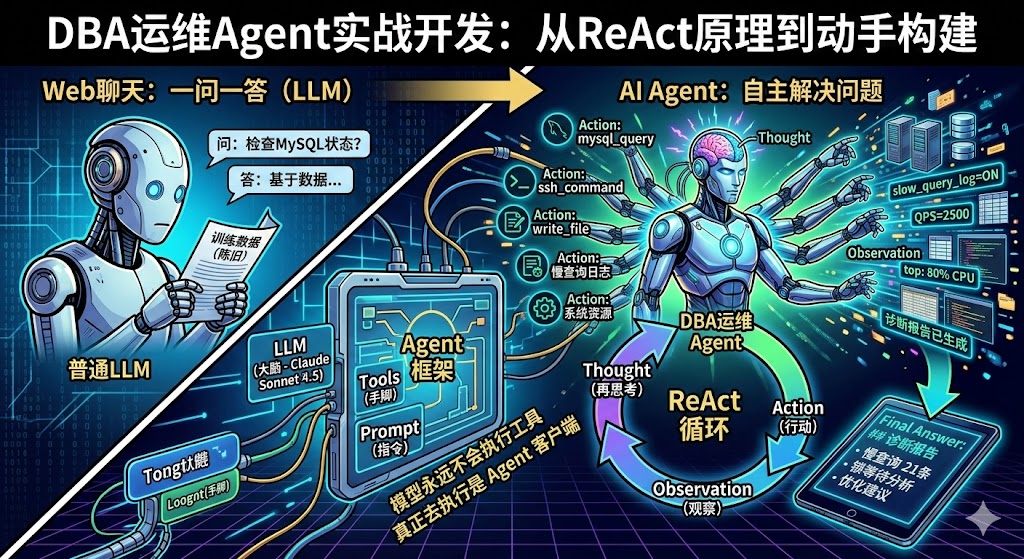
> Based on the practical development process of a DBA operations Agent, combined with the principles of the ReAct paper, this guide helps you understand the working essence of Agents like Claude Code and equips you with the ability to build your own specialized Agent.
Why Understand Agents#
When we use tools like Claude Code daily, they might seem magical—you throw a problem at it, and it helps you locate issues, modify code, or even operate servers. But if you don't understand the underlying principles, it's hard to truly integrate AI into your workflow.
Understanding Agents has two levels of significance:
- Understand the principles to improve usage efficiency: Knowing how Claude Code works helps you collaborate with it better, understanding what to delegate and what you need to control.
- Build your own, customize specialized tools: Once you understand the essence of Agents, you can completely develop an Agent specialized for your business scenario based on the APIs and models your company provides—for example, a MySQL operations Agent or a monitoring alert analysis Agent.
The goal of this article is: By developing a minimal MySQL operations Agent, thoroughly understand how tools like Claude Code work. In the future, when you see agents/intelligences like Xiaolongxia/Claude code/kiro, it will be like a butcher dissecting an ox—you'll see right through them.
1. From "Q&A" to "Autonomously Solving Problems"#
The Essential Difference Between Web Chat and Agents#
Previously, when we used large models on web pages, the interaction was Q&A: you throw a question, and the model spits out an answer based on its training data, that's it. The model doesn't know your server status, your database configuration, and can't execute any commands for you.
Claude Code's approach is completely different. After receiving your question, it comes with a set of tools (like executing bash commands, reading/writing files, checking CPU, etc.) and repeatedly interacts with the large model:
- Send your question + tool list to the large model.
- The large model analyzes and says: "Execute the
topcommand for me." - Claude Code executes
topand feeds the result back. - The large model sees the result and says: "Check the disk for me again."
- Continue executing, continue feeding results back.
- Iterate dozens of times until the large model says: "Enough information, here's my final conclusion."
For the user, you only input one sentence and then wait. But behind the scenes, the Agent may have already run back and forth with the model dozens of times.
Why AI Suddenly Became "Powerful" in 2025#
Many people feel that since the second half of 2025, AI tools have suddenly become very practical—helping you write code, deploy services, and locate faults. But there's a common misunderstanding here: It's not that the model itself has become much stronger, but the Agent "client" has become stronger.
Previous models could only answer questions based on training data. Now, Agents can continuously "feed" new information to the model—real-time system status, database query results, log content. The model is no longer a closed-book exam but has become an "open-book + assistant helping you flip through books" mode.
2. Two Fundamental Principles You Must Remember#
Principle 1: The Model Has No Memory#
This is crucial. Although many people have seen it in various articles, they may not understand it deeply enough.
Large models have no memory whatsoever. Whether it's the same account, the same session, between two consecutive questions, the model does not remember or associate them. You think it "remembers" the previous content because the Agent does one thing for it: Packages all previous conversation history and tool execution results into a huge prompt and sends it completely to the model every time.
So you'll see that with each round of interaction, the content the Agent sends to the model gets longer and longer—the first round might be 1000 words, the fifth round might be 5000 words, the tenth round might be tens of thousands of words. This is why token consumption is so fast.
Principle 2: The Model Never Executes Tools#
The large model itself does not and cannot execute any tools. It only does one thing: Based on your question and existing information, tell the Agent which tool to call and what the parameters are.
The Agent program itself is what actually executes SSH commands, runs MySQL queries. After execution, the Agent doesn't understand these return results (maybe successful, maybe an error); it just throws the results back to the model as-is, letting the model decide what to do next.
3. What is an Agent#
Agent (Intelligent Agent) = A program that makes the model think continuously, continuously call external tools, until it solves the user's problem.
Claude Code, OpenCode, these are all Agents. They are just client tools; behind them, they need a large model to complete the reasoning work.
Understand with a diagram:
        Your Code (Agent Framework)
       ┌──────────────────────────────────────────┐
       │                                          │
User ─►│  Loop {                                  │
       │    1. Send problem + tool list to LLM    │
       │    2. LLM returns: I want to call XX tool│
       │    3. Agent executes tool, gets result   │
       │    4. Feeds result back to LLM           │
       │    5. LLM judges: Is info enough?        │
       │       - Not enough → Go back to 1        │
       │       - Enough → Output Final Answer     │
       │  }                                        │
       └──────────────────────────────────────────┘
Core Difference:
- Ordinary LLM Call: Q&A, model can only answer based on training data.
- Agent Mode: Model can actively call tools to get real-time information, give answers after multiple rounds of reasoning.
There's another detail worth noting: When the Agent starts, it sends all tool definitions (name, purpose, parameter descriptions) to the model at once. For example, if you configure dozens of tools like GitHub, MCP, bash, etc., regardless of whether your problem is related to any tool, they are all included. This is why as soon as you open Claude Code, the context consumption is already high—because the tool definitions alone take up tens of thousands of words.
4. ReAct: The Core Working Mode of Agents#
ReAct (Reasoning + Acting) is currently the most mainstream working mode for Agents, from the 2022 paper ReAct: Synergizing Reasoning and Acting in Language Models.
Core Loop#
┌─────────────────────────────────────────────────────┐
│                    ReAct Loop                        │
│                                                     │
│   Thought ──► Action ──► Observation ──► Thought    │
│   (Think)      (Act)       (Observe)     (Think)    │
│      │                                     │        │
│      └─────── Not enough info, loop ◄──────┘        │
│                                                     │
│               Enough info ──► Final Answer          │
└─────────────────────────────────────────────────────┘
The core idea is: The large model first thinks (Thought) about what information is currently needed, then decides on an action (Action) for the Agent to execute. After the Agent executes and returns the observation result (Observation), the model continues thinking based on the new information. This loop doesn't require you to write any if-else logic—the model itself decides which tool to call, how many times, and when to stop.
Previously, when we wrote automation programs, we relied on template matching and conditional judgment, needing to exhaust various scenarios, so it was troublesome and required frequent changes. Now, the Agent hands all judgment logic to the model, and the model decides what to do next.
Actual Running Example#
Take "Check MySQL master-slave replication status" as an example, the Agent's actual thinking process:
[LLM #1]
  Thought: Need to check master-slave status, first look at SHOW SLAVE STATUS
  Action: mysql_query
  Action Input: {"query": "SHOW SLAVE STATUS"}
  → Tool returns: [No result set] (Indicates not a slave)

[LLM #2]
  Thought: Not a slave, see if it's a master
  Action: mysql_query
  Action Input: {"query": "SHOW MASTER STATUS"}
  → Tool returns: mysql-bin.000007 | 180681919 | ... | GTID:1-1833162

[LLM #3]
  Thought: It's a master. Check if any slaves are connected
  Action: mysql_query
  Action Input: {"query": "SHOW SLAVE HOSTS"}
  → Tool returns: [No result set] (No slave connections)

[LLM #4]
  Thought: Master normal but no slaves, check semi-sync status and error log
  Action: ssh_command
  Action Input: {"command": "tail -50 /data0/mysql_3306/log/error.log"}
  ...

[LLM #6]
  Thought: I now know the final answer
  Final Answer: ## Diagnostic Report ...
In this process, the model itself judged: First check slave status → Found it's not a slave → Switch to check master status → Confirmed it's a master → Check slave connections → Check logs. You don't need to preset this logic at all; the model makes decisions based on the returns from each step.
5. The Three Elements of Agent Development#
┌────────────────────────────────────────────┐
│              Agent = LLM + Tools + Prompt   │
│                                            │
│  ┌─────────┐  ┌─────────┐  ┌───────────┐  │
│  │   LLM   │  │  Tools  │  │  Prompt   │  │
│  │  Large  │  │  Tool   │  │  Role     │  │
│  │  Model  │  │   Set   │  │ Definition│  │
│  │  (Brain)│  │ (Hands) │  │ (Command) │  │
│  └─────────┘  └─────────┘  └───────────┘  │
└────────────────────────────────────────────┘
| Element | What You Need to Do | Project Example |
| --- | --- | --- |
| LLM | Choose model, configure API address | Claude Sonnet 4.5 via API Gateway |
| Tools | Write Python functions for the model to call | ssh_command / mysql_query / write_file |
| Prompt | Tell the model who it is, what it can do | "You are a DBA expert, read-only diagnosis..." |
> 80% of development work is writing Tools. LLM and Prompt are usually decided quickly.
6. Step by Step Development Process#
Step 1: Define the Scenario, Define Tool Boundaries#
Answer three questions first:
- What problem does the Agent solve?MySQL/Linux remote read-only diagnosis.
- What tools are needed?SSH execute commands, MySQL queries, write report files.
- What are the security boundaries?Read-only, cannot perform write operations.
Scenario: DBA Daily Diagnosis
  ├── Need SSH to execute commands → ssh_command tool
  ├── Need to query MySQL   → mysql_query tool
  └── Need to save reports   → write_file tool
Comments (description) in the tool code are very important—the model relies on these descriptions to decide when to call which tool and what parameters to pass. These comments are not for humans to read; they are for the model.
For safety, we also need to add allowlists/blocklists to the tools. For example, the MySQL tool only allows read-only operations like
SHOW, SELECT, and prohibits dangerous commands like DROP, DELETE, TRUNCATE.Step 2: Set Up Project Structure#
mkdir -p ~/q/agent/tools
touch ~/q/agent/{config.yaml,main.py,crew.py,requirements.txt}
touch ~/q/agent/tools/{__init__.py,ssh_tool.py,mysql_tool.py,write_file_tool.py}
Step 3: Write Tools (Core Workload)#
Each tool is a Python class, inheriting
BaseTool, implementing the _run method:from crewai.tools import BaseTool
from pydantic import BaseModel, Field
class MySQLQueryInput(BaseModel):
query: str = Field(description="SQL query statement to execute")
class MySQLQueryTool(BaseTool):
name: str = "mysql_query"
description: str = "Execute MySQL read-only queries..." # The model uses this to decide when to use this tool
args_schema: Type[BaseModel] = MySQLQueryInput
def _run(self, query):
# 1. Security check (read-only allowlist)
# 2. Execute query
# 3. Return formatted result (string)
return "Result text"Tool Development Points:
- Write
descriptionclearly—the model relies on it to decide when to call. _runreturns plain text—the model can only process text.- Implement good security interception—the model might attempt dangerous operations.
- Add timeout control—prevent commands like
tail -ffrom blocking indefinitely.
Step 4: Configure LLM Connection#
# config.yaml

llm:
  model: "openai/claude-sonnet-4-5-20250929"
  base_url: "https://your-api-gateway/v1"
api_key: "sk-xxx"from crewai import LLM
llm = LLM(
model="openai/claude-sonnet-4-5-20250929",
base_url="https://your-api-gateway/v1",
api_key="sk-xxx"
)> Note: If the API gateway uses the OpenAI-compatible protocol, the model name needs the
openai/ prefix to let litellm use the OpenAI channel.Step 5: Assemble the Agent#
from crewai import Agent, Task, Crew

agent = Agent(
    role="DBA Operations Expert",
    goal="Diagnose MySQL and Linux operational status",
    backstory="You are a senior DBA, proficient in MySQL 5.7/8.0...",
    tools=[ssh_tool, mysql_tool, write_tool],
    llm=llm,
    verbose=True,
)
Step 6: Run It#
task = Task(
    description="User question: %s" % user_input,
    expected_output="Diagnostic results and suggestions (in Chinese)",
    agent=agent,
)
crew = Crew(agents=[agent], tasks=[task])
result = crew.kickoff()
print(result)
7. Practice: A Complete Diagnostic Process#
Let's give the Agent a real task: "Analyze SQL response time and memory resources."
After the Agent starts working, in debug mode, you can see the complete interaction process:
Round 1: Model receives the problem, decides to first check slow query configuration.
Action: mysql_query → SHOW GLOBAL VARIABLES LIKE '%slow%'
Observation: slow_query_log=ON, long_query_time=0.5
Round 2: Model knows the slow query threshold is 0.5 seconds, continues to check slow query count.
Action: mysql_query → SHOW GLOBAL STATUS LIKE 'Slow_queries'
Observation: Slow_queries=21
Rounds 3 - 8: Model continues to query QPS, thread status, lock information, query cache...
Rounds 9 - 12: Model thinks it still needs to see system resources, automatically executes
top, free and other commands via SSH.Round 18: Model finally thinks it has enough information, outputs Final Answer:
- Slow query count: 21, threshold 0.5 seconds.
- QPS statistics and slow query ratio.
- Lock wait analysis.
- Memory usage status.
- Comprehensive score and optimization suggestions.
Throughout the process, you only input one command, but the Agent has automatically completed 18 rounds of diagnosis. This is the charm of Agents.
8. Pitfall Records#
Problems encountered and solutions during actual development (this experience is very important; the probability of the code running directly on the first try is almost zero):
| Problem | Cause | Solution |
| --- | --- | --- |
| MySQL root connection rejected | root only allows socket connection | Change to SSH + mysql CLI method |
| Model reports prefill error | Some backends don't support assistant prefill | Switch to a supported model version |
| Cannot find litellm |
openai/ prefix requires litellm for routing | pip install 'litellm<1.60' |
| chromadb reports sqlite3 version too low | System's built-in sqlite version insufficient | pip install pysqlite3-binary + monkey-patch |
| numpy incompatible with CPU | numpy 2.x requires new instruction set | pip install 'numpy<2' |
| tail -f causes tool to never return | paramiko recv_exit_status() blocks indefinitely | Switch to channel-level non-blocking read + deadline timeout |
| SHOW SLAVE STATUS\G reports error | \G is a mysql CLI interactive command, batch mode doesn't support it | Model automatically corrects by removing \G and retries |
| debug log not output | Framework overrides custom logger | Monkey-patch to protect custom logger |> Key Experience: The code generated by the model on the first try almost never runs directly. You need to provide