Beginner
I Recreated Claude's Newly Released Generative UI Interaction!
I recreated the generative UI interaction just released by Claude!
The day before yesterday, Anthropic launched a new interaction based on generative UI within Claude.
It can help you introduce concepts and information visually within the chat message flow, which is far easier to understand than plain text.
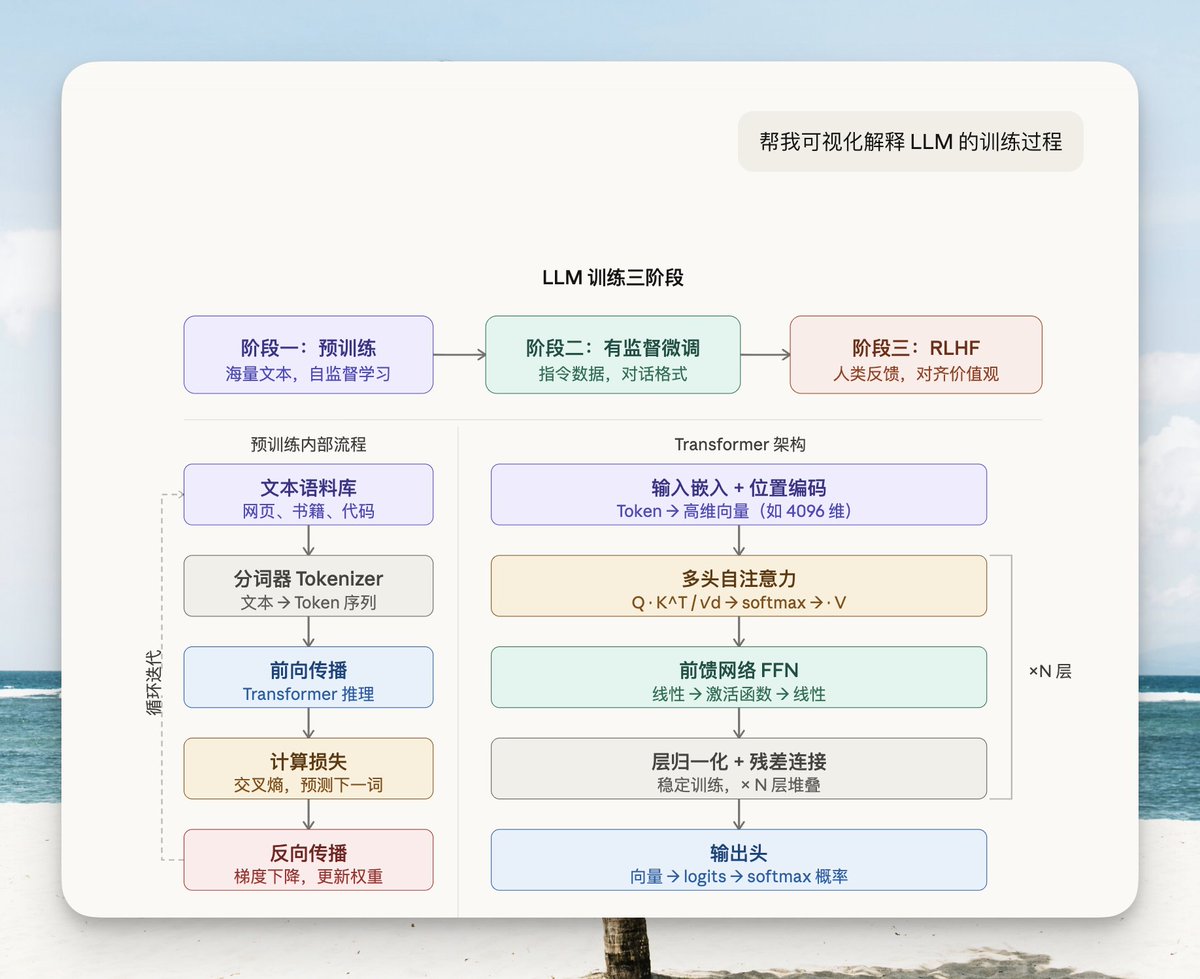
I've been looking at similar solutions for a while. Just as Claude released theirs, I felt I had to speed up my own work.
It also gave me a chance to reverse-engineer their approach.
After intensely pushing Codex and Claude for two days, I actually managed to pull it off!

This feature allows the AI to draw interactive charts directly in the chat, with streaming output—rendering as it generates.
Before, when you asked an AI to write a webpage, you had to wait for the entire page code to be generated before it could render, which took forever.
Now it's different. You can watch the chart being drawn stroke by stroke on the canvas, with SVG nodes popping up one after another.
The generation process itself is impressive, and once it's done, you can interact with it immediately.
Experience it directly in my Agent product, Code Pilot: https://github.com/op7418/CodePilot
In this post, I'll introduce its usage, the specific implementation process, and some considerations.
What are some fun ways to use it?#
Data Analysis: Finally making sense of numbers
For example, ask it to draw a chart for "Daily cost estimates of the US-Iran conflict."
Before, the AI would give you a huge block of text, making the numerical relationships impossible to grasp.
Now it outputs a chart directly, clearly showing the amount for each part, with text and charts mixed in the output—explaining where needed, drawing where needed.

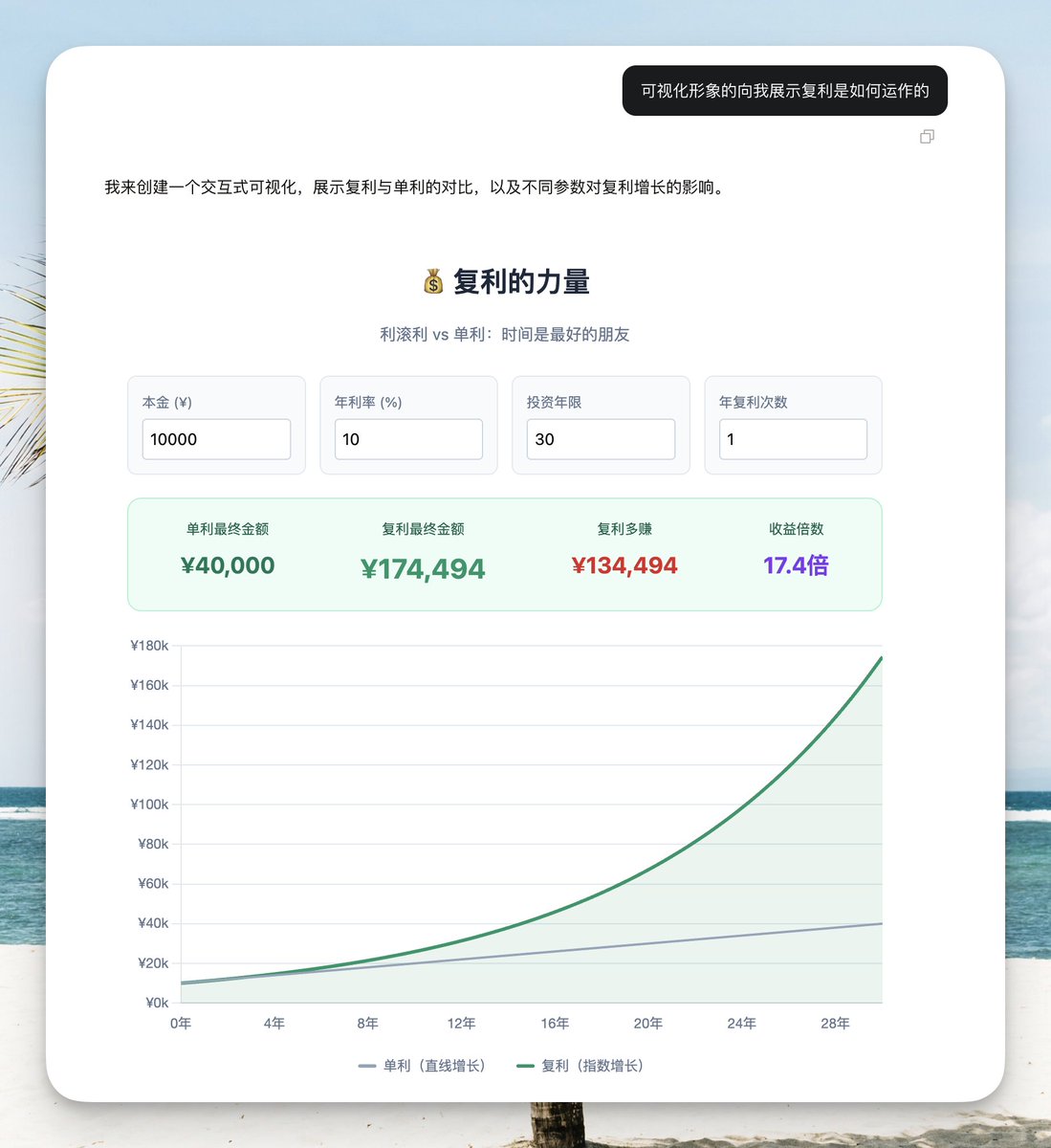
Small Tools: Making interactive calculators, etc.
Ask it to make a compound interest calculator.
Drag sliders to change the initial amount, investment period, and the chart and numbers below update in real-time.
This isn't a static image; it's a real interactive tool.
Loan calculations, unit conversions—all sorts of things can be made.
Architecture Diagrams: A programmer's favorite
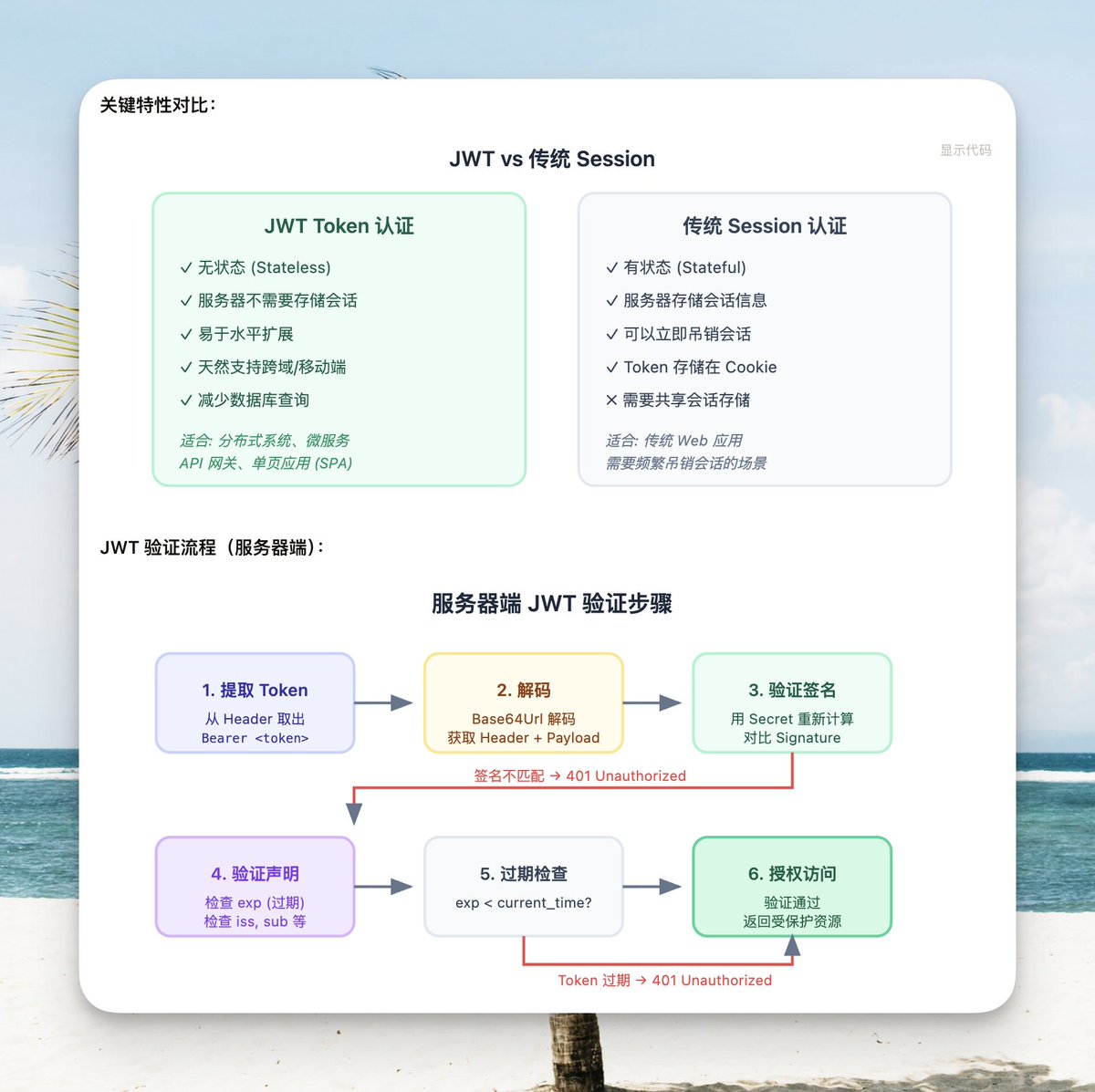
You can ask it to draw the architecture of a project or visualize a specific implementation plan.
For example, here I asked it to draw the complete flow from API to JWT authentication.
Feature comparisons, flowcharts, hierarchical structures—all are graphical, making it much faster to understand the architecture than reading text descriptions.
Analyzing Online Data
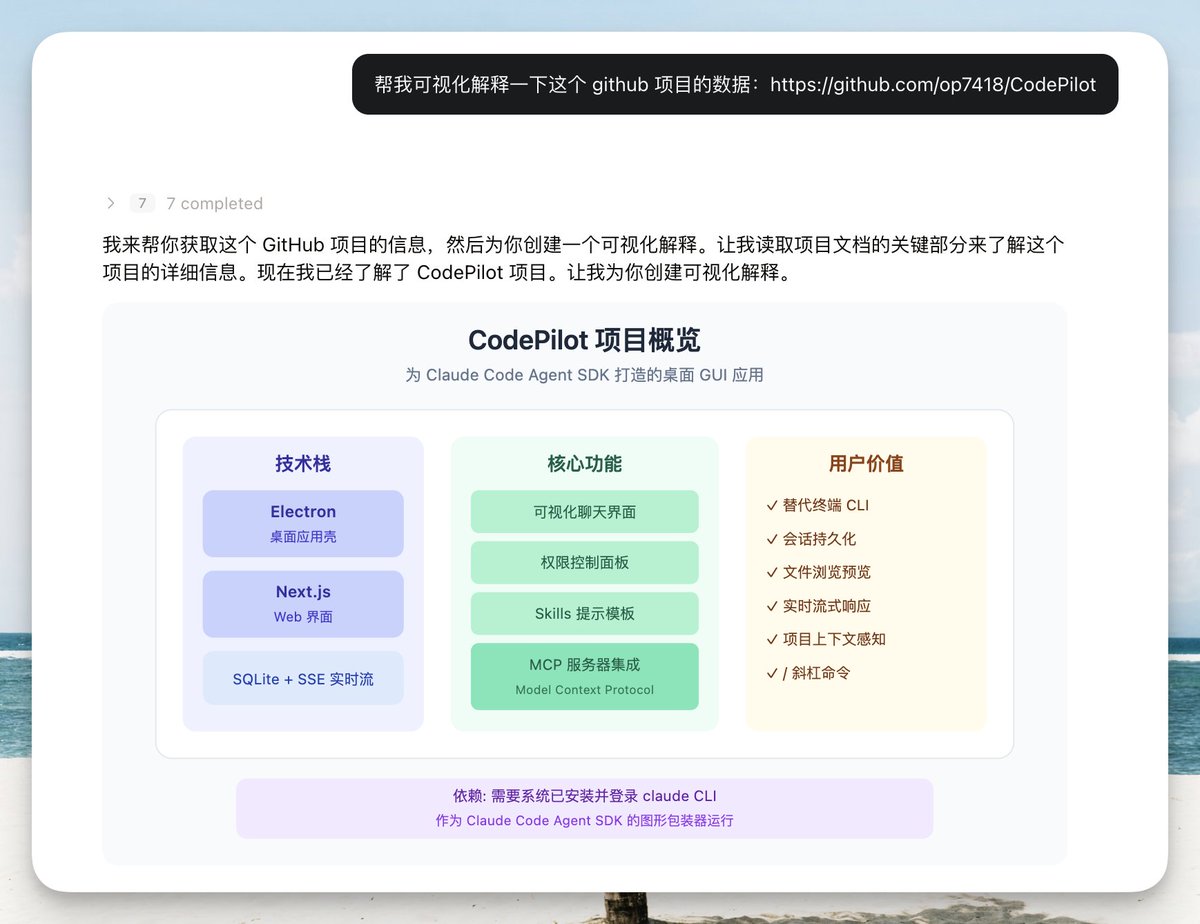
Another trick is to directly give it a GitHub repository link, and it fetches the data itself and visualizes the analysis.
For example, here I gave it my own project address, Codepilot, and asked for analysis.
Star count, fork count, tech stack, architecture design, core modules—all drawn as charts.
You can see the entire project overview at a glance, much better than reading a huge block of text.
Interactive and In-depth Explanations
The strongest aspect is how tightly it integrates with the model; it's not just a one-time output.
You can interact with the generated diagrams and ask for more detailed explanations.
For example, here I asked it to explain the relationship between monsoons and ocean currents.
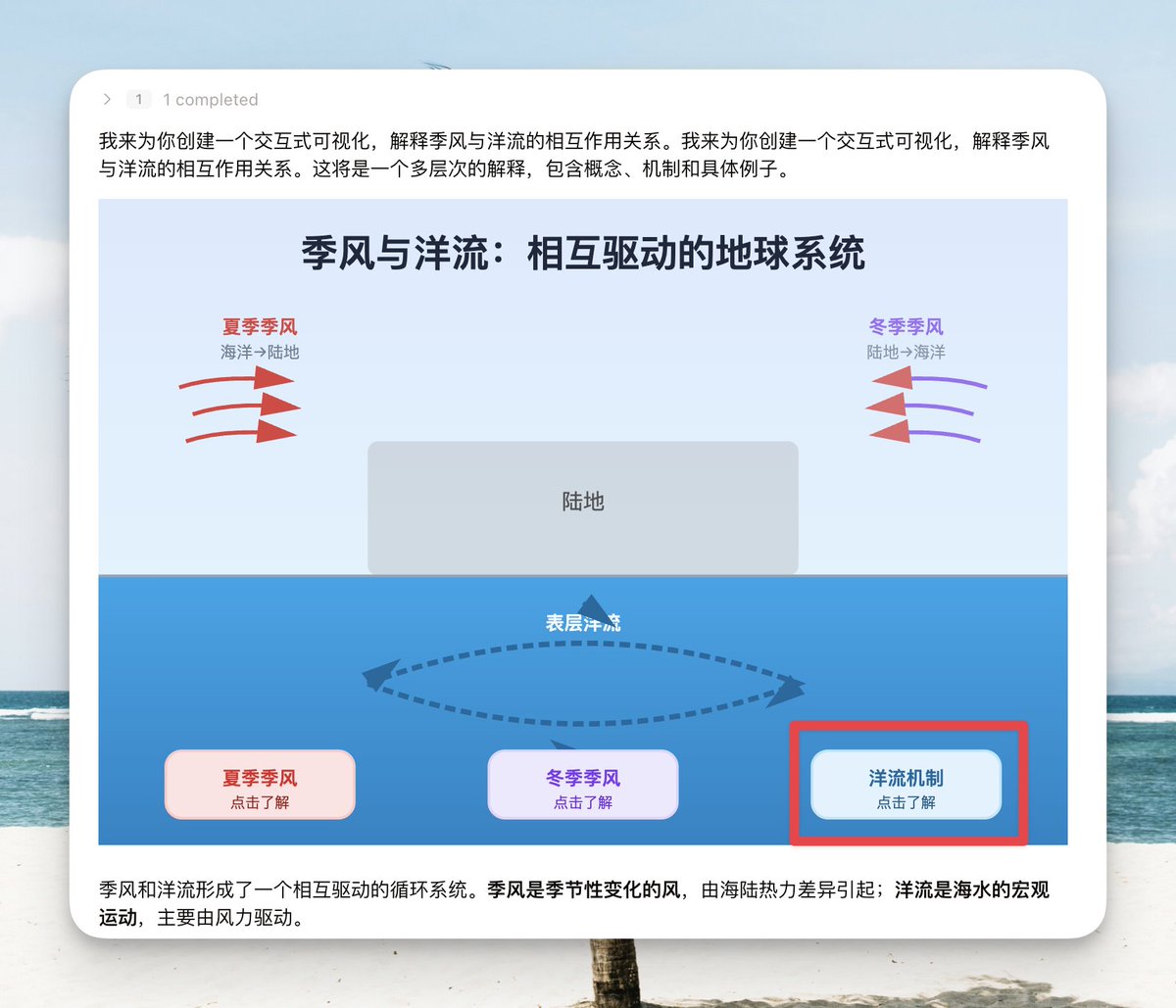
If we want to understand more details, we can click the "Ocean Current Mechanism" button.
It automatically sends an instruction to the current model to continue generating a schematic diagram of the ocean current mechanism.

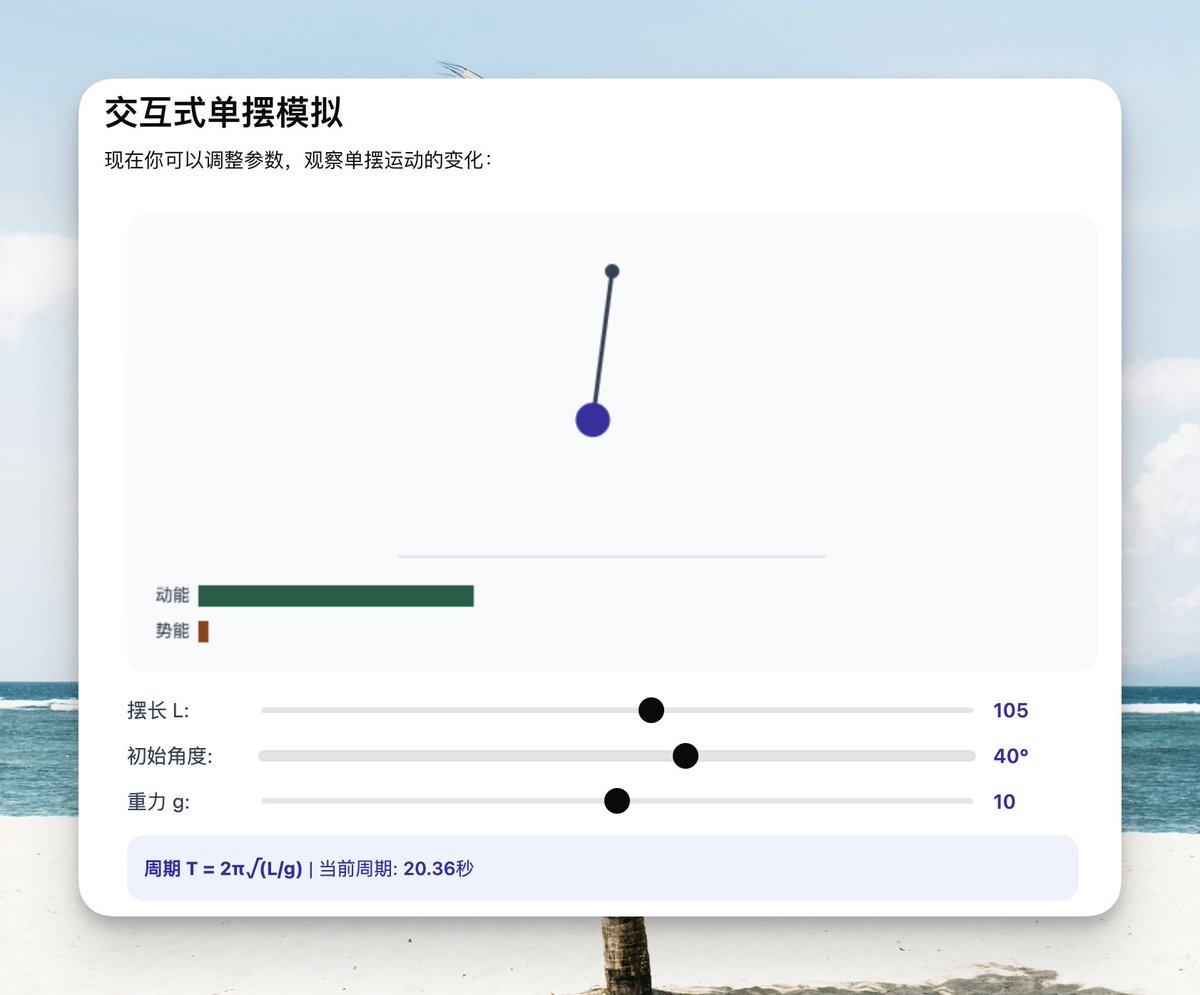
Of course, we can have even more complex interactions, like visualizing common physics and math formulas.
This is very useful for students. Each parameter can be controlled via sliders and inputs, and the animation changes immediately.
Support for Domestic Models
After implementing it in Codepilot, it's not just Claude that can use it.
Kimi K2.5, Minimax M2.5, and the native Anthropic models all run fine.
I think the graphics drawn by K2.5 are even prettier than Sonnet 4.6, and the architecture analysis is also very detailed.
If you're using this feature, I recommend trying K2.5 first.
Okay, that covers the model's capabilities.
If you're not interested in how it's implemented, you can go install Codepilot and have fun playing with it.
How is it implemented?#

How Claude does it
Claude.ai officially uses a
tool_use mechanism.The model calls a dedicated tool to output structured widget content.
The frontend parses the
input parameters of the tool call to render it.This solution works fine within Claude.ai's own architecture.
But it doesn't work when ported to CodePilot, for three reasons:
- SDK Limitations. CodePilot uses Claude Agent SDK's
preset: 'claude_code'mode, which doesn't allow registering custom tools. The SDK exposes a text delta stream; tool-level extensions aren't possible. - Streaming Experience. The result of
tool_usemust wait forinput_json_deltato be fully assembled before rendering, and doesn't support incremental HTML rendering. With the code fence method, HTML arrives with the text stream, allowing preview as it generates. - Rendering Isolation. Claude.ai uses Shadow DOM for isolation. We chose a sandboxed iframe. Iframe isolation is more thorough—a completely independent JS execution environment, with CSP precisely controlling resource loading, eliminating style leakage and script escape.
How we did it
Trigger: Code Fence
The model outputs a special Markdown code fence to trigger rendering:
```show-widget
{"title":"training_flow","widget_code":"<svg width=\"100%\" viewBox=\"0 0 680 400\">...</svg>"}
```
This format reuses CodePilot's existing code fence patterns (like
image-gen-request, batch-plan, etc.), which the frontend parser chain naturally supports.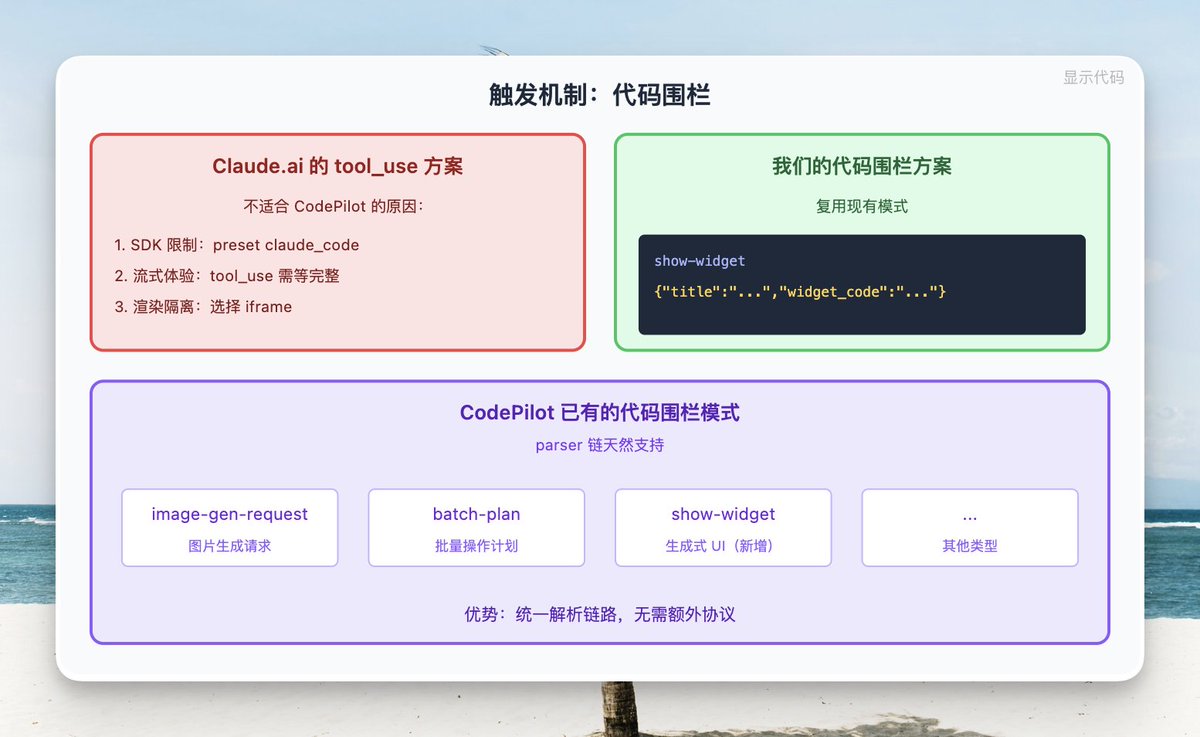
Rendering: Sandboxed iframe
Each widget is rendered in a
sandbox="allow-scripts" iframe. The iframe's srcdoc is a carefully constructed receiver page.The CSP policy only allows external scripts from 4 CDN domains, with
connect-src 'none' blocking all network requests.Content updates are received via
postMessage. During the streaming preview phase, widget:update is sent without executing scripts. For final rendering, widget:finalize is sent to execute scripts.A
ResizeObserver monitors content height changes and reports them to the parent page via postMessage.All
<a> clicks are intercepted and forwarded to the parent page to open in a new window.Theme synchronization relies on listening for class changes on the parent page, switching between dark/light modes in real-time.
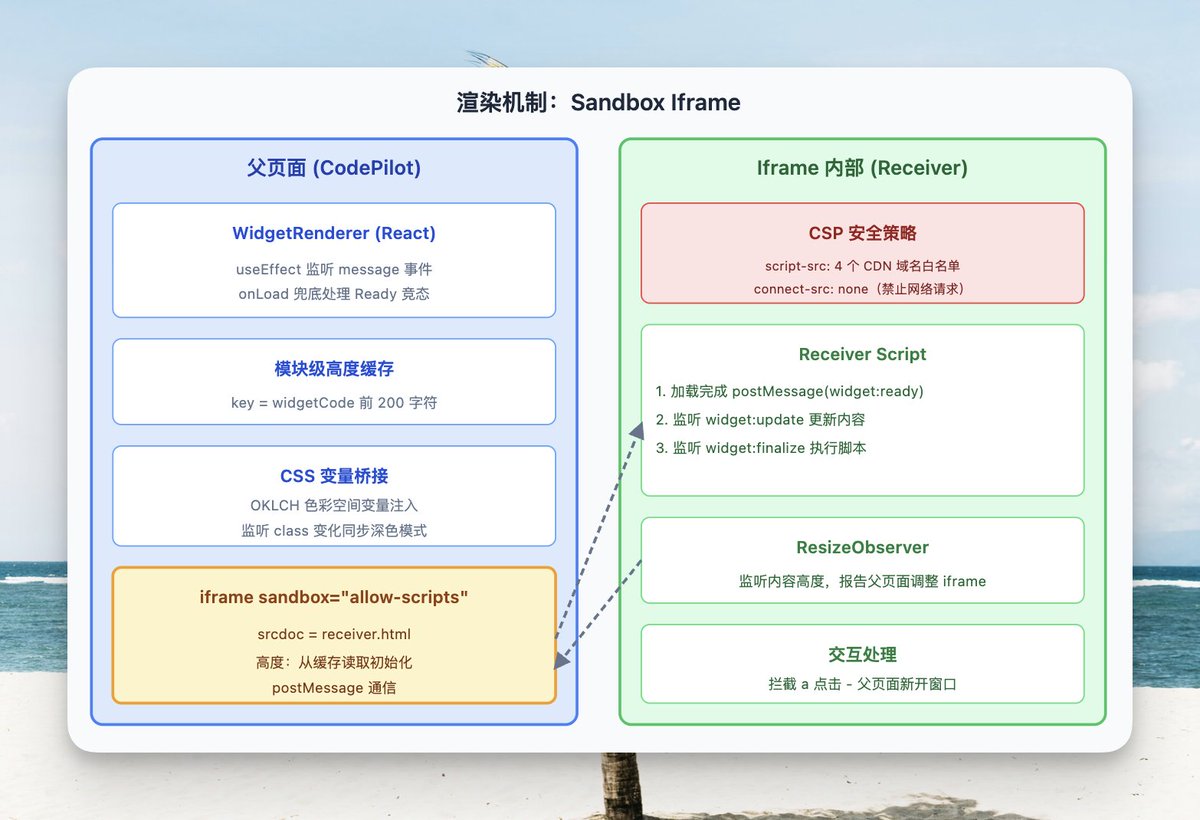
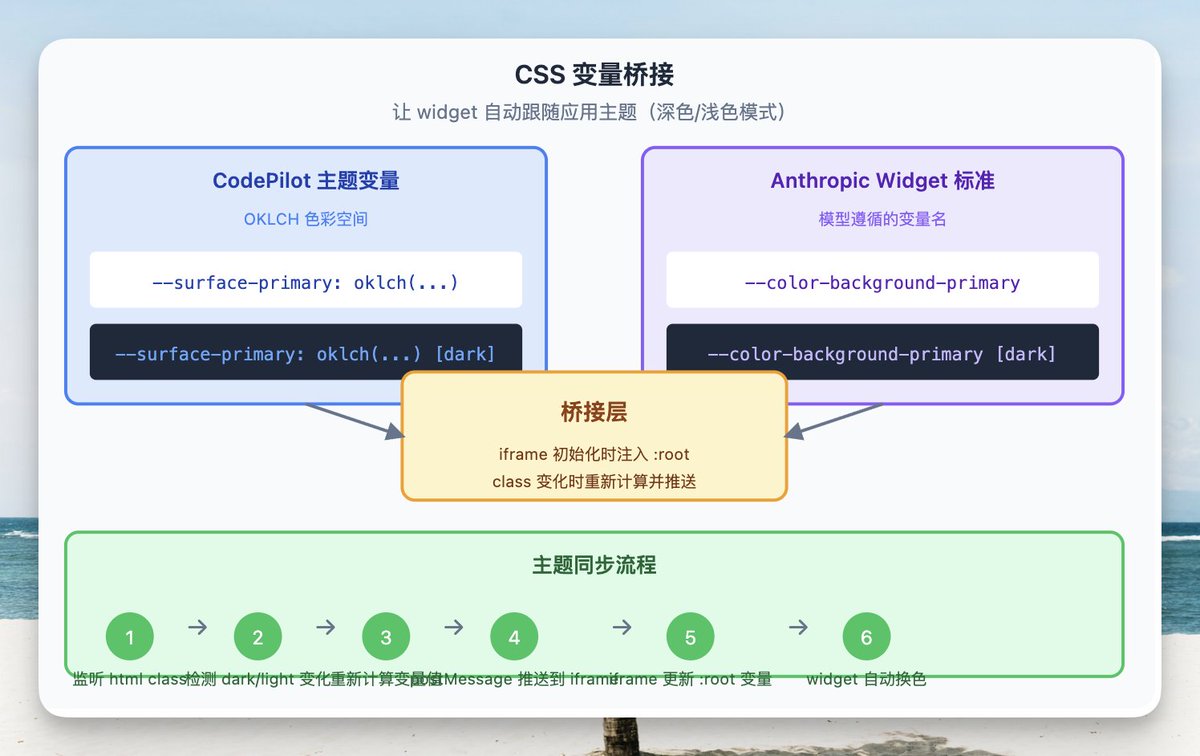
CSS Variable Bridging
This is key to making the widget visually integrate with the application.
CodePilot uses CSS variables in the OKLCH color space. Anthropic's widget design guidelines use standard variable names like
--color-background-primary.The bridging layer injects CodePilot's variable values into the iframe's
:root during initialization. CSS written by the model according to the guidelines can then directly use the current theme's colors.When dark mode switches, the parent page detects the class change, recalculates the variable values, and pushes them to the iframe.
Streaming Rendering
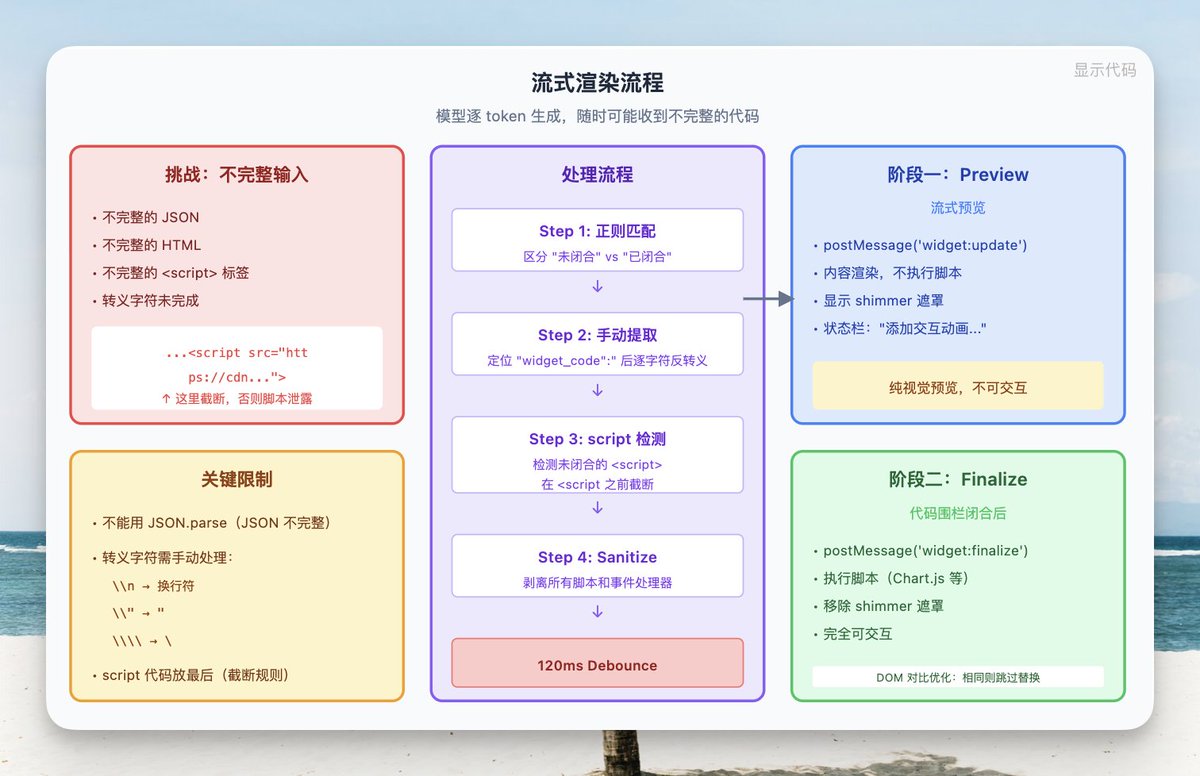
This is the most complex part of the entire implementation.
The model generates token by token. The widget code received at any moment could be incomplete JSON, incomplete HTML, or incomplete
<script> tags.The processing flow is like this:
A regex matches
```show-widget, distinguishing between "unclosed" and "closed" states.Manually locate the content after
"widget_code":" and unescape it character by character. Can't use JSON.parse because the JSON isn't finished yet.When an unclosed
<script> tag is detected, truncate before <script to avoid JavaScript code being displayed as visible text.A 120ms debounce prevents the iframe from updating too frequently.
Streaming content strips all scripts and event handlers; interaction isn't needed during the preview phase.
Experience Polish: The Details That Shouldn't Be Noticed
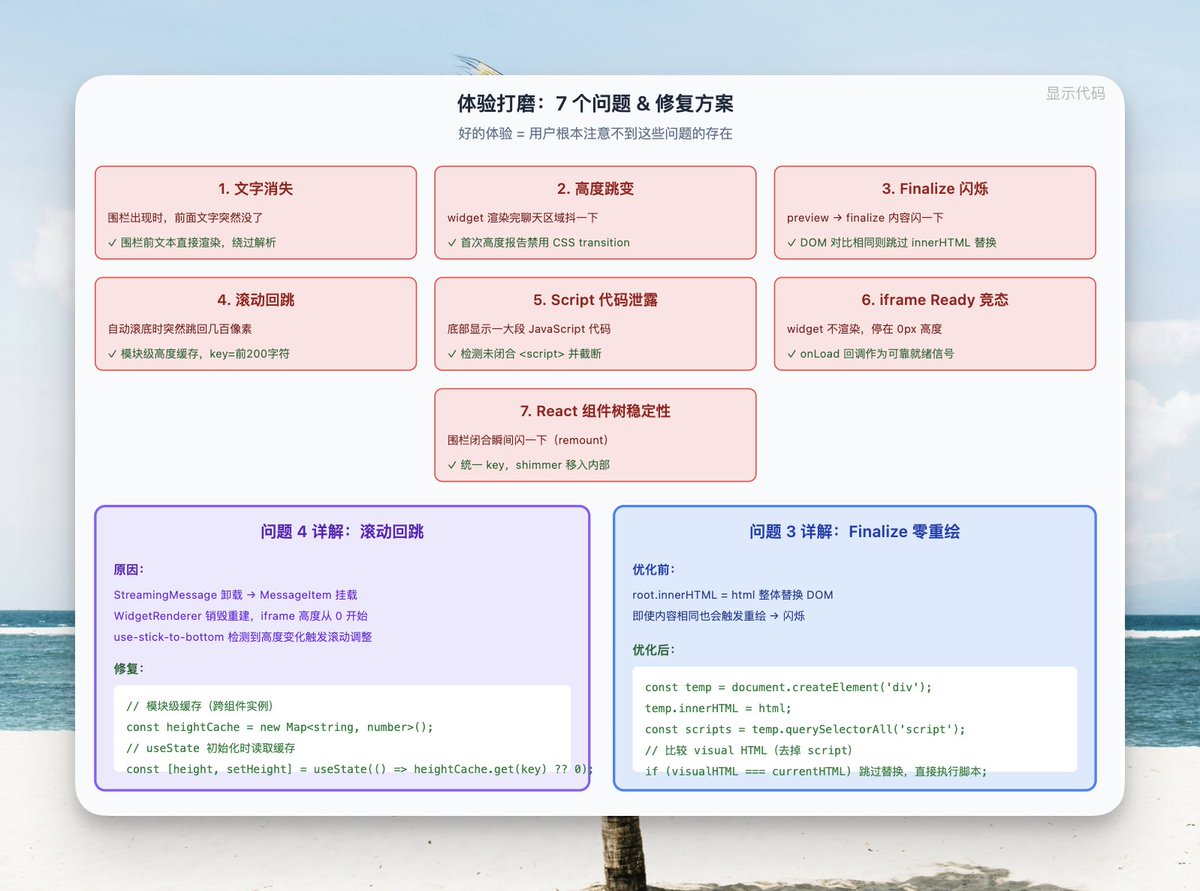
Actually, looking at the code or the implementation plan, it's not complicated. What's complex is polishing the experience.
There are so many places that can affect the experience; you need to make users not notice those details and the generation process. This requires handling things differently at each stage:
- Details that make it look non-streaming
- Content that shouldn't appear
Text Disappearing
The model first outputs some introductory text ("Let me visually explain for you..."), then starts outputting the widget fence.
As soon as the fence appears, the preceding text suddenly disappears, only returning after the widget finishes rendering.
The reason is that
parseAllShowWidgets() returns an empty array for plain text. When the fence first appears but isn't closed yet, the text before the fence is passed into this function and gets lost.Fix: When text before a fence is detected that doesn't contain a completed widget fence, directly render it as
<MessageResponse>, bypassing the parsing function.Height Jumping
The moment the widget finishes rendering, the entire chat area shakes.
The iframe initial height is 0px.
When the content first reports its actual height, it might be 400px+.
CSS transition makes this change happen over 300ms, resulting in a noticeable animated jump.
Fix: Temporarily disable CSS transition on the first height report, making the height snap into place instantly. Subsequent height fine-tuning uses smooth transitions.
Finalize Flicker
When the widget switches from streaming preview to final rendering, the content flashes.
The receiver iframe executes
root.innerHTML = html during finalize, replacing the entire DOM. Even if the old and new content are exactly the same (pure SVG widget), the browser triggers a frame repaint.Fix: During finalize, first parse the new HTML into a temporary container, separating out script elements. Compare the visual HTML (without scripts) with the current DOM—if they're the same, skip the
innerHTML replacement and just append and execute the scripts. Pure SVG widgets achieve zero-repaint finalize.Scroll Bounce-back
The chat is automatically scrolling to the bottom, then suddenly jumps back hundreds of pixels, then jumps back again.
When streaming ends, the
StreamingMessage component unmounts and the MessageItem component mounts. These are two completely different React components, and the internal WidgetRenderer is destroyed and recreated. The new instance's iframe height starts from 0, causing the content area height to plummet. use-stick-to-bottom detects the height change and triggers a scroll adjustment.Fix: Module-level height cache. Whenever a widget reports its height, write it to the cache using the first 200 characters of
widgetCode as the key. The new WidgetRenderer instance reads the height from the cache during useState initialization, so the iframe starts rendering at the correct height, avoiding the 0→actual transition.Script Code Leakage
When a widget with Chart.js loads, a large block of JavaScript code is displayed at the bottom.
The
<script> tag output by the model arrives character by character during streaming. When the <script> opening tag arrives but the </script> hasn't yet, sanitizeForStreaming strips the opening tag, but the JavaScript code inside the tag becomes a bare text node, rendered by the browser as visible content.Fix: After extracting the partial code in
StreamingMessage, detect if the last <script has a matching </script>. If not, truncate at the <script position. The widget guidelines specify scripts go last, so truncation doesn't affect visual content. During truncation, show a shimmer overlay, with the status bar displaying "Adding interactive animations for visualization..."iframe Ready Race Condition
In very rare cases, the widget doesn't render at all, stuck at 0px height.
WidgetRenderer registers a message event listener via useEffect. But the iframe's receiver script sends widget:ready immediately after loading. If the iframe loads faster than the React effect executes, widget:ready is sent before the listener is registered, and iframeReady never becomes true.Fix: Add an
onLoad callback to the iframe element as a fallback. When onLoad triggers, the receiver script has definitely finished executing, providing a reliable ready signal.React Component Tree Stability
The widget flashes once at the moment the fence closes.
Two problems stacked:
- Streaming partial widgets don't have a React key. After closing, they get
key="w-0". The key change causes a remount. - The shimmer overlay is implemented with an outer
<div>, changing the component tree structure. The type change causes another remount.
Fix: Calculate a stable key for partial widgets (
w-N, where N is the expected position in the final segments array), consistent with the key after closing. Move the shimmer overlay inside WidgetRenderer, controlled by a showOverlay prop. The component tree is always <WidgetRenderer key="w-N">, unchanged.Final Thoughts#
The entire generative UI system—the hard part isn't "getting a piece of HTML to run in an iframe." That's easy.
The real complexity lies in making this iframe maintain visual stability across state transitions like streaming, component lifecycle switches, and theme changes.
Every "flash," "jump," or "disappearance" requires understanding React's reconciliation, the browser's rendering pipeline, and the timing of
postMessage.The final effect is: users see charts and diagrams naturally interspersed in the model's replies, as if they were always meant to be there.
That's all for today. If you found this helpful, you can give me a like or share it with friends who might need it.