Beginner
The Ultimate Guide to OpenClaw: Cloud vs Mac Mini, Most Cost-Effective AI Models, Essential Skills, Use Cases
The Ultimate Guide to OpenClaw: Cloud vs Mac Mini, Most Cost-Effective AI Models, Essential Skills, Use Cases…
There are already quite a few guides about OpenClaw, but they are a bit fragmented. Many friends have heard of it but don't know where to start. This article attempts to be the most comprehensive Chinese guide, helping you answer the following core questions:
- What exactly is OpenClaw? How is it different from ChatGPT / Claude?
- Install on Mac Mini or Cloud VPS? Is the MaxClaw zero-barrier solution worth using?
- How to choose AI models most cost-effectively? How to implement automatic task and model tiering?
- How to configure the three key files SOUL, MEMORY, HEARTBEAT? Which Skills are essential to install?
- What can OpenClaw do? What are some real use cases?
- How to handle security issues?
- How can individual investors use OpenClaw?
Disclaimer: All discussions in this article are not investment advice, just a guide for using a technical tool. Also, this article was completed by me and OpenClaw together, you can directly throw it to your Agent to learn.
【Table of Contents】#
- What is OpenClaw? A one-sentence explanation
- Core Concept: Why it's different from ChatGPT
- Installation Options Showdown: Mac Mini vs Cloud VPS vs Hosted Platform vs MaxClaw
- AI Model Selection Guide: The Secret to Saving Money (Includes practical tiered models, API aggregation routing solutions)
- How to Make Good Use of the Three Key Files: SOUL, MEMORY, HEARTBEAT
- Essential Skills: Make Your AI Employee Actually Get Work Done
- 12 Real Use Cases
- Security Guide: 5 Must-Do Things
- My Configuration Plan and Suggestions (Including suggestions for content creators and investors)
1. What is OpenClaw? A one-sentence explanation#
OpenClaw = An AI employee that runs 24/7 on your own device, communicates with you via WhatsApp / Telegram / iMessage, and can help you send emails, manage schedules, write code, browse the web, manage files, and even help you negotiate car prices.
It is not an AI model (not ChatGPT, not Claude), but an open-source AI agent framework. You can think of it as an "operating system for digital employees"—it doesn't think by itself, but it connects to the AI brain you choose (Claude, GPT, Gemini, DeepSeek, etc.), plus your various tools (email, calendar, file system, browser), and becomes a truly "productive" AI assistant.
Key Information
- Founder: Peter Steinberger, Austrian programmer, founder of PSPDFKit
- Release Date: November 2025 (originally named ClawdbotMoltbot → OpenClaw)
- Open Source License: MIT License (completely free to use)
- GitHub Stars: Over 200k stars as of February 2026
- Important Event: On February 14, 2026, Peter announced joining OpenAI, and the project was transferred to an open-source foundation.
Why is it called OpenClaw?
Originally called Clawdbot (a pun on Claude + bot), received a trademark complaint from Anthropic and was renamed Moltbot (lobster theme 🦞), finally settled on OpenClaw. The community affectionately calls it "Molty".
2. Core Concept: Why it's different from ChatGPT#
I'll use a simple analogy:
ChatGPT / Claude = A very smart person, sitting there waiting for your questions.
OpenClaw = A very smart person + a desk + a computer + all your account passwords, online 24/7 to help you get work done.
The difference is:
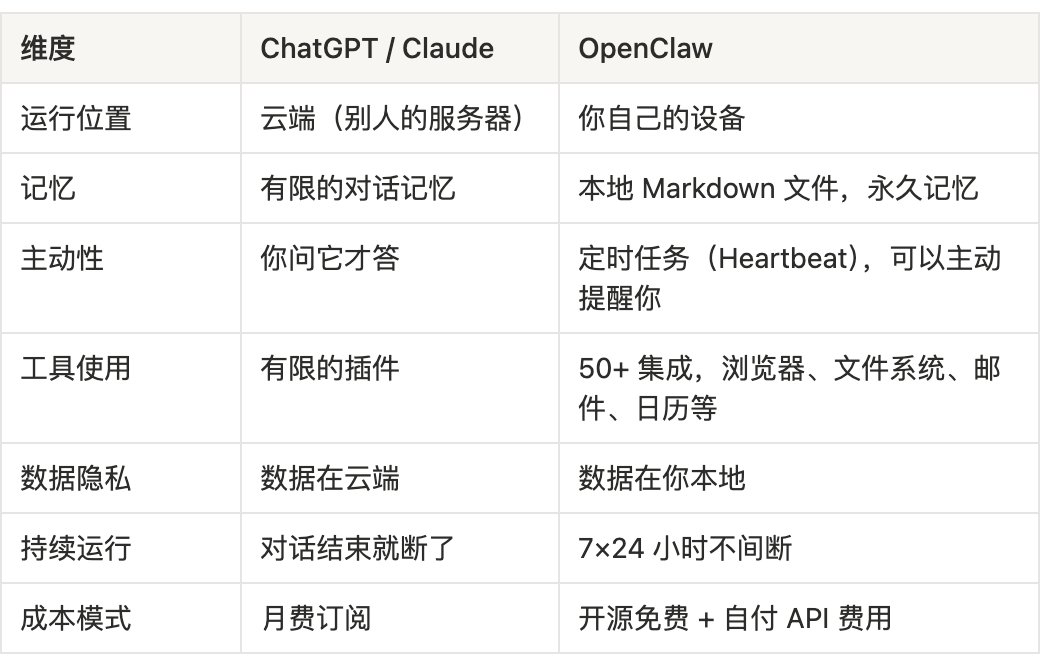
Core Architecture (Non-technical version)
OpenClaw's architecture is actually quite simple, three parts:
- Gateway: A program running on your device, equivalent to OpenClaw's "brain dispatch center", responsible for receiving messages, calling AI, executing tasks. Once started, it runs continuously in the background.
- Channel: How you communicate with OpenClaw. It supports WhatsApp, Telegram, iMessage, Discord, Slack, etc. You send it a message, and it starts working.
- Skills: What OpenClaw can do, expanded by installing different Skills. For example, "Manage GitHub", "Control Smart Home", "Search the Web", etc. The community has 100+ pre-built skills, and you can also write your own.
There's also a cool feature called Heartbeat: OpenClaw automatically wakes up at regular intervals (default 30 minutes), checks a to-do list you set, and decides if there's anything it needs to proactively contact you about. This is the source of its "proactivity".
3. Installation Options Showdown: Mac Mini vs Cloud VPS vs Hosted Platform#
This is the most debated topic in the community. I've made a detailed comparison of the three options:
Option A: Mac Mini (Recommendation Index ⭐⭐⭐⭐⭐ Suitable for Apple users)
The Mac Mini M4 has become the "officially recommended hardware" in the OpenClaw community. There were reports that Mac Minis were once out of stock due to OpenClaw's popularity.
Advantages:
- iMessage Integration: A killer feature unique to Mac, using iMessage to chat with your AI employee provides the most seamless experience. iMessage is the WeChat for Americans.
- Apple Ecosystem Integration: HomeKit smart home control, Apple Notes, Reminders, Calendar all integrated in one place. Some users have configured an AI assistant for each family member, sharing the Apple ecosystem.
- Suitable as an "AI Home Server": Place it in the living room or study, connect to smart home devices (some have done Jarvis voice cloning + Home Assistant to control all lights and AC), help kids set up a Minecraft server and accept real-time requests from kids via chat interface, automatically remind kids of exam schedules—one Mac Mini becomes the family's AI butler.
- Extremely Low Power Consumption: Mac Mini M4 idle power is only 3-5 watts, annual electricity cost about 30-50 RMB, running 7×24 is no problem.
- Strongest Privacy: All data is on your home device, doesn't pass through any third-party servers.
- Lowest Long-term Cost: One-time purchase, only need to pay API fees.
- Real Demand Validation from Silicon Valley: OpenClaw caused Mac Minis to be out of stock in Silicon Valley, some even bought Mac Minis specifically to run OpenClaw and gave them names.
Disadvantages:
- High Upfront Cost: Mac Mini M4 16GB starts at $599 (~4300 RMB).
- Not Truly 24/7: Power outages, internet disconnections, macOS forced updates will interrupt it.
- Cannot Remotely Scale: Memory is soldered, if you buy 16GB, it's 16GB.
- Need to Configure Security Yourself: Port forwarding, firewall, SSL certificates.
Hardware Selection Suggestions:
- Mac Mini M4 16GB ($599): Enough! If you use cloud APIs (Claude, GPT), 16GB is completely sufficient because AI computation happens remotely.
- Mac Mini M4 Pro 24GB ($1,399): Consider if you want to run some small models locally (via Ollama).
- Used M1/M2 Mac Mini: Can be bought for around $400-500, performance is completely fine for running OpenClaw + cloud APIs, the most cost-effective choice.
Option B: Cloud VPS (Recommendation Index ⭐⭐⭐⭐ Suitable for technical users)
VPS means you rent a virtual server in a data center and run OpenClaw remotely.
Advantages:
- Truly 24/7 Operation: Data centers have backup power and redundant networks.
- Low Cost: $4-12/month (~30-85 RMB/month).
- Security Isolation: Even if attacked, only affects an empty server, not your personal computer.
- Scalable: Need more resources? Click to upgrade.
- DigitalOcean Provides One-Click Deployment: Starting at $6/month, can be set up in minutes.
Disadvantages:
- No iMessage (requires macOS hardware).
- No Local File Access: Cannot access files on your computer.
- Requires Linux Basics: SSH, Docker, firewall configuration.
- Data on Third-Party: Privacy not as good as local.
Recommended VPS Providers:
- Google Cloud: New users get $300 free credit, enough to run OpenClaw for several months, the best option for zero-cost trial of cloud deployment (I'm currently using this option).
- Hetzner: Starting at $4/month, European servers, extremely cost-effective.
- Contabo: Starting at $4/month, also cheap.
- DigitalOcean: Starting at $6/month, has OpenClaw one-click deployment template, most hassle-free.
- Oracle Cloud: Has a free tier, can run Gateway for free.
Minimum Requirements: 2 vCPU, 4GB RAM, 40GB SSD is enough.
Quoted tweet https://t.co/JUkejnZVKV https://x.com/i/web/status/2019693762868588782
Option C: Hosted Platform (Recommendation Index ⭐⭐⭐ Suitable for those who don't want to tinker at all)
Several third-party companies have launched OpenClaw hosting services:
- OpenClaw Cloud: $39.90/month, official hosting.
- RunMyClaw: $30/month, dedicated server + zero-knowledge key security.
- ZeroClaw Cloud: Pay-as-you-go pricing, Kubernetes-level security isolation.
- xCloud: $24/month.
Advantages: Zero configuration, automatic updates, technical support.
Disadvantages: Most expensive, worst privacy, still need to pay API fees yourself.
Option D: Large Model Vendor Hosted Solutions (Recommendation Index ⭐⭐⭐⭐ Suitable for users wanting zero-config + low cost)
Besides third-party hosting platforms, some large model vendors have started directly providing hosting services based on OpenClaw. The most representative is MiniMax's MaxClaw.
What is MaxClaw?
MaxClaw is an official cloud-hosted AI Agent launched by MiniMax (one of China's AI "Six Dragons", a Hong Kong-listed company) on February 25, 2026. It's based on the OpenClaw open-source framework, equipped with the MiniMax M2.5 model (229 billion parameter MoE architecture, only activating about 10 billion parameters per token), achieving high intelligence while keeping inference costs only 1/7 to 1/20 of Claude Sonnet.
How to use? Go to agent.minimax.io → Click "MaxClaw" → Deployment completed within 10 seconds. No terminal, no config files, no error messages.
Advantages:
- Truly Zero Barrier: No server, Docker, API Key needed, deployment in 10 seconds.
- Extremely Low Cost: M2.5 model inference price is far lower than Claude and GPT series.
- Built-in Long-term Memory: The Agent remembers your preferences and work habits, understands you better over time.
- 10,000+ Pre-built Expert Agents: Covering vertical fields like development, content creation, financial analysis.
- Supports Mainstream Office Platforms: Telegram, Discord, Slack, Feishu, DingTalk.
- Built-in Practical Skills: Image generation, video creation, web search, app deployment, trending content tracking, etc.
Disadvantages:
- Locked to M2.5 Model: Cannot switch to Claude, GPT, or other models. If you need Claude Opus's deep reasoning ability, MaxClaw can't do it.
- Data on MiniMax Servers: Users with extremely high privacy requirements need to weigh this.
- Limited Flexibility: Compared to the complete control of self-built OpenClaw, MaxClaw is "fully furnished move-in ready"—hassle-free but cannot be arbitrarily modified.
Who is it for? Users who don't want to tinker with tech, are budget-sensitive, and mainly work in Chinese. Especially if you just want to quickly experience the feeling of a "24/7 AI employee", MaxClaw is currently the lowest barrier entry.
Option E: Hybrid Solution (Progressive path recommended by founder Peter)
The deployment rhythm suggested by OpenClaw official:
- Month 1: Run on your laptop, familiarize yourself with the system.
- Month 2: Dockerize the configuration.
- Month 3: Deploy to VPS for 24/7 operation.
Moreover, OpenClaw supports hybrid architecture: Gateway runs on cloud VPS to ensure 24/7 online, your Mac connects as a "Node", providing local hardware functions like screen control, camera, iMessage.
My Suggestion

4. AI Model Selection Guide: The Secret to Saving Money#
This part is what many people care about most. OpenClaw is free, but AI model API calls cost money per Token.
4.1 Core Concept: What is a Token?
A Token is the basic unit for AI model billing. Simply put: 1 English word ≈ 1-2 Tokens, 1 Chinese character ≈ 2-3 Tokens. Every message you send, every reply from the AI, consumes Tokens.
4.2 API Price Comparison for Various Models (February 2026)

4.3 Monthly Cost Estimates for Different Usage Levels

See? Model choice can affect cost by over 100 times! Using GPT-4o-mini might cost just a few RMB per month, but using Claude Opus could cost hundreds of USD.
4.4 Most Cost-Effective Strategy: Tiered Models
This is the best practice summarized by experts in the community:
Layer 1: Cheap models handle 90% of daily tasks
- GPT-4o-mini, Gemini 3 Flash, Kimi K2.5
- Calendar management, email drafting, weather queries, simple chat
- Monthly cost: $1-5
Layer 2: Mid-tier models handle complex work
- Claude Sonnet 4.5, GPT-4o
- Code writing, long text analysis, strategy planning
- Monthly cost: $10-30
Layer 3: Top-tier models only used at critical moments
- Claude Opus 4.6 (only called when deep reasoning is needed)
- Monthly cost: On-demand
How to implement tiering in OpenClaw? 3 methods, from simple to advanced
OpenClaw provides multiple ways to implement "automatic task-to-model matching", you don't need to switch manually each time.
Method 1: Fallback Chain (Simplest, suitable for beginners)
Set a primary model and fallback models. When the primary model is rate-limited or errors, automatically switch to the fallback. This is the most basic tiering—though not based on task complexity, it ensures you always have a model available:
Method 2: Heartbeat uses cheap model, conversation uses good model (Intermediate, recommended)
OpenClaw's Heartbeat runs every 30 minutes, but most of the time it just checks "if there's anything to do" and replies HEARTBEAT_OK. Such simple checks absolutely don't need expensive models. You can specify a cheap model specifically for Heartbeat, while the main conversation continues using a good model:
Just this step can save a lot of money—Heartbeat runs 48 times a day. If Sonnet is used each time, Heartbeat alone could cost $15-20 per month; after switching to GPT-4o-mini, Heartbeat cost drops to a few cents.
Method 3: Multi-Agent + Sub-Agent Division of Labor (Advanced, best effect)
This is OpenClaw's most powerful tiering method. You can configure multiple Agents within one Gateway, each using different models, different workspaces, not interfering with each other. For example:
- "Secretary" Agent: Uses GPT-4o-mini, responsible for calendar, reminders, simple Q&A.
- "Analyst" Agent: Uses Claude Sonnet, responsible for market research, content analysis.
- "Advisor" Agent: Uses Claude Opus, only summoned when deep reasoning is needed.
The main Agent can also use the Sub-Agent function to delegate repetitive or batch tasks to cheaper models:
This way, the main Agent uses Sonnet for decision-making and planning, but the Sub-Agents it dispatches for legwork all use GPT-4o-mini, immediately reducing cost by an order of magnitude.
4.5 Smarter Way to Save: API Aggregation Routing
The tiered model idea is correct, but manually switching models is too troublesome. Good news: there are now "smart routers" that can automatically choose the cheapest and sufficient model for you.
Option A: OpenRouter (Most hassle-free SaaS solution)
OpenRouter is currently the largest AI model aggregation gateway, equivalent to "Stripe for models": one API Key accesses 500+ models, unified billing, automatic failover. OpenClaw already has built-in OpenRouter support, configuration is very simple.
- Cost: Adds 5-5.5% service fee on top of model base price.
- Highlight:
openrouter/automode automatically selects the most cost-effective model based on your prompt—simple heartbeat checks use cheap models, complex reasoning automatically upgrades. - Suitable for: Users who don't want to manage multiple API Keys, pursue simplicity and stability.
Option B: ClawRouter (The solution I'm currently using, a local router designed specifically for OpenClaw)
ClawRouter is an Agent-native router developed by BlockRunAI specifically for the OpenClaw ecosystem, going further than OpenRouter—it runs locally on your machine, <1 ms latency, scores each request on 15 dimensions, automatically routes to the cheapest and capable model.
Core logic divides requests into 4 levels: SIMPLE (simple query) → MEDIUM (general task) → COMPLEX (complex analysis) → REASONING (deep reasoning), each level matches corresponding models.
Actual effect: Mixed average cost about $2 per million Tokens, whereas using all Claude Opus would be $25 per million Tokens, saving about 90%.
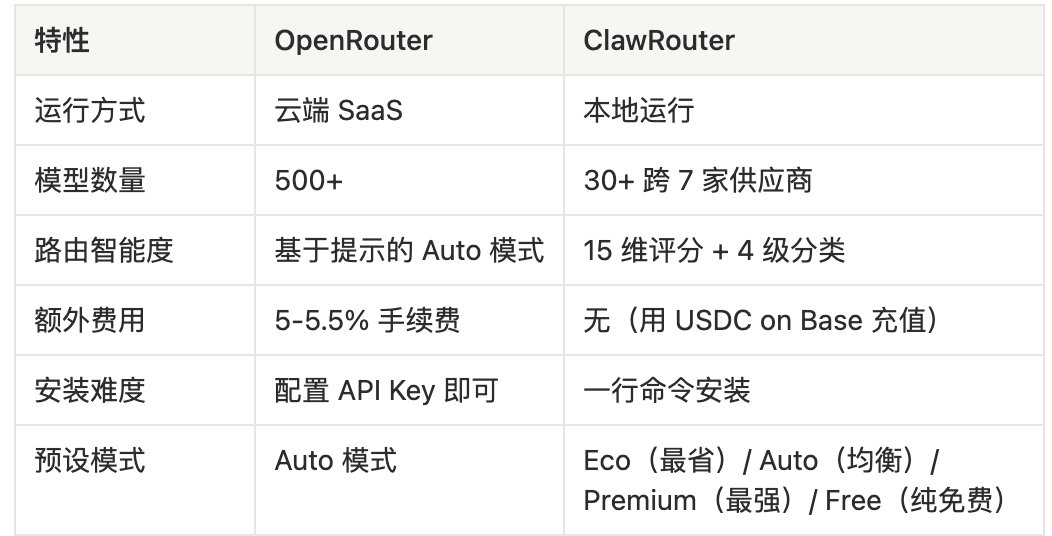
ClawRouter also has a Free mode, using the